Battery models & part numbers
| Reference / P/N |
|---|
| MSI 541383530007 |
| MSI 957-16FXXP-101 |
| MSI BP-M16F-33/2600 S |
| MSI S9N-3496200-M47 |
| MSI S9N-3496202-M47 |
| MSI S9N-3496204-M47 |
| MSI S9N-3496250-M47 |
| MSI-BTY-M6D-87Wh |
Compatible laptop models
| Model |
|---|
| Medion Erazer X6811 (MS-16F1) |
| Medion Erazer X6812 (MS-16F1) |
| Medion Erazer X6813 (MS-16F2) |
| Medion Erazer X6821 (MS-16F3) |
| Medion Erazer X6825 (MS-16F3) |
| Medion Erazer X7815 (MS-1761) |
| Medion Erazer X7829 (MS-1763) |
| MSI GT60 (MS-16F3) |
| MSI GT60 (MS-16F4) |
| MSI GT60 0NG Workstation |
| MSI GT60 2OC |
| MSI GT60 2OD |
| MSI GT60 2OD 3K IPS Edition |
| MSI GT60 2OJ Workstation |
| MSI GT60 2PC Dominator |
| MSI GT60 2PC Dominator 3K Edition |
| MSI GT60 2PE |
| MSI GT60 2PE Dominator 3K Edition |
| MSI GT60 2PE Dominator Pro |
| MSI GT60 2PE/2PC/2QD (MS-16F4) |
| MSI GT60 2QD |
| MSI GT60 2QD Dominator |
| MSI GT60-0NJ |
| MSI GT60-2OJ |
| MSI GT660R |
| MSI GT663 15,6 FHD |
| MSI GT663R |
| MSI GT670 |
| MSI GT680 |
| MSI GT680/GT680R (MS-16F2) |
| MSI GT680DX |
| MSI GT680DXR |
| MSI GT680R |
| MSI GT680R MS-16F2 |
| MSI GT683 |
| MSI GT683DX |
| MSI GT683DXH |
| MSI GT683DXR |
| MSI GT683R |
| MSI GT683R (MS-16F2) |
| MSI GT70 (MS-1763) |
| MSI GT70 20C |
| MSI GT70 2OC |
| MSI GT70 2OD |
| MSI GT70 2PE |
| MSI GT70 2QD |
| MSI GT70 2QD (MS-1763) |
| MSI GT70SR2 |
| MSI GT760 |
| MSI GT760R |
| MSI GT780 |
| MSI GT780DX |
| MSI GT780DXH |
| MSI GT780DXR |
| MSI GT780R |
| MSI GT783 |
| MSI GT783H-i716912BLW7H |
| MSI GX60 1AC (MS-16FK) |
| MSI GX60 1AC Hitman Edition |
| MSI GX60 3BE (MS-16FK) |
| MSI GX60 3CC (MS-16FK) |
| MSI GX660 (MS-16F1) |
| MSI GX660R (MS-16F1) |
| MSI GX680 (MS-16F2) |
| MSI GX70 3BE (MS-176K) |
| MSI GX70 3CC (MS-176K) |
| MSI GX780 (MS-1761) |
| MSI GX780DX |
| MSI GX780DXR |
| MSI WT60 (MS-16F4) |
| MSI WT60-2OJ |
| MSI WT60-2OK (MS-16F4) |
Introduction
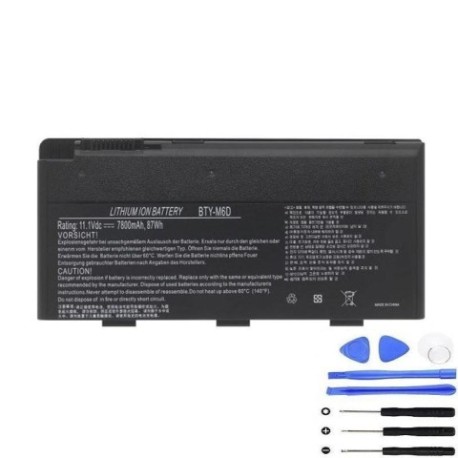
Keep your MSI or Medion gaming laptop performing at its best with our genuine replacement battery. The MSI BTY M6D 87Wh battery is designed specifically for high-performance laptops across multiple series including GT, GX, and WT models.
Common signs you need a replacement
| Symptom | Cause | Verification | Recommendation |
|---|---|---|---|
| Battery won’t hold charge | Ageing cells, deep discharge cycles | Check power settings, monitor discharge rate | Replace if under 50% original capacity |
| Laptop shuts down unexpectedly | Voltage drops under load | Run battery diagnostics | Immediate replacement needed |
| Battery swelling or overheating | Internal damage, safety risk | Visual inspection, temperature check | Stop using immediately and replace |
| Charging time increases significantly | Reduced battery efficiency | Time full charge cycle | Replace if over 4 hours for full charge |
How to check compatibility
Verify your laptop model matches our compatibility list above. Check your current battery’s part number (usually printed on the battery) or look up your laptop’s model number in system information. All compatible models are authorised for use with this battery.
When to replace
Replace your battery when it no longer holds sufficient charge for your needs, shows physical damage, or is over 2-3 years old with regular use. Gaming laptops typically require more frequent replacement due to higher power demands.
Installation guide (overview)
Power off and unplug your laptop. Remove the bottom panel (usually secured with screws). Disconnect the old battery connector and remove any mounting screws. Install the new battery, reconnect the connector, and reassemble. Always refer to your laptop’s service manual for specific instructions.
Usage & care tips
Avoid extreme temperatures (ideal range 15-25°C). Don’t leave your laptop plugged in constantly. Calibrate your battery monthly by fully charging then discharging to 10%. Store in a cool, dry place if not used for extended periods.
Safety & recycling in AU/NZ
Never attempt to open or modify the battery. Dispose of old batteries at authorised recycling centres – never in household waste. In Australia, check with your local council for battery recycling options. In New Zealand, use designated battery recycling facilities.
FAQ
How long does this battery last?
Typically 2-3 years with normal use, or 500-800 charge cycles.
Is this battery genuine MSI?
Yes, this is an authentic MSI replacement part with full compatibility.
What’s the warranty period?
Check the product page for current warranty details – usually 12 months.
Can I use this battery internationally?
Yes, the battery works with all voltage standards (100-240V).
How do I check my current battery health?
Use Windows Battery Report or third-party battery monitoring software.
What if my model isn’t listed?
Double-check your exact model number. If still not listed, this battery may not be compatible.
Is professional installation required?
No, most users can install it themselves following our guide, but professional service is available if preferred.