Battery models & part numbers
| Reference / P/N |
|---|
| MSI BTYM55 |
| MSI S9N-0J4J200-SB3 |
| MSI S9N-0J4J210-CLE |
| MSI S9N0J4J211CLE |
| MSI-BTY-M55-90Wh |
Compatible laptop models
| Model |
|---|
| MSI Alpha 15 B5EE (MS-158L) |
| MSI Alpha 15 B5EEK (MS-158L) |
| MSI Alpha 17 B5EE (MS-17LL) |
| MSI Alpha 17 B5EEK (MS-17LL) |
| MSI Bravo 15 C7UDX (MS-158N) |
| MSI Crosshair 15 A11UCK (MS-1582) |
| MSI Crosshair 15 A11UDK (MS-1582) |
| MSI Crosshair 15 A11UEK (MS-1582) |
| MSI Crosshair 15 A11UGK (MS-1582) |
| MSI Crosshair 15 A12UEZK (MS-1583) |
| MSI Crosshair 15 A12UGSZK (MS-1583) |
| MSI Crosshair 15 A12UGZK (MS-1583) |
| MSI Crosshair 15 B12UEZ (MS-1583) |
| MSI Crosshair 15 B12UGSZ (MS-1583) |
| MSI Crosshair 15 B12UGZ (MS-1583) |
| MSI Crosshair 15 B12UGZ-290FR |
| MSI Crosshair 17 A12UEZK (MS-17L3) |
| MSI Crosshair 17 A12UGSZK (MS-17L3) |
| MSI Crosshair 17 A12UGZK (MS-17L3) |
| MSI Crosshair 17 B12UGSZ (MS-17L3) |
| MSI Crosshair 17 B12UGSZ-037FR |
| MSI Crosshair 17 B12UGSZ-263XES |
| MSI GF66 Katana 11UG (MS-1581) |
| MSI GF66 Katana 11UG-062 |
| MSI GF66 Katana 11UG-098 |
| MSI GF66 Katana 11UG-220 |
| MSI GF66 Thin 11UD (MS-1581) |
| MSI GF66 Thin 11UE (MS-1581) |
| MSI GF66 Thin 11UE-063 |
| MSI GF66 Thin 11UG (MS-1581) |
| MSI GF66 Thin 11UH (MS-1581) |
| MSI GF76 Katana 11UD/11UDK (MS-17L2) |
| MSI GF76 Thin 11UE (MS-17L1) |
| MSI GF76 Thin 11UEK (MS-17L1) |
| MSI GF76 Thin 11UG (MS-17L1) |
| MSI GF76 Thin 11UHK (MS-17L1) |
| MSI GL66 Leopard 11UE (MS-1581) |
| MSI GL66 Leopard 11UEK (MS-1581) |
| MSI GL66 Leopard 11UH (MS-1581) |
| MSI GL66 Leopard 11UH-028 |
| MSI Katana 11UG (MS-17L1) |
| MSI Katana 1UG-090 |
| MSI Katana A17 AI B8VEK/B8VFK/B8VGK |
| MSI Katana GF66 11SC (MS-1582) |
| MSI Katana GF66 11SC-210 |
| MSI Katana GF66 11UC |
| MSI Katana GF66 11UE (MS-1582) |
| MSI Katana GF66 11UG (MS-1582) |
| MSI Katana GF76 11UD (MS-17L2) |
| MSI Katana GF76 11UDK (MS-17L2) |
| MSI Katana GF76 11UG |
| MSI Pulse GL66 11UE (MS-1581) |
| MSI Pulse GL66 11UEK (MS-1581) |
| MSI Pulse GL66 11UGK (MS-1581) |
| MSI Pulse GL66 11UGKV (MS-1581) |
| MSI Pulse GL66 12UEOK (MS-1583) |
| MSI Pulse GL66 12UGK (MS-1583) |
| MSI Pulse GL76 11SCK (MS-17L2) |
| MSI Pulse GL76 11UCK (MS-17L2) |
| MSI Pulse GL76 11UDK (MS-17L2) |
| MSI Pulse GL76 12UEK (MS-17L3) |
| MSI Pulse GL76 12UGK (MS-17L3) |
| MSI Pulse GL76 12UGSZOK/12UGOK (MS-17L3) |
| MSI Sword 15 A11SC (MS-1582) |
| MSI Sword 15 A11UC (MS-1582) |
| MSI Sword 15 A11UD (MS-1582) |
| MSI Sword 15 A11UE (MS-1582) |
| MSI Sword 15 A11UG (MS-1582) |
| MSI WF66 11UI (MS-1582) |
| MSI WF66 11UJ (MS-1582) |
| MSI WF76 11UI |
Introduction
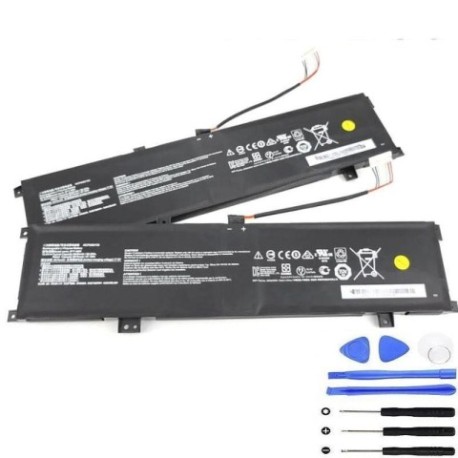
Keep your MSI laptop performing at its best with our genuine replacement battery. The MSI BTY M55 90Wh battery is designed to restore your device’s original power and reliability.
Common signs you need a replacement
| Symptom | Cause | Verification | Recommendation |
|---|---|---|---|
| Short battery life | Ageing cells | Check power settings | Consider replacement |
| Laptop won’t hold charge | Battery degradation | Test with power adapter | Replace battery |
| Swelling/bulging | Internal damage | Visual inspection | Replace immediately |
| Overheating | Faulty cells | Monitor temperature | Replace for safety |
How to check compatibility
Verify your laptop model matches our compatibility list above. Check your current battery’s part number against our reference numbers. Always cross-reference with your device’s specifications.
When to replace
Replace your battery when runtime drops below 50% of original capacity, if physical damage is visible, or if your laptop frequently shuts down unexpectedly. Most batteries need replacement after 2-3 years of regular use.
Installation guide (overview)
Power off and unplug your laptop. Remove the bottom cover using appropriate screwdrivers. Disconnect the old battery connector and remove mounting screws. Install the new battery, reconnect, and reassemble. Always follow manufacturer guidelines.
Usage & care tips
Avoid extreme temperatures (ideal range 15-25°C). Don’t leave your laptop plugged in constantly. Calibrate your battery monthly by fully charging then discharging. Store in cool, dry conditions when not in use.
Safety & recycling in AU/NZ
Never attempt to open or modify batteries. Dispose of old batteries at authorised recycling centres. In Australia, use Batteryback or council collection services. In New Zealand, utilise accredited e-waste recyclers.
FAQ
How long does shipping take? Typically 3-7 business days within Australia and New Zealand.
Is this battery genuine? Yes, we supply authentic MSI replacement batteries with full warranty.
What’s the warranty period? Our batteries come with 12 months warranty from date of purchase.
Can I install it myself? Yes, with basic technical skills and proper tools. Professional installation recommended if unsure.
How do I recycle my old battery? Contact your local council or visit an authorised e-waste recycling centre.
What if my model isn’t listed? Contact our support team with your laptop’s exact model number for verification.
Is overnight charging safe? Modern laptops have protection circuits, but unplugging when fully charged extends battery life.