Battery models & part numbers
| Reference / P/N |
|---|
| HP BN03 |
| HP BN03051XL-PL |
| HP HSTNN-OB1O |
| HP L76965-AC1 |
| HP L77034-005 |
| HP-BN03XL-51Wh |
Compatible laptop models
| Model |
|---|
| HP Envy 13-ba0000s |
| HP Envy x360 13-ay0000s |
| HP Envy x360 13-bd0000s |
| HP Envy x360 15-ed0000s |
| HP Envy x360 15-ed1000s |
| HP Envy x360 15-ee0000s |
| HP Envy x360 15-eu0000s |
| HP Envy x360 15m-ed0000s |
| HP Envy x360 15t-ed000 CTOs |
| HP Envy x360 15T-ed000s |
| HP Envy x360 15z-ee000s |
| HP Envy x360 2in1 15-ew0000s |
| HP Envy x360 Convertible 15-eu0000s |
| HP Omen 16-c0000s |
| HP Omen Gaming 16-b0000s |
| HP Pavilion Plus 14-eh1s |
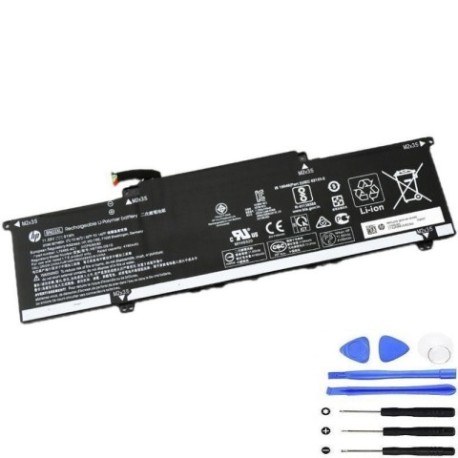
Introduction
Keep your HP laptop running at peak performance with our authorised HP BN03XL 51Wh replacement battery. This high-quality battery is designed specifically for compatible HP Envy, Omen, and Pavilion models commonly used by Australian and New Zealand consumers.
Common signs you need a replacement
| Symptoms | Causes | Verification | Recommendation |
|---|---|---|---|
| Short battery life | Ageing cells | Check power settings | Consider replacement |
| Laptop shuts down unexpectedly | Battery degradation | Monitor battery health | Replace battery |
| Battery won’t hold charge | Worn-out components | Test with power adapter | Immediate replacement |
| Swelling or bulging | Internal damage | Visual inspection | Replace immediately |
How to check compatibility
Verify your laptop model matches our compatibility list above. Check your current battery’s part number (usually found on the battery itself) against our reference numbers. For HP laptops, you can also use the HP Support Assistant software to identify your exact battery model.
When to replace
Replace your battery when you notice significant performance decline, typically after 2-3 years of regular use. If your battery shows any swelling or doesn’t hold charge for more than 30 minutes, replacement is urgently recommended for safety.
Installation guide (overview)
Power off your laptop and disconnect all cables. Remove the bottom panel (usually secured with screws). Disconnect the old battery connector and remove any mounting screws. Install the new HP BN03XL battery, reconnect the connector, and reassemble. Always refer to your laptop’s service manual for detailed instructions.
Usage & care tips
For optimal battery life, avoid extreme temperatures (ideal range 15-25°C). Don’t leave your laptop plugged in constantly – occasional discharge cycles help maintain battery health. Store in a cool, dry place when not in use for extended periods.
Safety & recycling in AU/NZ
Never attempt to open or modify the battery. Dispose of old batteries at authorised recycling centres – most electronics retailers in Australia and New Zealand offer free battery recycling services. Do not dispose of in household waste.
FAQ
How long does shipping take to AU/NZ?
Typically 7-14 business days depending on your location.
Is this battery genuine HP?
This is a high-quality replacement battery compatible with HP laptops.
What warranty do you offer?
Our batteries come with a 12-month warranty for peace of mind.
Can I install this myself?
Yes, with basic technical skills and proper tools, most users can install it following our guide.
Will this work with my HP Envy x360?
Check the compatibility list above – most Envy x360 models are supported.
How do I recycle my old battery?
Take it to any Officeworks, JB Hi-Fi, or other electronics retailer for free recycling.
What’s the battery capacity?
51Wh capacity, providing reliable performance for compatible HP laptops.