Battery models & part numbers
| Reference / P/N |
|---|
| 5B11B66552 |
| L20L4PE1 |
| L20M4PE1 |
| Lenovo-L20C4PE1-75Wh |
| SB11B66551 |
| SB11B66553 |
Compatible laptop models
| Model |
|---|
| Lenovo IdeaPad 5 Pro 16ARH7 (82SN) |
| Lenovo IdeaPad 5 Pro 16IAH7 (82SK) |
| Lenovo IdeaPad 5 Pro-16ACH6 (82L5) |
| Lenovo IdeaPad 5 Pro-16IHU6 (82L9) |
| Lenovo IdeaPad Creator 5-16ACH6 (82L6) |
| Lenovo Yoga Slim 7 Pro 16ACH6 (82QQ) |
| Lenovo Yoga Slim 7 Pro 16ARH7 (82UW) |
| Lenovo Yoga Slim 7 Pro 16IAH7 (82VA) |
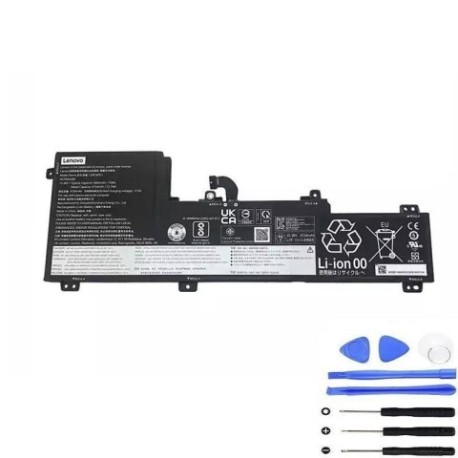
Introduction
Is your Lenovo laptop not holding charge like it used to? The Lenovo L20C4PE1 75Wh replacement battery restores your device’s mobility and performance. This genuine-compatible battery is specifically designed for various Lenovo IdeaPad and Yoga models available in Australia and New Zealand.
Common signs you need a replacement
| Symptoms | Causes | Verification | Recommendation |
|---|---|---|---|
| Battery drains quickly | Ageing cells, reduced capacity | Check battery health in system settings | Consider replacement if under 2 hours runtime |
| Laptop won’t power on without charger | Battery no longer holds charge | Remove charger – device shuts down immediately | Immediate replacement needed |
| Battery percentage jumps erratically | Faulty battery management system | Monitor percentage changes during use | Replace to prevent sudden shutdowns |
| Laptop bulging or uneven surface | Battery swelling, safety hazard | Visual inspection, place on flat surface | Stop using immediately and replace |
| Overheating during light use | Inefficient battery operation | Check temperature, monitor performance | Replace to prevent damage to other components |
How to check compatibility
Verify your laptop model matches our compatible list above. Check your current battery’s part number (usually printed on the battery itself) or look up your laptop’s model number (found on the bottom case or in system information). Cross-reference with our tables to ensure perfect fit and performance.
When to replace
Replace your battery when runtime drops below 50% of original capacity, typically after 2-3 years of regular use. Other indicators include the battery not charging to 100%, sudden shutdowns at 20-30% remaining, or physical swelling. In Australia and New Zealand’s climate, batteries may degrade faster due to temperature fluctuations.
Installation guide (overview)
Power down your laptop and disconnect all cables. Remove the bottom case screws (keep them organised). Gently disconnect the battery connector from the motherboard. Remove any securing screws or tape. Install the new battery, reconnect the connector, and reassemble. Always consult your device’s service manual or seek professional assistance if unsure.
Usage & care tips
For optimal battery life in AU/NZ conditions: Avoid extreme temperatures (ideal range 15-25°C), don’t leave your laptop in hot cars. Calibrate monthly by charging to 100% then discharging to 5%. Use authorised chargers only. Store at 40-60% charge if not using for extended periods.
Safety & recycling in AU/NZ
Never puncture or disassemble batteries. Dispose of old batteries at authorised collection points – most electronics retailers in Australia and New Zealand offer free battery recycling. Do not place in household rubbish. In case of battery leakage, avoid contact with skin and ventilate the area.
FAQ
How long does shipping take in Australia?
Most orders ship within 1-2 business days with delivery times varying by location (typically 3-7 business days across Australia).
Is this battery compatible with New Zealand voltage?
Yes, our batteries are designed for global use and compatible with NZ’s 230V power standards.
What warranty do you offer?
We provide a 12-month warranty covering manufacturing defects and performance issues.
Can I install this battery myself?
Yes, with basic technical skills. However, we recommend professional installation if you’re uncomfortable with electronics.
How do I check my current battery’s health?
On Windows, use the battery report feature. On Lenovo Vantage, check the battery health section for capacity percentage.
Will this battery work with my charger?
Yes, it’s compatible with your original Lenovo charger. Always use genuine or authorised chargers for safety.
What’s the battery capacity in practical terms?
The 75Wh capacity typically provides 6-8 hours of mixed use, depending on your settings and applications.