Battery models & part numbers
| Reference / P/N |
|---|
| HP-MC02XL-47Wh |
Compatible laptop models
| Model |
|---|
| HP Elite X2 G8 Tablet |
| HP Elite X2 G8s |
| HP HSTNN-DB9E |
| HP L45645-2C1 |
| HP M33875-005 |
Introduction
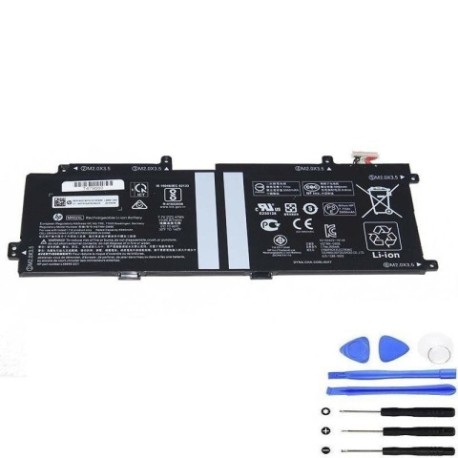
Keep your HP Elite X2 G8 tablet performing at its best with a genuine replacement battery. Our HP MC02XL 47Wh battery is specifically designed for your device, ensuring optimal performance and safety.
Common signs you need a replacement
| Symptom | Possible Cause | How to Verify | Recommendation |
|---|---|---|---|
| Short battery life | Battery degradation over time | Check battery health in system settings | Consider replacement if under 80% capacity |
| Device won’t hold charge | Faulty battery cells | Test with different power adapter | Replace battery immediately |
| Battery swelling | Internal damage or overheating | Visual inspection of battery compartment | Stop using and replace urgently |
| Unexpected shutdowns | Insufficient power delivery | Monitor during high-performance tasks | Replace to restore stability |
How to check compatibility
Verify your device model matches one of the compatible models listed above. Check your current battery’s part number (usually printed on the battery itself) or refer to your device’s specifications in system information.
When to replace
Replace your battery when you notice significant performance decline, typically after 2-3 years of regular use or when battery health drops below 80% of original capacity.
Installation guide (overview)
1. Power off your device completely. 2. Remove any external power sources. 3. Carefully open the battery compartment following manufacturer guidelines. 4. Disconnect the old battery and remove it. 5. Install the new HP MC02XL 47Wh battery. 6. Reconnect all components and close the compartment. 7. Charge fully before first use.
Usage & care tips
• Avoid extreme temperatures (operate between 10°C and 35°C)
• Don’t leave device plugged in constantly
• Perform regular full discharge cycles
• Store in cool, dry conditions when not in use
Safety & recycling in AU/NZ
Always use authorised replacement batteries. In Australia and New Zealand, dispose of old batteries at designated recycling centres. Never dispose of lithium batteries in household waste due to fire risk.
FAQ
How long does this battery last?
Typically 2-3 years with normal use, or approximately 500 charge cycles.
Is this battery genuine HP?
This is a high-quality replacement battery compatible with HP devices.
What’s the warranty period?
Check the product page for current warranty details.
How do I recycle my old battery?
Take it to any authorised battery recycling centre in Australia or New Zealand.
Will this work with my specific model?
Yes, if your model matches one listed in the compatibility table above.
How long does installation take?
Most users complete installation in 15-30 minutes.
Do I need special tools?
Basic screwdrivers are usually sufficient for battery replacement.