Lenovo L19M3PF9 45Wh Replacement Battery
High-quality replacement battery compatible with multiple Lenovo ThinkBook models. Perfect for Australian and New Zealand users seeking reliable laptop power solutions.
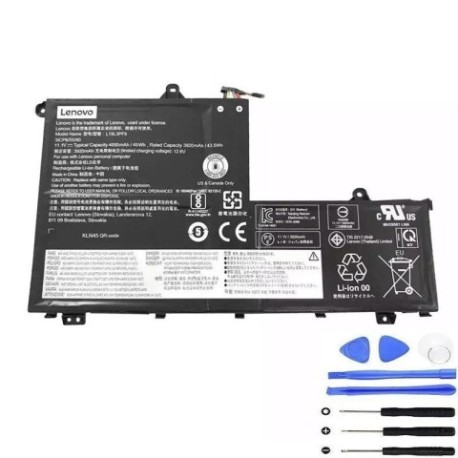
Battery models & part numbers
| Reference / P/N |
|---|
| 5B10V25237 |
| 5B10V25238 |
| 5B10V25251 |
| 5B10W67255 |
| 5B10W67347 |
| 5B10W67364 |
| 5B10X55569 |
| 5B10X55570 |
| 5B10X55572 |
| L19C3PF1 |
| L19C3PF9 |
| L19D3PF1 |
| L19L3PF8 |
| L19M3PF1 |
| Lenovo-L19M3PF9-45Wh |
| SB10V25236 |
| SB10V25242 |
| SB10V25248 |
Compatible laptop models
| Model |
|---|
| Lenovo ThinkBook 14 G2 ARE (20VF) |
| Lenovo ThinkBook 14 G2 ITL (20VD) |
| Lenovo ThinkBook 14 G3 ITL (21A3) |
| Lenovo ThinkBook 14 G4 ABA (21DK) |
| Lenovo ThinkBook 14 G4 IAP (21DH) |
| Lenovo ThinkBook 14 IIL (20SL) |
| Lenovo ThinkBook 14 IML (20RV) |
| Lenovo ThinkBook 14-IIL (20SL) |
| Lenovo ThinkBook 14-IML (20RV) |
| Lenovo ThinkBook 14s Yoga G2 (21DM) |
| Lenovo ThinkBook 14s Yoga IRU (21JG) |
| Lenovo ThinkBook 15 G2 ARE (20VG) |
| Lenovo ThinkBook 15 G3 ACL (21A4) |
| Lenovo ThinkBook 15 G4 IAP (21DJ) |
| Lenovo ThinkBook 15 IIL (20SM) |
| Lenovo ThinkBook 15 IML (20RW) |
| Lenovo ThinkBook 15-IIL (20SM) |
| Lenovo ThinkBook 15-IML (20RW) |
Introduction
This genuine replacement battery delivers reliable power for your Lenovo ThinkBook laptop. With 45Wh capacity and built-in safety features, it’s the perfect solution for Australian and New Zealand professionals and students.
Common signs you need a replacement
| Symptoms | Causes | Verification | Recommendation |
|---|---|---|---|
| Battery drains quickly (under 1 hour) | Ageing cells, frequent charging cycles | Check battery health in Windows settings | Replace if capacity below 50% |
| Laptop won’t power on without charger | Battery no longer holds charge | Remove charger and try to power on | Immediate replacement needed |
| Battery percentage jumps erratically | Faulty battery management system | Monitor percentage changes during use | Replace to prevent sudden shutdowns |
| Battery swelling or physical damage | Internal short circuits, overheating | Visual inspection, check for bulging | Replace immediately for safety |
| Overheating during charging | Internal resistance increase | Feel battery temperature while charging | Replace to prevent damage to laptop |
How to check compatibility
Check your laptop’s model number on the bottom case or in System Information. Compare with our compatibility list above. You can also check your current battery’s part number by removing it from your laptop.
When to replace
Replace your battery when it holds less than 50% of its original capacity, shows physical damage, or causes power issues. Most laptop batteries last 2-3 years with regular use in Australian conditions.
Installation guide (overview)
1. Power off laptop and disconnect charger
2. Remove bottom case screws
3. Carefully disconnect old battery connector
4. Install new battery and reconnect
5. Replace bottom case and power on
Note: Refer to your laptop’s service manual for detailed instructions.
Usage & care tips
• Avoid extreme temperatures (ideal range 15-25°C)
• Don’t leave laptop plugged in constantly
• Perform partial discharges rather than full cycles
• Store at 40-60% charge if not using for extended periods
• Keep battery contacts clean and dry
Safety & recycling in AU/NZ
Never dispose of batteries in household waste. In Australia, use Batteryback or council recycling programmes. In New Zealand, take to authorised recycling centres. Damaged or swollen batteries should be handled with care and recycled promptly.
FAQ
How long does shipping take to AU/NZ?
Typically 5-10 business days with express options available.
Is this battery genuine Lenovo?
This is a high-quality replacement battery compatible with Lenovo specifications.
What warranty is provided?
12-month warranty covering manufacturing defects.
Can I install this myself?
Yes, with basic technical skills and proper tools. Follow safety precautions.
Will this work with my specific ThinkBook model?
Check the compatibility list above or contact us with your model number.
How do I calibrate the new battery?
Charge to 100%, use until it shuts down, then charge uninterrupted to 100%.
What if my laptop isn’t in the compatibility list?
Contact our support team with your laptop and current battery details.