Lenovo L18M4PF3 45Wh Replacement Battery – Complete Guide for AU/NZ Users
If your Lenovo laptop is struggling to hold charge or shutting down unexpectedly, you’ve found the right replacement battery solution. This comprehensive guide covers everything Australian and New Zealand consumers need to know about the Lenovo L18M4PF3 45Wh battery.
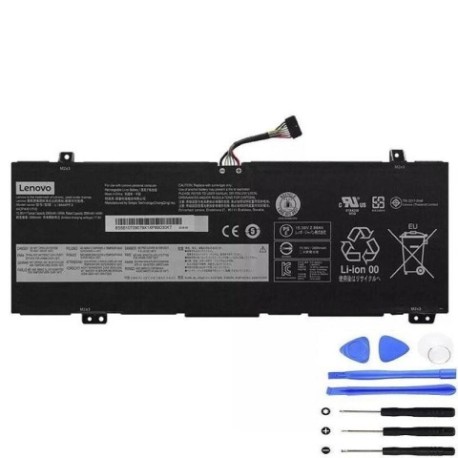
Battery models & part numbers
| Reference / P/N |
|---|
| 4ICP4/41/110 |
| 5B10T09081 |
| 5B10W67194 |
| 5B10W67415 |
| L18C4PF3 |
| Lenovo-L18M4PF3-45Wh |
Compatible laptop models
| Model |
|---|
| Lenovo FLEX-14API (81SS) |
| Lenovo IdeaPad C340-14API (81N6) |
| Lenovo IdeaPad C340-14IML (81TK) |
| Lenovo IdeaPad C340-14IWL (81N4) |
| Lenovo IdeaPad C340-14IWL (81RL) |
| Lenovo IdeaPad Flex-14IML (81TK) |
| Lenovo IdeaPad Flex-14IML (81XG) |
| Lenovo IdeaPad Flex-14IWL (81SQ) |
| Lenovo IdeaPad S540-14API (81NH) |
| Lenovo IdeaPad S540-14IML (81NF) |
| Lenovo IdeaPad S540-14IML Touch (81NF) |
| Lenovo IdeaPad S540-14IML Touch (81V0) |
| Lenovo IdeaPad S540-14IWL (81ND/81QX) |
| Lenovo IdeaPad S540-14IWL Touch (81ND) |
| Lenovo IdeaPad S540-14IWL Touch (81QX) |
Introduction
The Lenovo L18M4PF3 45Wh battery is a high-quality replacement solution designed specifically for various Lenovo IdeaPad and Flex models popular in Australia and New Zealand. This lithium-ion battery delivers reliable performance and extended usage time for your daily computing needs.
Common signs you need a replacement
| Symptoms | Causes | Verification | Recommendation |
|---|---|---|---|
| Rapid battery drain | Ageing battery cells | Check battery health in Windows | Replace if under 50% capacity |
| Laptop shuts down unexpectedly | Voltage drops under load | Monitor during intensive tasks | Immediate replacement needed |
| Battery won’t charge fully | Charging circuit failure | Check charging indicator | Replace battery first |
| Physical swelling or bulging | Gas buildup from degradation | Visual inspection | Replace immediately – safety risk |
| Overheating during use | Internal resistance increase | Temperature monitoring | Replace to prevent damage |
How to check compatibility
Verify your laptop’s compatibility by checking the model number on the bottom sticker of your device. Compare it against our comprehensive compatibility list above. You can also check your current battery’s part number by removing the battery (if removable) or using Lenovo’s Vantage software to identify your current battery model.
When to replace
Most laptop batteries last 2-4 years with regular use. Consider replacement when your battery holds less than 60% of its original capacity, shows physical damage, or causes performance issues. For Australian and New Zealand users, extreme temperature variations can accelerate battery degradation.
Installation guide (overview)
1. Power off your laptop and disconnect all cables
2. Remove the bottom panel using appropriate screwdrivers
3. Disconnect the battery connector from the motherboard
4. Remove any screws securing the battery
5. Install the new L18M4PF3 battery in reverse order
6. Reassemble and charge fully before first use
Usage & care tips
• Avoid frequent full discharges – charge between 20-80% for optimal lifespan
• Store in cool, dry conditions (15-25°C ideal)
• Use only authorised Lenovo chargers
• Calibrate your battery monthly by fully charging then discharging
• Avoid leaving laptop plugged in constantly
Safety & recycling in AU/NZ
In Australia and New Zealand, lithium-ion batteries must be recycled properly. Never dispose of batteries in household waste. Use dedicated battery recycling services available at most electronics retailers, council waste centres, or through programs like Batteryback in Australia. Damaged or swollen batteries should be handled with care and taken to specialised recycling facilities immediately.
FAQ
How long does shipping take to AU/NZ?
Typically 7-14 business days depending on your location.
Is this battery genuine Lenovo?
This is a high-quality compatible replacement meeting original specifications.
What warranty is provided?
Most suppliers offer 12-24 months warranty for Australian consumers.
Can I install this battery myself?
Yes, with basic technical skills and proper tools, most users can safely install it.
How do I maximise battery life?
Avoid extreme temperatures, use power-saving modes, and maintain 20-80% charge levels.
Is this battery safe for air travel?
Yes, the 45Wh capacity is well under airline restrictions for carry-on luggage.
What if my model isn’t listed?
Double-check your model number and contact the supplier for confirmation.