Battery models & part numbers
| Reference / P/N |
|---|
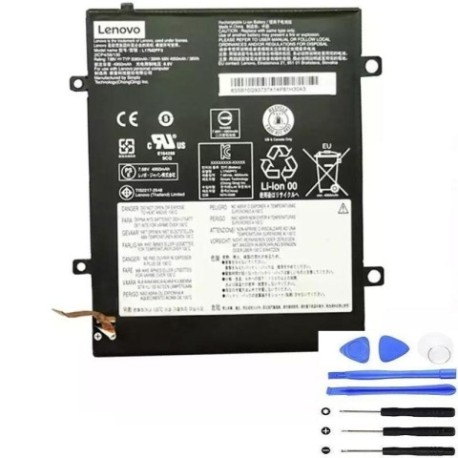
| L17C2PF1 |
| L17D2PF2 |
| Lenovo-L17M2PF3-39Wh |
Compatible laptop models
| Model |
|---|
| Lenovo 5B10Q93736 |
| Lenovo 5B10Q93737 |
| Lenovo 5B10Q93738 |
| Lenovo 5B10W67242 |
| Lenovo 5B10W67245 |
| Lenovo 5B10W67343 |
| Lenovo IdeaPad D330-10IGL (82H0) |
| Lenovo IdeaPad D330-10IGM (81H3) |
| Lenovo IdeaPad D330-10IGM (81MD) |
Introduction
Keep your Lenovo laptop running at peak performance with our authorised replacement battery. This 39Wh power solution is designed specifically for compatible Lenovo models available in Australia and New Zealand.
Common signs you need a replacement
| Symptoms | Causes | Verification | Recommendation |
|---|---|---|---|
| Battery drains quickly | Ageing cells, reduced capacity | Check battery health in system settings | Consider replacement if under 50% capacity |
| Laptop won’t hold charge | Failed battery circuits | Test with power adapter disconnected | Immediate replacement needed |
| Battery swelling | Internal gas buildup | Visual inspection of battery compartment | Replace immediately for safety |
| Overheating during use | Inefficient power conversion | Monitor temperature above 45°C | Replace to prevent damage |
| Random shutdowns | Voltage instability | Check event logs for power errors | Replace battery to restore stability |
How to check compatibility
Verify your laptop model matches our compatibility list above. Check your current battery part number (usually printed on the battery itself) or locate your laptop model number on the bottom casing or in system information.
When to replace
Replace your battery when it no longer holds sufficient charge for your needs, shows physical damage or swelling, or your system indicates battery health below 60%. Most laptop batteries last 2-3 years with regular use.
Installation guide (overview)
Power off and unplug your laptop. Remove the bottom panel (typically secured with small screws). Disconnect the battery connector from the motherboard. Remove any mounting screws, then lift out the old battery. Install the new battery in reverse order, ensuring all connections are secure.
Usage & care tips
Avoid extreme temperatures (ideal range 15-25°C). Don’t leave your laptop plugged in constantly – occasional discharge cycles help maintain battery health. Store in a cool, dry place when not in use for extended periods.
Safety & recycling in AU/NZ
Never attempt to open or puncture batteries. Dispose of old batteries at authorised recycling centres – most electronics retailers offer free battery recycling services. In Australia, check with Batteryback.org.au. In New Zealand, use Sustainable.org.nz for recycling locations.
FAQ
How long does shipping take in AU/NZ?
Typically 3-7 business days depending on your location.
Is this battery genuine Lenovo?
This is a high-quality compatible replacement meeting original specifications.
What warranty do you offer?
12-month warranty covering manufacturing defects.
Can I install this myself?
Yes, with basic technical skills and appropriate tools.
How do I check my current battery health?
Use your operating system’s power/battery settings or third-party battery monitoring software.
What if my model isn’t listed?
Contact our support team with your exact laptop model for compatibility verification.
Do you provide installation instructions?
Detailed step-by-step guides are available on our website for all compatible models.