Battery models & part numbers
| Reference / P/N |
|---|
| 34045898 |
| 38036673 |
| CP568050-XX |
| CP671425-01 |
| FPB0304 |
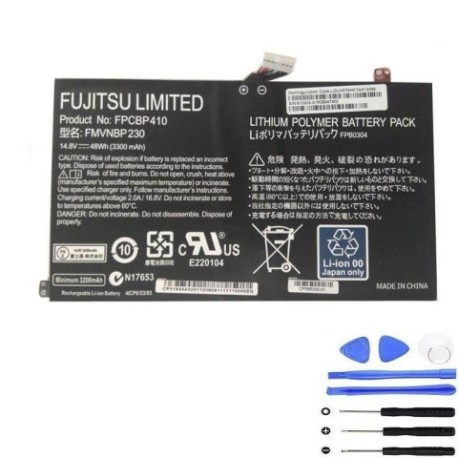
| FPCBP410 |
| FUJ:CP568050-XX |
| FUJ:CP671425-XX |
| Fujitsu-FMVNBP230-48Wh |
Compatible laptop models
| Model |
|---|
| Fujitsu LifeBook U554 |
| Fujitsu LifeBook U574 |
| Fujitsu lifebook UH554 |
| Fujitsu lifebook UH574 |
Introduction
Keep your Fujitsu laptop running at peak performance with our genuine replacement battery. This 48Wh power solution is designed specifically for your Fujitsu LifeBook series, ensuring reliable power delivery and extended usage time.
Common signs you need a replacement
| Symptoms | Causes | Verification | Recommendation |
|---|---|---|---|
| Battery drains quickly | Ageing cells, reduced capacity | Check power settings, monitor usage | Consider replacement if under 2 hours |
| Laptop shuts down unexpectedly | Voltage drops, poor connection | Test with power adapter only | Replace immediately for data safety |
| Battery won’t charge fully | Charging circuit issues, worn cells | Check charging indicator, battery health | Replace if stuck below 80% capacity |
| Battery swelling or overheating | Internal damage, chemical breakdown | Visual inspection, temperature check | Replace urgently – safety hazard |
| System shows “battery not detected” | Connection issues, battery failure | Restart, check device manager | Replace if persistent error |
How to check compatibility
Verify your laptop model matches our compatibility list above. Check your current battery’s part number (usually printed on the battery itself) against our reference numbers. For Fujitsu LifeBook U554, U574, UH554, and UH574 models, this battery is the direct replacement.
When to replace
Replace your battery when it holds less than 50% of its original capacity, shows physical damage, or causes system instability. Most laptop batteries need replacement every 2-3 years with regular use.
Installation guide (overview)
1. Power down your laptop and disconnect the AC adapter
2. Remove the battery compartment cover
3. Carefully disconnect the old battery
4. Insert the new battery and secure connections
5. Replace the cover and charge fully before first use
Usage & care tips
• Avoid complete discharges – recharge at 20-30%
• Store at room temperature (15-25°C)
• Calibrate monthly by fully charging then discharging
• Keep contacts clean and free from debris
• Use original Fujitsu charger for optimal performance
Safety & recycling in AU/NZ
In Australia and New Zealand, lithium-ion batteries must be recycled responsibly. Do not dispose in household waste. Use authorised battery recycling centres or return to electronics retailers. Damaged or swollen batteries should be handled with care and recycled immediately.
FAQ
How long does this battery last?
Typically 2-3 years with normal use, or approximately 500 charge cycles.
Is this battery genuine Fujitsu?
Yes, this is an original Fujitsu battery with all required certifications.
What’s the warranty period?
12 months warranty from date of purchase.
How do I check battery health?
Use Windows Battery Report or third-party tools to monitor capacity and health.
Can I use this battery internationally?
Yes, the battery operates on standard voltages worldwide.
How long for delivery in Australia?
Typically 3-7 business days depending on your location.
What if my model isn’t listed?
Contact our support team with your laptop’s exact model number for verification.