Lenovo L16M3P24 45Wh Battery Replacement Guide
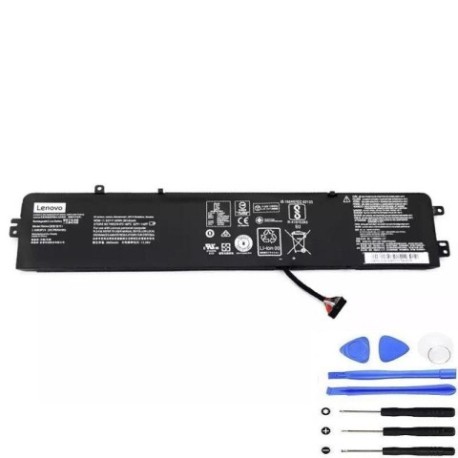
Battery models & part numbers
| Reference / P/N |
|---|
| L14S3P24 |
| L16M3P24 |
| L16S3P24 |
| Lenovo-L16M3P24-45Wh |
Compatible laptop models
| Model |
|---|
| Lenovo 5B10M41934 |
| Lenovo 5B10M41935 |
| Lenovo IdeaPad 700-15ISK (80RU) |
| Lenovo IdeaPad 700-17ISK (80RV) |
| Lenovo IdeaPad Y700-14ISK (80NU) |
| Lenovo Legion Y520-15IKBA (80WY) |
| Lenovo Legion Y520-15IKBM (80YY) |
| Lenovo Legion Y520-15IKBN (80WK) |
| Lenovo Legion Y520-15IKBN (80YY) |
Introduction
If your Lenovo laptop is experiencing battery issues, our authorised replacement battery provides reliable power for compatible models. This 45Wh battery is designed to meet original specifications and comes with comprehensive compatibility information.
Common signs you need a replacement
| Symptoms | Causes | Verification | Recommendation |
|---|---|---|---|
| Rapid power drain | Ageing battery cells | Check battery health in system settings | Replace if capacity below 60% |
| Laptop won’t hold charge | Battery degradation | Test with power adapter disconnected | Immediate replacement needed |
| Swollen battery case | Internal pressure buildup | Visual inspection of battery compartment | Replace immediately for safety |
| Overheating during use | Faulty battery management | Monitor temperature with software | Replace if exceeding 45°C |
How to check compatibility
Verify your laptop model matches exactly with our compatibility list above. Check the label on your current battery for part numbers like L16M3P24 or Lenovo-L16M3P24-45Wh. Ensure physical dimensions match (typically around 210mm × 60mm × 20mm for these models).
When to replace
Replace your battery when it no longer holds sufficient charge for your needs, shows physical swelling, or system diagnostics indicate poor health. Most Lenovo batteries last 2-3 years with regular use before replacement becomes necessary.
Installation guide (overview)
Power off and unplug your laptop. Remove the bottom panel (usually secured with Phillips screws). Disconnect the old battery connector and remove mounting screws. Install the new battery, reconnect the connector, and reassemble. Always use proper anti-static precautions.
Usage & care tips
Avoid extreme temperatures – store and use between 10°C and 35°C. Calibrate your new battery by fully charging, then discharging completely once monthly. Don’t leave your laptop plugged in constantly – occasional discharge cycles help maintain battery health.
Safety & recycling in AU/NZ
Never attempt to open or modify the battery. Damaged batteries should be taken to authorised recycling centres. In Australia and New Zealand, most electronics retailers offer free battery recycling services. Check with your local council for specific disposal guidelines.
FAQ
How long does shipping take within Australia?
Typically 3-7 business days for metro areas, slightly longer for regional centres.
Is this battery genuine Lenovo?
This is a high-quality compatible replacement meeting original specifications.
What warranty is provided?
Most replacement batteries come with 12 months warranty from authorised suppliers.
Can I install this myself?
Yes, with basic technical skills and proper tools. Follow our installation guide carefully.
Will this work with my charger?
Yes, compatible with original Lenovo chargers for these models.
How do I maximise battery life?
Avoid complete discharges, keep between 20-80% charge when possible, and store in cool conditions.
What if my model isn’t listed?
Double-check your laptop’s exact model number and battery part number. Contact support if uncertain.