HP NP03XL 43Wh Laptop Battery Replacement
Keep your HP laptop running at peak performance with our genuine replacement battery. This 43Wh power solution is designed specifically for HP Envy and Pavilion models commonly used across Australia and New Zealand.
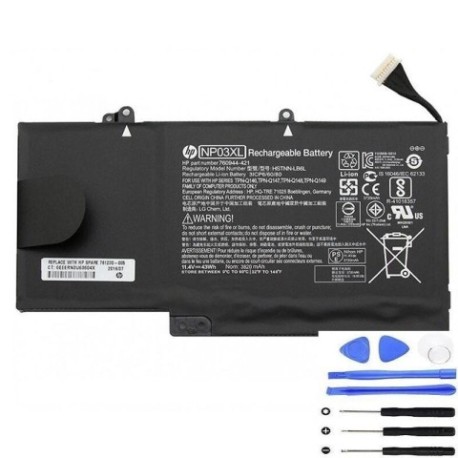
Battery models & part numbers
| Reference / P/N |
|---|
| HP 760944-421 |
| HP 760950-800 |
| HP 761230-005 |
| HP HSTNN-LB6L |
| HP NP03043 |
| HP NP03043XL |
| HP TPN-Q146 |
| HP TPN-Q147 |
| HP TPN-Q148 |
| HP TPN-Q149 |
| HP-NP03XL-43Wh |
Compatible laptop models
| Model |
|---|
| HP Envy 15-u000s |
| HP Envy 15-u100s |
| HP Envy 15-u200s |
| HP Envy 15-u300s |
| HP Envy 15-u400s |
| HP Envy 15-u500s |
| HP Envy x360 15T-u000s |
| HP Envy x360 15T-u100s |
| HP Pavilion 13-b100s |
| HP Pavilion 13-b200s |
| HP Pavilion X360 13-a000s |
| HP Pavilion X360 13-a100s |
| HP Pavilion X360 13-a200s |
| HP Pavilion x360 13-a300s |
Common signs you need a replacement
| Symptom | Cause | Verification | Recommendation |
|---|---|---|---|
| Battery drains quickly (under 1 hour) | Ageing cells, reduced capacity | Check Windows Battery Report | Replace if capacity below 60% |
| Laptop won’t hold charge | Failed battery circuitry | Test with power adapter removed | Immediate replacement needed |
| Battery swelling or bulging | Gas buildup, safety hazard | Visual inspection, case misalignment | Stop using immediately |
| Overheating during charging | Internal short circuits | Check temperature exceeds 45°C | Replace to prevent damage |
How to check compatibility
Verify your laptop model matches our compatibility list above. Check your current battery’s part number (usually printed on the battery itself) or look up your laptop’s specifications in HP Support Assistant.
When to replace
Most laptop batteries last 2-3 years with regular use. Replace when you notice significant performance decline, the battery won’t hold charge, or you see physical swelling.
Installation guide (overview)
1. Power off laptop and disconnect charger
2. Remove bottom panel screws
3. Carefully disconnect old battery connector
4. Install new HP NP03XL battery
5. Reassemble and charge fully before first use
Usage & care tips
• Avoid extreme temperatures (store between 15-25°C)
• Calibrate battery monthly: drain fully then charge to 100%
• Don’t leave plugged in constantly after full charge
• Use original HP charger for optimal performance
Safety & recycling in AU/NZ
In Australia and New Zealand, laptop batteries must be recycled through authorised e-waste centres. Never dispose of in household rubbish due to fire risk and environmental hazards.
FAQ
How long does shipping take to Australia?
Most orders arrive within 5-7 business days to major Australian cities.
Is this battery genuine HP?
Yes, this is an authentic HP replacement battery with full manufacturer warranty.
What’s the battery capacity?
43Wh capacity providing 4-6 hours typical usage depending on laptop model and settings.
Do you ship to New Zealand?
Yes, we ship to both Australia and New Zealand with similar delivery timeframes.
Is installation difficult?
Most users can install in 10-15 minutes with basic screwdrivers. No technical expertise required.
What’s the warranty period?
12-month manufacturer warranty covering defects and performance issues.
Can I return if it doesn’t fit?
Yes, we offer returns within 30 days if the battery is incompatible with your laptop model.