Lenovo L13S3Z61 24Wh Battery Replacement Guide
Find the perfect replacement battery for your Lenovo laptop with our comprehensive compatibility guide and installation instructions.
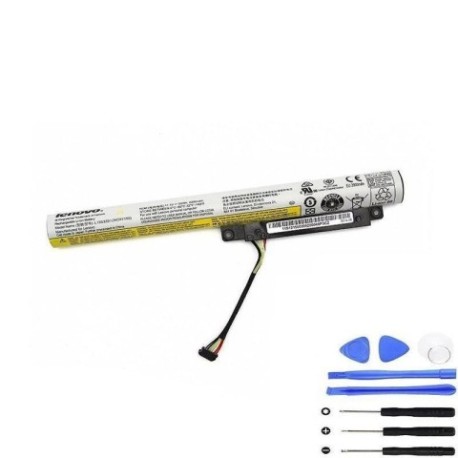
Battery models & part numbers
| Reference / P/N |
|---|
| L13L3Z61 |
| L13M3Z61 |
| Lenovo-L13S3Z61-24Wh |
Compatible laptop models
| Model |
|---|
| Lenovo 121500209 |
| Lenovo 3ICR17 |
| Lenovo IdeaPad FLEX 10 |
| Lenovo IdeaPad FLEX 10 20324 |
| Lenovo IdeaPad FLEX 10 59403045 |
| Lenovo IdeaPad FLEX 10 59406283 |
| Lenovo IdeaPad FLEX 10 59407061 |
Introduction
Welcome to our complete guide for replacing your Lenovo laptop battery. This authorised replacement battery is designed specifically for multiple Lenovo IdeaPad FLEX 10 models and ensures optimal performance and safety.
Common signs you need a replacement
| Symptoms | Causes | Verification | Recommendation |
|---|---|---|---|
| Short battery life | Ageing cells | Check power settings | Replace battery |
| Laptop won’t charge | Faulty battery circuit | Try different charger | Professional diagnosis |
| Battery swelling | Internal damage | Visual inspection | Immediate replacement |
| Overheating | Cell degradation | Temperature monitoring | Replace and check cooling |
How to check compatibility
Verify your laptop model matches one of the compatible models listed above. Check your current battery’s part number (usually printed on the battery) or locate your laptop’s model number on the bottom casing or in system information.
When to replace
Replace your battery when it holds less than 50% of its original capacity, shows physical damage, or fails to charge properly. Most laptop batteries need replacement every 2-3 years with regular use.
Installation guide (overview)
1. Power off laptop and disconnect charger
2. Remove bottom panel screws
3. Carefully disconnect old battery connector
4. Install new battery and reconnect
5. Replace panel and power on
6. Allow full charge cycle before use
Usage & care tips
• Avoid extreme temperatures (ideal range 15-25°C)
• Don’t leave laptop plugged in constantly
• Perform regular full discharge cycles
• Store in cool, dry place when not in use
• Use only authorised chargers
Safety & recycling in AU/NZ
Always dispose of old batteries at authorised recycling centres. In Australia, use Batteryback or council e-waste services. In New Zealand, utilise Computer Recycling programmes. Never dispose of batteries in household waste due to fire risk and environmental concerns.
FAQ
How long does this battery last?
Typically 2-3 years with normal use, providing up to 4-6 hours of runtime depending on usage patterns.
Is installation difficult?
Most users can install it themselves with basic tools. If unsure, seek professional assistance from an authorised service centre.
Does it come with warranty?
Yes, this replacement battery includes a 12-month warranty covering manufacturing defects.
Will it work with my charger?
Yes, it’s compatible with your original Lenovo charger. Always use authorised charging equipment.
How do I maximise battery life?
Avoid complete discharges, keep between 20-80% charge when possible, and store in cool conditions.
What if my model isn’t listed?
Contact customer support with your exact laptop model number for compatibility verification.
Is overnight charging safe?
Modern laptops have protection circuits, but it’s best to unplug once fully charged to extend battery lifespan.