Battery models & part numbers
| Reference / P/N |
|---|
| Lenovo-45N1019-63Wh |
Compatible laptop models
| Model |
|---|
| Lenovo 0A36281 |
| Lenovo 0A36282 |
| Lenovo 0A36283 |
| Lenovo 0A36306 |
| Lenovo 0A36307 |
| Lenovo 29++ |
| Lenovo 42T4861 |
| Lenovo 42T4862 |
| Lenovo 42T4863 |
| Lenovo 42T4865 |
| Lenovo 42T4866 |
| Lenovo 42T4867 |
| Lenovo 42T4871 |
| Lenovo 42T4872 |
| Lenovo 42T4873 |
| Lenovo 42T4875 |
| Lenovo 42T4876 |
| Lenovo 42T4900 |
| Lenovo 42T4901 |
| Lenovo 42T4902 |
| Lenovo 42T4903 |
| Lenovo 42T4967 |
| Lenovo 42Y4834 |
| Lenovo 42Y4864 |
| Lenovo 44 44+ |
| Lenovo 45N1018 |
| Lenovo 45N1021 |
| Lenovo 45N1022 |
| Lenovo 45N1023 |
| Lenovo 45N1024 |
| Lenovo 45N1025 |
| Lenovo 45N1026 |
| Lenovo 45N1029 |
| Lenovo 45N1031 |
| Lenovo 45N1033 |
| Lenovo 45N1035 |
| Lenovo 45N1172 |
| Lenovo 45N1175 |
| Lenovo 45N1709 |
| Lenovo 45N1710 |
| Lenovo 92P1073 |
| Lenovo LOX221L7 |
| Lenovo ThinkPad X220 |
| Lenovo ThinkPad X220 (4286) |
| Lenovo ThinkPad X220 (4287) |
| Lenovo ThinkPad X220 (4289) |
| Lenovo ThinkPad X220 (4290) |
| Lenovo ThinkPad X220 (4291) |
| Lenovo ThinkPad X220 (4292) |
| Lenovo ThinkPad X220 (4293) |
| Lenovo ThinkPad X220i |
| Lenovo ThinkPad X220i (4286) |
| Lenovo ThinkPad X220i (4287) |
| Lenovo ThinkPad X220i (4290) |
| Lenovo ThinkPad X230 |
| Lenovo ThinkPad X230 (2306) |
| Lenovo ThinkPad X230 (2320) |
| Lenovo ThinkPad X230 (2322) |
| Lenovo ThinkPad X230 (2324) |
| Lenovo ThinkPad X230 (2325) |
| Lenovo ThinkPad X230 (2330) |
| Lenovo ThinkPad X230 (2333) |
| Lenovo ThinkPad X230i |
| Lenovo ThinkPad X230i (2306) |
| Lenovo ThinkPad X230i (2320) |
| Lenovo ThinkPad X230i (2322) |
| Lenovo ThinkPad X230i (2324) |
| Lenovo ThinkPad X230i (2325) |
Introduction
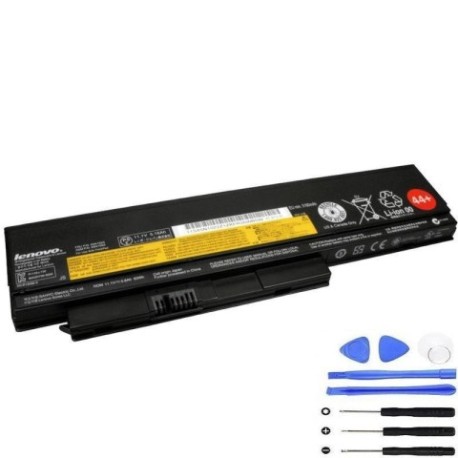
Keep your Lenovo laptop running at peak performance with our genuine 45N1019 63Wh replacement battery. This high-quality battery is designed specifically for multiple Lenovo ThinkPad models and ensures reliable power for your workday.
Common signs you need a replacement
| Symptom | Cause | Verification | Recommendation |
|---|---|---|---|
| Short battery life | Ageing cells | Check power settings | Consider replacement |
| Laptop won’t hold charge | Battery degradation | Monitor charge cycles | Replace battery |
| Swelling/bulging | Internal damage | Visual inspection | Replace immediately |
| Overheating | Faulty cells | Check temperature | Replace for safety |
| Random shutdowns | Power instability | Test under load | Replace battery |
How to check compatibility
Verify your laptop model matches our compatibility list above. Check your current battery’s part number or look for model information on your laptop’s bottom label or system information.
When to replace
Replace your battery when you notice significant performance decline, typically after 2-3 years of regular use or when capacity drops below 60% of original.
Installation guide (overview)
Power off your laptop and disconnect from power. Remove the old battery by releasing the locking mechanism. Align the new battery with the connectors and press firmly until it clicks into place.
Usage & care tips
Avoid extreme temperatures (store between 15-25°C). Calibrate your battery monthly by fully charging then discharging. Don’t leave your laptop plugged in constantly.
Safety & recycling in AU/NZ
Dispose of old batteries at authorised recycling centres. Never puncture or expose batteries to fire. In Australia and New Zealand, battery recycling is available at most electronics retailers.
FAQ
How long does delivery take in Australia?
Typically 3-7 business days depending on your location.
Is this battery genuine Lenovo?
Yes, this is an authentic Lenovo 45N1019 battery with full compatibility.
What’s the warranty period?
12 months warranty from date of purchase.
Can I use this with newer Lenovo models?
Only compatible with models listed in our compatibility table.
How do I recycle my old battery?
Take it to any authorised battery recycling centre in Australia or New Zealand.
What’s the battery capacity?
63Wh capacity providing extended usage time.
Is installation difficult?
No, most users can install it in minutes following our guide.