ASUS B21N1505 32Wh Battery Replacement Guide for Australian & New Zealand Users
Is your ASUS VivoBook struggling to hold a charge? Our comprehensive guide helps you identify compatible models, recognise replacement signs, and safely install your new battery with AU/NZ specific safety and recycling information.
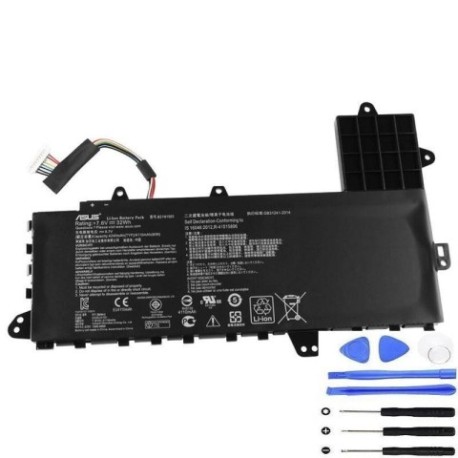
Battery models & part numbers
| Reference / P/N |
|---|
| 0B200-01400200 |
| 0B200-01400300 |
| Asus-B21N1505-32Wh-B |
| B21Bn91 |
Compatible models
| Model |
|---|
| Asus E402M E402S E502S |
| Asus VivoBook E402MA E402NA |
| Asus VivoBook E402SA E402WA E402YA |
| Asus VivoBook F402NA F402WA |
| Asus VivoBook L402NA L402SA |
| Asus VivoBook R147SA R417MA |
| Asus VivoBook X402MA X402NA X402SA X402YA |
Introduction
Welcome to your complete guide for ASUS B21N1505 32Wh battery replacement. This high-quality lithium-ion battery is specifically designed for various ASUS VivoBook models popular in Australia and New Zealand. Whether you’re a student, professional, or casual user, maintaining optimal battery health ensures your laptop remains reliable for work, study, and entertainment.
Modern laptops like the ASUS VivoBook series are essential tools for Australians and New Zealanders, serving everything from remote work to online learning. A healthy battery means freedom from constant charging and peace of mind during important tasks. This guide provides everything you need to make an informed decision about battery replacement, including compatibility verification, installation guidance, and local safety considerations.
Common signs you need a replacement
| Symptom | Cause | Verification | Recommendation |
|---|---|---|---|
| Reduced runtime | Battery degradation over 300-500 cycles | Check battery health in Windows Power Report | Replace when capacity drops below 60% |
| Laptop shuts down unexpectedly | Voltage drops under load | Monitor battery percentage during use | Immediate replacement recommended |
| Battery not charging to 100% | Cell imbalance or BMS issues | Check charging status in system tray | Replace if persistent after calibration |
| Physical swelling or bulging | Gas buildup from chemical reactions | Visual inspection of battery compartment | Replace immediately – safety hazard |
| Overheating during charging | Internal resistance increase | Feel battery temperature during charge | Replace to prevent damage to laptop |
How to check compatibility
Ensuring compatibility is crucial for both safety and performance. For ASUS VivoBook owners in Australia and New Zealand, here’s how to verify your laptop model matches the B21N1505 battery:
Finding Your Model Information: Locate the model sticker on the bottom of your laptop. For ASUS devices, this is typically found near the battery compartment or on the bottom case. The model number will be clearly printed – common formats include E402MA, F402NA, or similar. You can also find this information in Windows by pressing Windows Key + R, typing “msinfo32”, and checking System Model.
ASUS-Specific Verification: ASUS provides excellent support resources for Australian customers. Visit the official ASUS Australia support website and enter your serial number or model to access compatible accessories. The B21N1505 battery is designed specifically for the VivoBook series listed in our compatibility table, ensuring perfect fit and function.
Physical Compatibility Check: Before purchasing, compare your current battery’s dimensions (approximately 205mm x 60mm x 4mm) and connector type. The B21N1505 uses a standard 4-pin connector common to ASUS laptops. If you’re unsure, take a photo of your current battery and compare it with our product image.
When to replace
Timing your battery replacement correctly balances cost with performance needs. For Australian and New Zealand users, consider replacement when:
Performance Threshold: When your battery lasts less than 2 hours for light tasks (web browsing, document editing) or shows significant voltage drops during use. Most ASUS VivoBook batteries should provide 4-6 hours of typical use when new.
Age Considerations: Lithium-ion batteries naturally degrade over time, typically lasting 2-3 years with regular use. If your laptop is approaching this age and showing reduced performance, proactive replacement prevents unexpected downtime.
Seasonal Considerations: In Australia’s varied climate, extreme temperatures can accelerate battery degradation. If you notice performance drops during summer heat or winter cold, it might indicate the battery is nearing end-of-life.
Before Important Events: If you have critical work projects, exams, or travel planned, replacing an aging battery proactively ensures reliability when you need it most.
Installation guide
Replacing your ASUS VivoBook battery is straightforward with proper preparation. Follow these steps for a successful installation:
Preparation: Power down your laptop completely and disconnect the AC adapter. Work on a clean, static-free surface. Gather necessary tools: typically a small Phillips screwdriver. Ground yourself by touching a metal object to prevent static discharge.
Removing the Old Battery: Turn your laptop upside down. Locate the battery compartment – for most VivoBook models, this is centrally located. Remove the screws securing the battery compartment cover (if applicable). Carefully disconnect the battery connector by pulling straight out – never pull by the wires. Remove any screws securing the battery itself, then lift it out.
Installing the New B21N1505: Place the new battery in position, ensuring the connector aligns properly. Secure with screws if your model requires them. Reconnect the battery connector, ensuring it clicks into place. Replace any compartment covers and screws.
Initial Setup: Connect the AC adapter and power on your laptop. Windows should recognise the new battery automatically. Allow the battery to charge fully before first use. For optimal calibration, perform a full charge-discharge cycle: charge to 100%, use until it shuts down, then charge uninterrupted to 100% again.
Troubleshooting: If the laptop doesn’t recognise the new battery, ensure the connector is fully seated. Try resetting the EC (Embedded Controller) by holding the power button for 40 seconds with the AC adapter disconnected. If issues persist, check for BIOS updates on the ASUS support site.
Usage & care tips
Maximise your new battery’s lifespan with these practical tips tailored for Australian and New Zealand conditions:
Optimal Charging Practices: Avoid frequently draining your battery to 0%. Instead, try to keep it between 20-80% for daily use. Modern lithium-ion batteries don’t suffer from “memory effect” but extreme discharges stress the cells. For long-term storage, charge to about 50% and store in a cool, dry place.
Temperature Management: Australian summers can be harsh on electronics. Avoid leaving your laptop in hot cars or direct sunlight. Ideal operating temperature is 10°C to 35°C. If the battery feels hot during use, give it a break to cool down.
Power Settings Optimisation: Use Windows Power Options to create a balanced power plan. Reduce screen brightness, disable unused wireless radios, and close unnecessary applications to extend battery life. ASUS-specific power management software may offer additional optimisation features.
Regular Maintenance: Perform a full calibration every 2-3 months: charge to 100%, use until automatic shutdown, then charge uninterrupted to 100%. This helps the battery controller accurately estimate remaining capacity.
Safety & recycling in AU/NZ
Battery safety and proper disposal are particularly important in Australia and New Zealand’s environmentally conscious communities:
Safety Precautions: Never attempt to open or modify the battery casing. Avoid exposing the battery to water or extreme temperatures. If you notice swelling, overheating, or unusual odours, discontinue use immediately and contact professional assistance.
Australian Recycling Options: In Australia, laptop batteries are considered e-waste and should not go in household bins. Most electronics retailers offer free battery recycling services. Check with Officeworks, JB Hi-Fi, or your local council’s e-waste program. Battery World locations also accept used batteries for recycling.
New Zealand Recycling: Across the Tasman, organisations like RCN e-Cycle and Computer Recycling provide battery disposal services. Many council transfer stations have dedicated e-waste areas. Some retailers like Noel Leeming and Harvey Norman offer take-back programs.
Transportation Guidelines: When shipping or transporting used batteries, ensure terminals are protected from short circuits. Tape the connectors or place batteries in individual plastic bags. Follow Australia Post and New Zealand Post guidelines for battery shipping.
FAQ
How long does the B21N1505 battery typically last?
With normal use, expect 2-3 years of service or 300-500 full charge cycles. Heavy users might see reduced lifespan, while occasional users may get longer service.
Will this battery work with my ASUS laptop if it’s not in the compatibility list?
We strongly recommend against using batteries with unlisted models. Physical compatibility doesn’t guarantee electrical compatibility, which could lead to performance issues or safety hazards.
How can I maximise my new battery’s lifespan?
Avoid extreme temperatures, don’t leave it plugged in constantly at 100%, and perform regular calibration cycles. Also, use the original ASUS charger whenever possible.
What warranty comes with this battery?
Quality replacements typically include 12-24 month warranties. Check specific supplier terms, and ensure you purchase from authorised retailers for warranty validity in Australia and New Zealand.
My laptop won’t recognise the new battery – what should I do?
First, ensure the connector is fully seated. Try an ECreset by holding the power button for 40 seconds with AC disconnected. Update BIOS from ASUS support site if issues persist.
Is it safe to use third-party batteries in my ASUS laptop?
Quality third-party batteries from reputable suppliers that meet original specifications are generally safe. Look for Australian Consumer Law protections, proper certifications, and positive reviews from other AU/NZ customers.
How do I properly dispose of my old laptop battery in Australia/New Zealand?
Never dispose of in household waste. Use council e-waste services, retailer take-back programs, or dedicated battery recycling facilities. Many Officeworks, JB Hi-Fi (AU) and Noel Leeming (NZ) stores accept old batteries.