Battery models & part numbers
| Reference / P/N |
|---|
| 01AV451 |
| 4X50K14092 |
| Lenovo-00HW030-96Wh |
| SB10F46468 |
Compatible laptop models
| Model |
|---|
| Lenovo ThinkPad P70 |
| Lenovo ThinkPad P70 (20ES/20ER) |
| Lenovo ThinkPad P71 |
| Lenovo ThinkPad P71 (20HK/20HL) |
Introduction
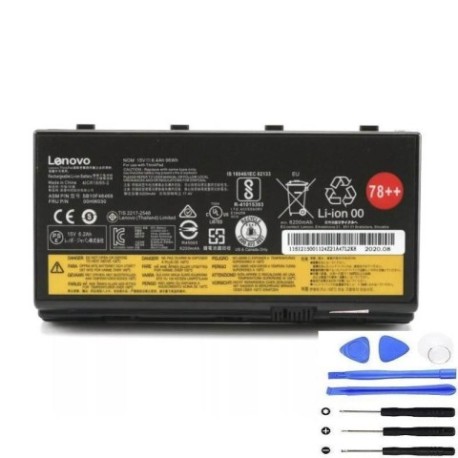
Keep your Lenovo ThinkPad P70 or P71 performing at its best with our genuine replacement battery. This 96Wh power solution ensures your mobile workstation stays productive throughout your workday.
Common signs you need a replacement
| Symptom | Possible Cause | How to Verify | Recommendation |
|---|---|---|---|
| Battery drains quickly | Reduced capacity from age/cycles | Check battery health in system settings | Consider replacement if under 50% capacity |
| Laptop shuts down unexpectedly | Battery can’t maintain voltage under load | Monitor during intensive tasks | Replace to prevent data loss |
| Battery won’t charge fully | Degraded cells or charging circuit | Check charging percentage over time | Replace if stuck below 80% charge |
| Battery swelling or overheating | Internal damage or failure | Visual inspection, temperature check | Replace immediately for safety |
How to check compatibility
Verify your laptop model matches one in our compatibility table above. Check your current battery part number against our reference list. For additional confirmation, consult your original purchase documentation or Lenovo’s official support resources.
When to replace
Replace your battery when you notice significant performance degradation, typically after 2-3 years of regular use or 300-500 charge cycles. Immediate replacement is recommended for any physical damage, swelling, or safety concerns.
Installation guide (overview)
1. Power down your laptop and disconnect from power
2. Remove the bottom cover following manufacturer guidelines
3. Disconnect the old battery connector
4. Remove any securing screws
5. Install the new battery and reconnect
6. Replace the cover and power on
Always refer to official Lenovo documentation for detailed instructions specific to your model.
Usage & care tips
• Avoid extreme temperatures (ideal range 15-25°C)
• Calibrate your battery monthly by fully charging then discharging
• Store at 40-60% charge if not using for extended periods
• Use authorised Lenovo chargers only
• Keep battery contacts clean and dry
Safety & recycling in AU/NZ
Never attempt to open or modify the battery casing. Dispose of old batteries at authorised recycling centres – most electronics retailers offer free battery recycling services. In Australia, check with Battery World or Officeworks. In New Zealand, use recognised e-waste collection points.
FAQ
How long does this battery last on a full charge?
Up to 6-8 hours depending on usage, settings and laptop configuration.
Is this battery genuine Lenovo?
Yes, this is an authentic Lenovo part with full compatibility.
What warranty do you offer?
All our batteries come with a 12-month replacement warranty.
How do I check my current battery health?
Use Lenovo Vantage software or check Power Options in Windows System Settings.
Can I use this battery with other ThinkPad models?
No, this battery is specifically designed for P70 and P71 models only.
How long does shipping take within Australia/NZ?
Typically 3-7 business days depending on your location.
Do you provide installation services?
We recommend professional installation at authorised service centres for warranty protection.