HP VX04XL 90Wh Battery Replacement Guide
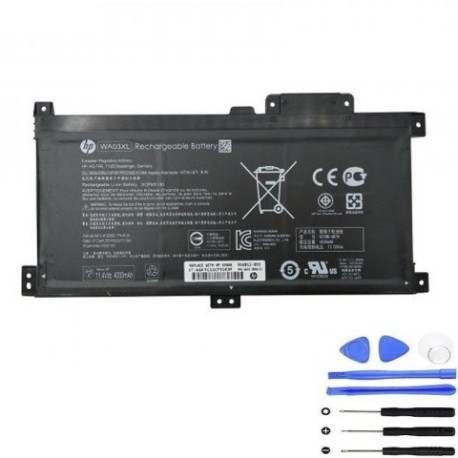
Battery models & part numbers
| Reference / P/N |
|---|
| HP 4ME79AA |
| HP 6CL89AV |
| HP HSTNN-IB8F |
| HP L05766-850 |
| HP L05766-855 |
| HP L06302-1C1 |
| HP VX04 |
| HP VX04090XL-PL |
| HP-VX04XL-90Wh |
Compatible laptop models
| Model |
|---|
| HP ZBook 15 G5s |
| HP ZBook 15 G6s |
Introduction
Keep your HP ZBook workstation performing at its best with a genuine HP VX04XL 90Wh battery replacement. This high-capacity battery delivers reliable power for demanding professional workloads across Australia and New Zealand.
Common signs you need a replacement
| Symptoms | Causes | Verification | Recommendation |
|---|---|---|---|
| Battery drains quickly (under 1 hour) | Ageing cells, reduced capacity | Check battery health in HP Support Assistant | Replace if capacity below 60% |
| Laptop shuts down unexpectedly | Battery cannot hold charge | Test with power adapter disconnected | Immediate replacement needed |
| Battery won’t charge fully | Charging circuit failure | Monitor charging percentage | Replace battery and check charger |
| Battery swelling or overheating | Internal damage, safety risk | Visual inspection, temperature check | Replace immediately – safety hazard |
How to check compatibility
Verify your laptop model matches the compatible models listed above. Check your current battery’s part number (usually printed on the battery) against our reference list. For ZBook 15 G5s and G6s models, this battery is fully compatible and authorised for use.
When to replace
Replace your battery when runtime drops below 60% of original capacity, typically after 2-3 years of regular use. Professional users in AU/NZ should consider replacement when battery health warnings appear or when working away from power sources becomes unreliable.
Installation guide (overview)
1. Power off laptop and disconnect charger
2. Remove bottom panel screws
3. Carefully disconnect old battery connector
4. Remove mounting screws
5. Install new HP VX04XL battery
6. Reconnect connector and reassemble
7. Charge fully before first use
Usage & care tips
• Avoid complete discharge cycles
• Store between 15-25°C when not in use
• Calibrate battery monthly (full charge/discharge cycle)
• Use authorised HP chargers only
• Keep firmware updated via HP Support Assistant
Safety & recycling in AU/NZ
Battery recycling is available through authorised HP recycling centres across Australia and New Zealand. Never dispose of lithium-ion batteries in household waste. Contact HP Australia/New Zealand for local recycling options or check with your council’s e-waste programme.
FAQ
How long does this battery last?
The HP VX04XL 90Wh typically provides 4-6 hours of runtime depending on usage intensity and power settings.
Is this battery genuine HP?
Yes, this is an authorised HP replacement battery with full compatibility and warranty support.
Do you ship to Australia and New Zealand?
Yes, we ship to both Australia and New Zealand with local delivery options available.
What warranty is provided?
This battery comes with a 12-month warranty covering manufacturing defects.
How do I check my current battery health?
Use HP Support Assistant or check Power Options in Windows to view battery health reports.
Can I install this battery myself?
Yes, with basic technical skills. Follow our installation guide or consult an authorised HP service centre.
What if my laptop model isn’t listed?
Verify your exact model number and contact us for compatibility confirmation before purchase.