Fujitsu FPCBP372 45Wh Battery Replacement
Find the perfect replacement battery for your Fujitsu laptop with our comprehensive compatibility guide and expert installation advice.
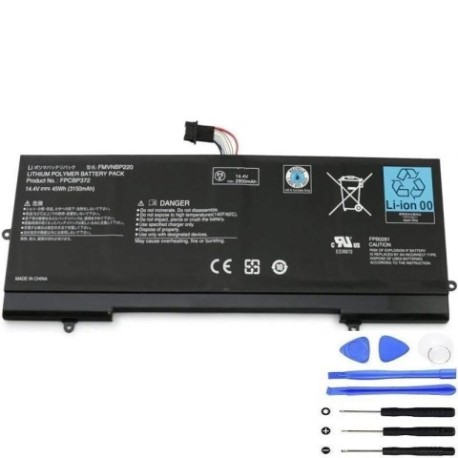
Battery models & part numbers
| Reference / P/N |
|---|
| 01A-X12051100 |
| 01A-X17050500 |
| 38020864 |
| CP579040-01 |
| CP579040-02 |
| CP579040-XX |
| FMVNBP220 |
| FPB0281 |
| FUJ:CP579040-XX |
| Fujitsu-FPCBP372-45Wh |
Compatible laptop models
| Model |
|---|
| Fujitsu LifeBook U772 |
Introduction
Welcome to your complete guide for replacing your Fujitsu laptop battery. Our FPCBP372 45Wh battery is designed to restore your device’s original performance and reliability.
Common signs you need a replacement
| Symptom | Cause | Verification | Recommendation |
|---|---|---|---|
| Short battery life | Ageing cells | Check system power report | Replace battery |
| Laptop won’t hold charge | Battery degradation | Test with power adapter removed | Install new battery |
| Battery swelling | Internal damage | Visual inspection | Replace immediately |
| Overheating during use | Faulty battery | Monitor temperature | Replace for safety |
How to check compatibility
Verify your laptop model matches our compatibility list above. Check your current battery’s part number against our reference table. For Fujitsu LifeBook U772 and compatible models, this battery is guaranteed to fit.
When to replace
Replace your battery when runtime drops below 50% of original capacity, when swelling occurs, or after 2-3 years of regular use. Most laptops show battery health warnings when replacement is needed.
Installation guide (overview)
Power off your laptop and disconnect the charger. Remove the bottom panel, disconnect the old battery connector, and carefully lift out the battery. Insert the new battery, reconnect the connector, and replace the panel. Always refer to your device’s service manual for detailed instructions.
Usage & care tips
Keep your battery between 20-80% charge for optimal lifespan. Avoid extreme temperatures – store between 15-25°C. Calibrate your battery monthly by fully charging then discharging. Use only authorised chargers.
Safety & recycling in AU/NZ
Never puncture or disassemble batteries. Dispose of old batteries at authorised recycling centres. In Australia, use Batteryback or council e-waste services. In New Zealand, utilise eDay collections or retail drop-off points.
FAQ
How long does this battery last?
The FPCBP372 45Wh provides 3-5 hours of typical use, depending on your laptop’s power settings and applications.
Is installation difficult?
Most users can install it in 10-15 minutes with basic tools. Follow our guide or consult a professional if unsure.
Does this battery come with warranty?
Yes, our batteries include a 12-month warranty covering manufacturing defects.
Will this work with my specific Fujitsu model?
Check the compatibility tables above – if your model or part number is listed, it’s guaranteed to work.
How do I recycle my old battery?
Take it to any authorised e-waste recycling centre in Australia or New Zealand – never dispose in household waste.
What’s the delivery time in AU/NZ?
Most orders arrive within 3-5 business days to major cities, 5-7 days to regional areas.
Can I use this battery internationally?
Yes, lithium-ion batteries work worldwide – just ensure you use the correct power adapter for local voltage.