HP TR03XL 33Wh Battery Replacement Guide
Find the perfect replacement battery for your HP laptop with our comprehensive compatibility guide and installation tips for Australian and New Zealand users.
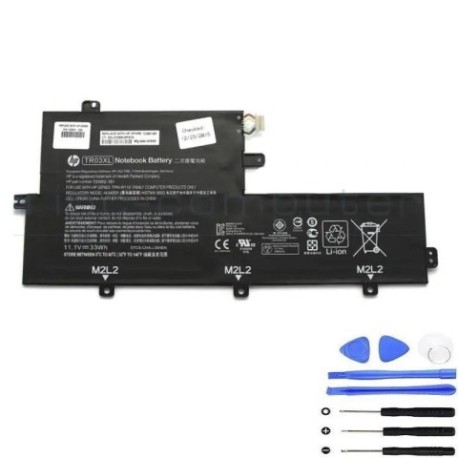
Battery models & part numbers
| Reference / P/N |
|---|
| 723922-1B1 |
| 723997-001 |
| 723997-006 |
| HP-TR03XL-33Wh |
| HSTNN-IB5G |
| TPN-W110 |
| TR03033XL-PL |
Compatible laptop models
| Model |
|---|
| HP Spectre 13 x2 Pros |
| HP Spectre 13-H200 x2 PCs |
| HP Split 13-f000 x2 PCs |
| HP Split 13-g100 x2 PCs |
| HP Split 13-g200 x2 PCs |
| HP Split 13t-f000 x2 PCs |
| HP Split 13t-g100 x2 PCs |
| HP Split X2 13s |
Introduction
The HP TR03XL 33Wh battery is a high-quality replacement power solution designed specifically for HP convertible laptops. This genuine-compatible battery offers reliable performance and extended usage time for your mobile computing needs.
Common signs you need a replacement
| Symptoms | Causes | Verification | Recommendation |
|---|---|---|---|
| Rapid power drain | Ageing battery cells | Check battery health in system settings | Consider replacement if under 2 hours |
| Laptop won’t hold charge | Battery degradation | Test with power adapter disconnected | Immediate replacement needed |
| Swelling or bulging | Internal damage or overheating | Visual inspection of battery compartment | Replace immediately for safety |
| Overheating during use | Faulty battery management | Monitor temperature with software | Replace to prevent damage |
| Random shutdowns | Voltage instability | Check event logs for power errors | Replace battery to restore stability |
How to check compatibility
Verify your laptop’s compatibility by checking the model number on the bottom casing or in system information. Cross-reference with our compatibility tables above. For HP laptops, you can also check the original battery’s part number – it should match one of the reference numbers listed.
When to replace
Replace your battery when it no longer holds a sufficient charge for your daily needs, typically after 2-3 years of regular use. Other indicators include the battery not charging to 100%, rapid discharge, or physical swelling. In Australia and New Zealand, it’s recommended to replace batteries before they completely fail to avoid unexpected downtime.
Installation guide (overview)
1. Power off your laptop and disconnect all cables
2. Remove the bottom panel using the appropriate screwdriver
3. Disconnect the battery connector from the motherboard
4. Remove any screws securing the battery
5. Carefully lift out the old battery
6. Insert the new HP TR03XL battery
7. Reconnect the battery connector and secure with screws
8. Replace the bottom panel and power on
Usage & care tips
• Avoid complete discharges – recharge when battery reaches 20-30%
• Store in cool, dry conditions between 15-25°C
• Calibrate your battery monthly by charging to 100% then discharging to 5%
• Use only authorised HP chargers for optimal performance
• Remove battery if storing laptop for extended periods
Safety & recycling in AU/NZ
In Australia and New Zealand, lithium-ion batteries must be disposed of properly at designated recycling centres. Never dispose of batteries in household waste. Look for battery recycling programs at electronics retailers or local council waste facilities. Damaged or swollen batteries should be handled with care and recycled immediately.
FAQ
How long does the HP TR03XL battery last?
Typically 2-4 hours depending on usage and laptop settings.
Is this battery genuine HP?
This is a high-quality compatible battery that meets or exceeds original specifications.
What’s the warranty period?
Most replacement batteries come with a 12-month warranty in Australia and New Zealand.
Can I install it myself?
Yes, with basic technical skills and the right tools, most users can install it following our guide.
How do I recycle my old battery?
Take it to any electronics retailer or council recycling centre that accepts batteries.
Will this battery work with my charger?
Yes, it’s compatible with standard HP chargers for these models.
What if my laptop model isn’t listed?
Check your original battery’s part number against our reference list for confirmation.