HP AM06XL 95.9Wh Battery Replacement Guide
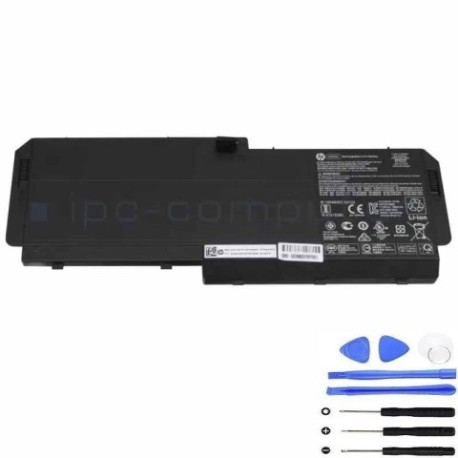
Battery models & part numbers
| Reference / P/N |
|---|
| HP AM06 |
| HP AM06095XL |
| HP AM06095XL-PL |
| HP HSN-Q12C |
| HP HSTNN-IB8G |
| HP L07044-850 |
| HP L07044-855 |
| HP L07350-1C1 |
| HP ZBook 17 G5s |
| HP ZBook 17 G6s |
| HP-AM06XL-95.9Wh |
Compatible laptop models
| Model |
|---|
| HP AM06 |
| HP AM06095XL |
| HP AM06095XL-PL |
| HP HSN-Q12C |
| HP HSTNN-IB8G |
| HP L07044-850 |
| HP L07044-855 |
| HP L07350-1C1 |
| HP ZBook 17 G5s |
| HP ZBook 17 G6s |
Introduction
Keep your HP laptop running at peak performance with our authorised HP AM06XL 95.9Wh replacement battery. This high-capacity battery is designed to meet original equipment specifications for optimal performance and safety.
Common signs you need a replacement
| Symptom | Cause | Verification | Recommendation |
|---|---|---|---|
| Battery drains quickly | Reduced capacity from age/cycles | Check battery health in system settings | Replace if capacity below 60% |
| Laptop won’t hold charge | Battery failure or deep discharge | Test with power adapter removed | Immediate replacement needed |
| Battery swelling | Internal damage or overheating | Visual inspection of battery case | Replace immediately for safety |
| Overheating during use | Battery degradation or faulty cells | Monitor temperature with software | Replace if consistently over 45°C |
How to check compatibility
Verify your laptop model matches one of the compatible models listed above. Check your current battery’s part number or look for model information in your system settings or on the original battery label.
When to replace
Replace your battery when it shows significant capacity loss (typically after 2-3 years), won’t hold a charge, shows physical damage, or causes performance issues. Regular replacement ensures optimal laptop performance and safety.
Installation guide (overview)
Power off and unplug your laptop. Remove the bottom panel, disconnect the old battery connector, and carefully remove any securing screws. Install the new battery, reconnect the connector, and replace the panel. Always refer to your laptop’s service manual for detailed instructions.
Usage & care tips
Avoid extreme temperatures (ideal range 15-25°C), don’t leave your laptop plugged in constantly, perform regular calibration cycles, and store in a cool, dry place when not in use for extended periods.
Safety & recycling in AU/NZ
Never attempt to open or modify the battery. Dispose of old batteries at authorised recycling centres – most electronics retailers offer free battery recycling services. In Australia, check with Battery World or Officeworks; in New Zealand, visit Noel Leeming or JB Hi-Fi for recycling options.
FAQ
How long does this battery last?
The HP AM06XL 95.9Wh typically provides 3-5 hours of normal usage, depending on your laptop model and usage patterns.
Is this battery genuine HP?
This is a high-quality replacement battery designed to meet original specifications and performance standards.
What’s the warranty period?
Most replacement batteries come with a 12-month warranty – check the product page for specific warranty details.
Can I install this myself?
Yes, with basic technical skills and proper tools. However, if unsure, we recommend professional installation.
How do I calibrate the new battery?
Fully charge the battery, then use until it reaches 5-10% capacity, then recharge fully. Repeat this cycle 2-3 times.
Is overnight charging safe?
Modern laptops have protection circuits, but for optimal battery health, avoid leaving your laptop plugged in constantly.
What if my laptop isn’t recognising the new battery?
Try resetting the battery by holding the power button for 30 seconds with the battery and adapter disconnected, then reconnect and power on.