HP RS06 62Wh Laptop Battery Replacement Guide
Find the perfect replacement battery for your HP Envy 14 series laptop with our comprehensive compatibility guide and installation tips for Australian and New Zealand users.
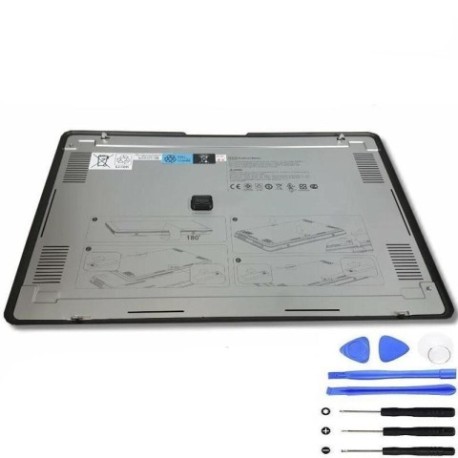
Battery models & part numbers
| Reference / P/N |
|---|
| HP 600999-171 |
| HP 602410-001 |
| HP WQ385AA |
| HP-RS06-62Wh |
Compatible laptop models
| Model |
|---|
| HP Envy 14-1000 |
| HP Envy 14-1100 |
| HP Envy 14-1200series |
| HP Envy 14t-1100 CTOs |
| HP Envy 14t-1200 CTOs |
Introduction
The HP RS06 62Wh battery is an authorised replacement power solution designed specifically for HP Envy 14 series laptops. This high-quality battery ensures optimal performance and reliability for your computing needs.
Common signs you need a replacement
| Symptom | Cause | Verification | Recommendation |
|---|---|---|---|
| Short battery life | Ageing cells | Check power settings | Replace battery |
| Laptop won’t hold charge | Battery degradation | Test with power adapter | Install new battery |
| Battery swelling | Internal damage | Visual inspection | Replace immediately |
| Overheating | Faulty cells | Temperature check | Professional assessment |
How to check compatibility
Verify your laptop model matches one of the compatible models listed above. Check your current battery’s part number or consult your laptop’s documentation. For custom configurations (CTOs), ensure your specific model matches the listed variants.
When to replace
Replace your battery when you notice significant reduction in runtime, the battery doesn’t hold charge, physical swelling occurs, or your laptop frequently shuts down unexpectedly. Most laptop batteries last 2-4 years with regular use.
Installation guide (overview)
Power off your laptop and disconnect all cables. Remove the bottom panel using the appropriate screwdriver. Carefully disconnect the old battery connector and remove any securing screws. Install the new HP RS06 62Wh battery, reconnect the connector, and reassemble your laptop.
Usage & care tips
Avoid extreme temperatures (ideal range 10°C to 35°C). Don’t leave your laptop plugged in constantly. Calibrate your battery monthly by fully charging then discharging. Store in a cool, dry place if not used for extended periods.
Safety & recycling in AU/NZ
Always use authorised replacement batteries. Never attempt to open or modify batteries. In Australia and New Zealand, recycle old batteries at designated collection centres. Many electronics retailers offer free battery recycling services.
FAQ
How long does the HP RS06 62Wh battery last?
Typically 3-5 hours depending on usage and laptop settings. High-performance tasks will reduce battery life.
Is this battery compatible with my HP Envy 14?
Yes, if your model matches one listed in the compatibility table above.
How do I properly dispose of my old battery?
Take it to an authorised battery recycling centre in your local area. Never dispose of in household waste.
Does this battery come with a warranty?
Most authorised retailers provide a 12-month warranty on replacement batteries.
Can I install this battery myself?
Yes, with basic technical skills and the right tools. Follow our installation overview or seek professional help if unsure.
How do I maximise battery lifespan?
Avoid complete discharges, keep your laptop cool, and don’t leave it plugged in constantly.
What if my laptop model isn’t listed?
Double-check your exact model number. If still not listed, this battery may not be compatible with your specific device.