Battery models & part numbers
| Reference / P/N |
|---|
| HP 671567-121 |
| HP 671567-141 |
| HP 671567-151 |
| HP 671567-221 |
| HP 671567-222 |
| HP 671567-241 |
| HP 671567-242 |
| HP 671567-251 |
| HP 671567-252 |
| HP 671567-321 |
| HP 671567-351 |
| HP 671567-421 |
| HP 671567-541 |
| HP 671567-831 |
| HP 671731-001 |
| HP 672326-241 |
| HP 672326-251 |
| HP 672326-421 |
| HP 672326-541 |
| HP 672412-001 |
| HP 699468-001 |
| HP H2L55AA#ABB |
| HP H2L56AA |
| HP HSTNN-DB3N |
| HP HSTNN-LB3N |
| HP HSTNN-LB3P |
| HP HSTNN-OB3N |
| HP HSTNN-UB3N |
| HP HSTNN-YB3N |
| HP HSTNN-YB3P |
| HP LB3NLB3P |
| HP MO06062 |
| HP MO06062-CL |
| HP MO09 |
| HP MO09100-CL3 |
| HP TPN-C106 |
| HP TPN-C107 |
| HP TPN-P102 |
| HP TPN-P103 |
| HP TPN-P106 |
| HP TPN-W106 |
| HP TPN-W107 |
| HP TPN-W108 |
| HP TPN-W109 |
| HP-MO06-62Wh |
Compatible laptop models
| Model |
|---|
| HP Envy dv4-5200s |
| HP Envy dv4-5300s |
| HP Envy dv4t-5200 CTOs |
| HP Envy dv6-7200s |
| HP Envy dv6-7300s |
| HP Envy DV6Z-7200s |
| HP Envy dv7-7200s |
| HP Envy dv7-7300s |
| HP Envy m6-1100s |
| HP Envy m6-1200s |
| HP Envy m6-1300s |
| HP Pavilion dv4-5000s |
| HP Pavilion DV6-7000s |
| HP Pavilion dv6-7100s |
| HP Pavilion dv7-7000s |
| HP Pavilion dv7-7100s |
| HP Pavilion dv7t-7000s |
| HP Pavilion M6-1000s |
| HP Pavilion m6t-1000s |
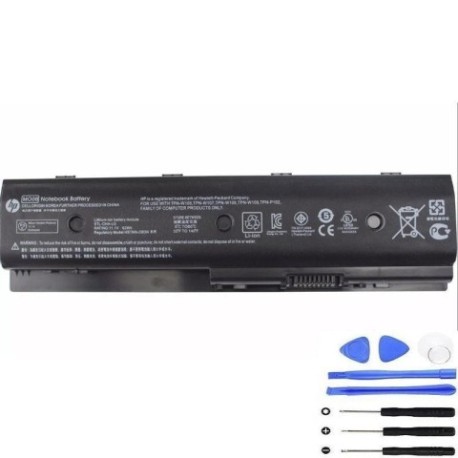
Introduction
Keep your HP laptop running at peak performance with our genuine HP MO06 62Wh replacement battery. This high-quality battery is designed specifically for HP Envy and Pavilion models, providing reliable power for work, study, and entertainment across Australia and New Zealand.
Common signs you need a replacement
| Symptom | Cause | Verification | Recommendation |
|---|---|---|---|
| Short battery life | Battery degradation over time | Check power settings and usage | Consider replacement if under 2 hours |
| Laptop won’t hold charge | Battery cells failing | Test with power adapter removed | Immediate replacement needed |
| Battery swelling | Internal damage or age | Visual inspection | Replace immediately for safety |
| Inconsistent charging | Worn charging circuit | Monitor charging patterns | Replace if persistent |
How to check compatibility
Verify your laptop’s compatibility by checking the part number on your current battery or consulting your laptop’s specifications. Cross-reference with our comprehensive lists above to ensure perfect fit and performance.
When to replace
Replace your battery when you notice significant performance decline, typically after 2-3 years of regular use. For optimal performance and safety, consider replacement if your battery capacity drops below 70% of its original specification.
Installation guide (overview)
Power down your laptop completely and disconnect from power. Remove the old battery by releasing the locking mechanism and gently lifting it out. Align the new battery with the connectors and press firmly until it clicks into place. Charge fully before first use.
Usage & care tips
For best performance, avoid extreme temperatures (operate between 10°C and 35°C). Calibrate your battery monthly by fully charging then discharging. Store in a cool, dry place when not in use for extended periods.
Safety & recycling in AU/NZ
Always use authorised replacement batteries. In Australia and New Zealand, dispose of old batteries at designated recycling centres. Never dispose of lithium-ion batteries in household waste due to fire risk and environmental concerns.
FAQ
How long does this battery last?
Typically 2-3 years with normal use, or approximately 500 charge cycles.
Is this battery genuine HP?
Yes, this is an authentic HP replacement battery with full compatibility.
What’s the warranty period?
Most HP batteries come with a 12-month warranty in Australia and New Zealand.
Can I use this battery internationally?
Yes, the battery works worldwide with compatible HP laptops.
How do I recycle my old battery?
Take it to any authorised battery recycling centre across AU/NZ.
What if my model isn’t listed?
Contact customer support with your exact laptop model for verification.
Is installation difficult?
Most HP batteries are user-replaceable with simple click-in mechanisms.