HP LE03XL 48Wh Laptop Battery Replacement
Find the perfect replacement battery for your HP laptop with our comprehensive compatibility guide. This HP LE03XL 48Wh battery is designed specifically for Australian and New Zealand consumers, offering reliable performance and safety compliance.
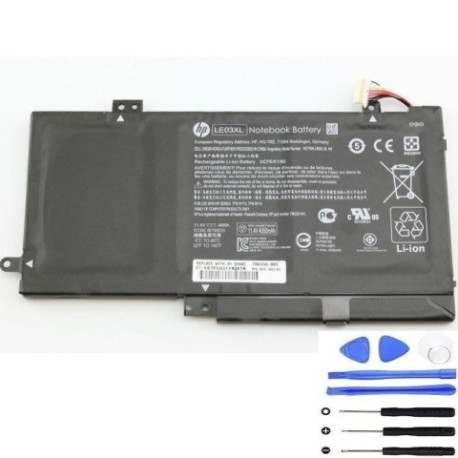
Battery models & part numbers
| Reference / P/N |
|---|
| HP 796220-541 |
| HP 796220-542 |
| HP 796220-831 |
| HP 796253-800 |
| HP 796356-005 |
| HP HSTNN-PB6M |
| HP HSTNN-UB6O |
| HP HSTNN-YB5Q |
| HP LE03 |
| HP LE03048XL |
| HP LE03048XL-PR |
| HP TPN-W113 |
| HP TPN-W114 |
| HP TPN-W116 |
| HP-LE03XL-48Wh |
Compatible laptop models
| Model |
|---|
| HP Envy x360 15-w000s |
| HP Envy x360 15-w100s |
| HP Envy x360 m6-w000s |
| HP Envy x360 m6-w100s |
| HP Pavilion X360 330 G1s |
| HP Pavilion x360 13-s000s |
| HP Pavilion x360 13-s100s |
| HP Pavilion x360 15-bk000s |
| HP Pavilion x360 15-bk100s |
| HP Pavilion x360 15t-bk000s |
Introduction
The HP LE03XL 48Wh battery is a high-quality replacement designed for various HP Envy and Pavilion x360 models. With Australian safety standards compliance and reliable performance, this battery ensures your laptop maintains optimal power throughout the day.
Common signs you need a replacement
| Symptom | Cause | Verification | Recommendation |
|---|---|---|---|
| Battery drains quickly | Ageing cells, reduced capacity | Check battery health in system settings | Replace if capacity below 60% |
| Laptop won’t hold charge | Failed battery cells | Test with power adapter removed | Immediate replacement needed |
| Battery swelling | Internal damage, safety hazard | Visual inspection, case separation | Stop use immediately, replace |
| Overheating during use | Inefficient power delivery | Monitor temperature, check vents | Replace to prevent damage |
How to check compatibility
Verify your laptop’s compatibility by checking the model number on the bottom casing or in system information. Compare against our comprehensive compatibility lists above. For additional verification, remove your current battery and match the part number with those listed.
When to replace
Replace your HP battery when you notice significant performance degradation, typically after 2-3 years of regular use. Key indicators include reduced runtime (less than 60 minutes), failure to charge completely, or physical swelling. Regular Australian climate conditions can accelerate battery wear.
Installation guide (overview)
1. Power off your laptop and disconnect all cables
2. Remove the bottom panel using appropriate screwdriver
3. Disconnect the battery connector from motherboard
4. Remove mounting screws and carefully lift out old battery
5. Insert new HP LE03XL battery and reconnect
6. Replace bottom panel and power on to test
Usage & care tips
• Avoid complete discharges – recharge when battery reaches 20%
• Store in cool, dry conditions (15-25°C ideal)
• Use authorised HP chargers only
• Calibrate battery monthly by full charge/discharge cycle
• Avoid extreme temperatures and direct sunlight
Safety & recycling in AU/NZ
This battery meets Australian/New Zealand safety standards. Never attempt to open or modify the battery. At end of life, recycle responsibly through authorised e-waste centres. Many Australian councils offer free battery recycling services. Never dispose of in household waste.
FAQ
How long does shipping take to Australia/New Zealand?
Standard delivery typically takes 5-10 business days within Australia and 7-14 days to New Zealand, depending on your location.
Is this battery genuine HP?
This is a high-quality replacement battery designed to meet or exceed original specifications, offering comparable performance at a competitive price.
What warranty is provided?
This battery comes with a 12-month warranty covering manufacturing defects and performance issues.
Can I use this battery with older HP models?
Only use with compatible models listed above. Using with incompatible devices may cause damage and void warranty.
How do I maximise battery lifespan?
Keep battery between 20-80% charge, avoid extreme temperatures, and use power-saving modes when possible.
Is professional installation required?
While DIY installation is straightforward, those uncomfortable with electronics should seek professional assistance.
What if my laptop model isn’t listed?
Check your current battery’s part number against our compatibility list. If uncertain, contact customer support for verification.