HP ML03XL 42Wh Battery Replacement Guide
Find the perfect replacement battery for your HP Spectre laptop with our comprehensive compatibility guide designed for Australian and New Zealand users.
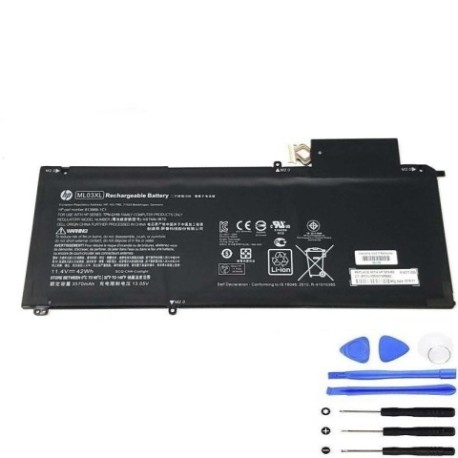
Battery models & part numbers
| Reference / P/N |
|---|
| HP 813999-1C1 |
| HP 814060-850 |
| HP 814277-005 |
| HP HSTNN-IB7D |
| HP ML03042 |
| HP ML03042XL-PL |
| HP TPN-Q165 |
| HP-ML03XL-42Wh |
Compatible laptop models
| Model |
|---|
| HP Spectre 12-a000 x2 Detachable PCs |
| HP Spectre 12-ab000 x2 Detachable PCs |
| HP Spectre X2 12-As |
| HP Spectre x2 12-a000s |
| HP Spectre x2 12-A001DXs |
| HP Spectre x2 Detachable 12s |
| HP Spectre x2 Detachable Convertibles |
| HP Spectre x2 Detachable PCs |
Introduction
The HP ML03XL 42Wh battery is designed specifically for HP Spectre x2 detachable laptops, providing reliable power for work and study across Australia and New Zealand.
Common signs you need a replacement
| Symptoms | Causes | Verification | Recommendation |
|---|---|---|---|
| Battery drains quickly | Ageing cells, reduced capacity | Check battery health in Windows | Replace if capacity below 60% |
| Laptop won’t hold charge | Failed battery circuit | Test with power adapter removed | Immediate replacement needed |
| Battery swelling | Internal damage, overheating | Visual inspection | Replace immediately for safety |
| Overheating during use | Inefficient power delivery | Monitor temperature with software | Replace if consistently over 45°C |
How to check compatibility
Verify your laptop model matches our compatibility list above. Check your current battery part number located on the battery itself or in Windows battery settings.
When to replace
Replace your battery when it no longer holds sufficient charge for your daily needs, shows physical damage, or reaches 2-3 years of regular use in AU/NZ conditions.
Installation guide (overview)
Power off your laptop, remove the back cover using appropriate tools, disconnect the old battery, install the new HP ML03XL 42Wh battery, and reassemble. Always use authorised service centres if unsure.
Usage & care tips
Avoid extreme temperatures, don’t leave laptop charging continuously, maintain 20-80% charge for optimal lifespan, and store in cool, dry conditions typical of Australian and New Zealand climates.
Safety & recycling in AU/NZ
Dispose of old batteries at authorised recycling centres. Never dispose in household waste. In Australia, use Batteryback or similar programmes. In New Zealand, utilise e-waste collection services.
FAQ
How long does the HP ML03XL 42Wh battery last?
Typically 2-4 hours depending on usage, with up to 500 charge cycles before significant capacity loss.
Is this battery compatible with my HP Spectre x2?
Yes, if your model appears in our compatibility list above.
Do you ship to Australia and New Zealand?
Yes, we deliver to both countries with standard and express shipping options available.
What warranty do you offer?
Our batteries come with a 12-month warranty covering manufacturing defects.
How do I check my current battery health?
In Windows, open Command Prompt and type “powercfg /batteryreport” to generate a detailed battery health report.
Can I install this battery myself?
Yes, with basic technical skills and proper tools. Otherwise, visit an authorised service centre.
What’s the difference between HP-ML03XL-42Wh and HP ML03042?
They are identical batteries with different part numbering systems – both work with the same laptop models.