HP LA04 41Wh Silver Battery Replacement Guide
Find the perfect replacement battery for your HP laptop with our comprehensive compatibility guide and expert advice for Australian and New Zealand users.
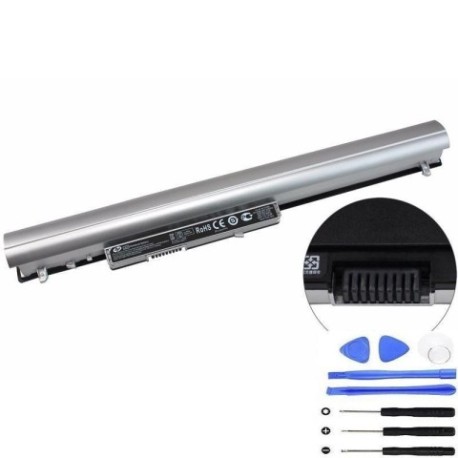
Battery models & part numbers
| Reference / P/N |
|---|
| HP 728248-141 |
| HP 728248-221 |
| HP 728248-541 |
| HP 728248-851 |
| HP 728421-800 |
| HP 728460-001 |
| HP 751906-121 |
| HP 751906-141 |
| HP 751906-541 |
| HP 752237-001 |
| HP 776622-001 |
| HP 776906-001 |
| HP F3B96AA |
| HP HSTNN-DB5M |
| HP HSTNN-I18C |
| HP HSTNN-IB5M |
| HP HSTNN-UB5M |
| HP HSTNN-UB5N |
| HP HSTNN-Y5BV |
| HP HSTNN-YB5M |
| HP HSTNN-YB5N |
| HP J1V00AA |
| HP LA03 |
| HP LA03031DF |
| HP LA04041 |
| HP LA04041-CL |
| HP LA04041DF |
| HP LA04041DF-CL |
| HP LA04DF |
| HP TPN-Q129 |
| HP TPN-Q130 |
| HP TPN-Q131 |
| HP TPN-Q132 |
| HP-LA04-41Wh-Silver |
Compatible laptop models
| Model |
|---|
| HP 15-f000s |
| HP 248 G1s |
| HP 340 G1s |
| HP 340 G2s |
| HP 345 G2s |
| HP 350 G1s |
| HP 350 G2s |
| HP 355 G2s |
| HP g14-a0xxs |
| HP Pavilion 14-n000s |
| HP Pavilion 14-n200s |
| HP Pavilion 14z-n100s |
| HP Pavilion 14z-n200s |
| HP Pavilion 15-n000s |
| HP Pavilion 15-n200s |
| HP Pavilion 15-n300s |
| HP Pavilion 15T-n100s |
| HP Pavilion 15T-n200s |
| HP Pavilion 15Z-n100s |
| HP Pavilion TouchSmart 15-n000s |
| HP Pavilion TouchSmart 15-n200s |
| HP ProBook 350 G2s |
Introduction
The HP LA04 41Wh Silver battery is a high-quality replacement power solution designed specifically for various HP laptop models popular in Australia and New Zealand. This 41Wh capacity battery provides reliable performance and extended usage time for your computing needs.
Common signs you need a replacement
| Symptom | Cause | Verification | Recommendation |
|---|---|---|---|
| Battery drains quickly | Ageing cells, reduced capacity | Check battery health in system settings | Replace if capacity below 60% |
| Laptop won’t hold charge | Failed battery cells | Test with power adapter removed | Immediate replacement needed |
| Battery swelling | Internal gas buildup | Visual inspection, case separation | Replace immediately for safety |
| Overheating during use | Internal resistance increase | Monitor temperature, feel case heat | Replace to prevent damage |
| Charging indicator issues | Battery management system failure | Check LED behaviour, system reports | Replace battery unit |
How to check compatibility
To ensure the HP LA04 battery is compatible with your laptop, check the part number on your current battery (usually found on a label on the battery itself) or verify your laptop model against our compatibility list above. You can also check your laptop’s documentation or HP’s official support website for battery specifications.
When to replace
Replace your HP battery when you notice significant reduction in battery life (less than 2 hours of normal use), the battery won’t hold a charge, physical swelling occurs, or your laptop indicates battery health is poor. Most laptop batteries need replacement every 2-3 years with regular use.
Installation guide (overview)
1. Power off your laptop and disconnect the AC adapter
2. Remove the current battery by sliding the release latches
3. Align the new HP LA04 battery with the connector
4. Slide the battery into place until it clicks securely
5. Connect the AC adapter and charge fully before first use
Always refer to your laptop’s user manual for specific instructions
Usage & care tips
• Avoid extreme temperatures (ideal range 10°C to 35°C)
• Calibrate your battery monthly by fully charging then discharging
• Store in cool, dry conditions if not using for extended periods
• Use only authorised HP chargers and accessories
• Avoid leaving laptop plugged in constantly at 100% charge
Safety & recycling in AU/NZ
In Australia and New Zealand, laptop batteries must be disposed of responsibly. Do not place in household rubbish. Take used batteries to authorised collection points at electronics retailers, council waste centres, or battery recycling programmes. Many retailers offer free battery recycling services.