ASUS B31N1507 48Wh Laptop Battery Replacement Guide
Is your ASUS laptop struggling to hold a charge? Our comprehensive guide covers everything Australian and New Zealand consumers need to know about replacing their laptop battery with the genuine ASUS B31N1507 48Wh model.
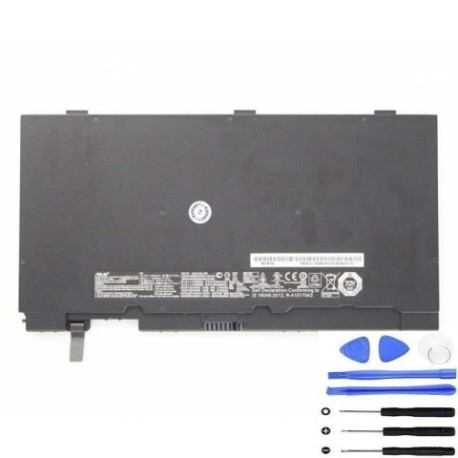
Battery models & part numbers
| Reference / P/N |
|---|
| Asus 0B200-01730000 |
| Asus B31Bn95 |
| Asus B31N1507 |
| Asus P5430 |
| Asus Pro Advanced B8430UA |
| Asus Pro Advanced BU403UA |
| Asus Pro Essential PU403UA |
| Asus Pro Essential PU403UF |
Compatible models
| Model |
|---|
| Asus 0B200-01730000 |
| Asus B31Bn95 |
| Asus B31N1507 |
| Asus P5430 |
| Asus Pro Advanced B8430UA |
| Asus Pro Advanced BU403UA |
| Asus Pro Essential PU403UA |
| Asus Pro Essential PU403UF |
Introduction
Laptop batteries are consumable components that naturally degrade over time. The ASUS B31N1507 48Wh battery is designed specifically for several ASUS business and professional laptop models commonly used across Australia and New Zealand. Understanding when and how to replace your battery can save you from unexpected downtime and maintain your laptop’s performance.
Common signs you need a replacement
| Symptom | Cause | Verification | Recommendation |
|---|---|---|---|
| Battery drains quickly | Reduced capacity from age/cycles | Check battery health in Windows | Consider replacement if below 60% |
| Laptop shuts down unexpectedly | Battery can’t maintain voltage | Monitor shutdown at specific % | Replace immediately for data safety |
| Battery won’t charge fully | Charging circuit or cell failure | Check charging indicator lights | Test with different charger first |
| Battery swelling/bulging | Gas buildup from chemical breakdown | Visual inspection of battery compartment | Replace immediately – safety hazard |
| Overheating during use | Increased internal resistance | Monitor temperature with software | Replace to prevent damage to laptop |
How to check compatibility
Finding your laptop’s exact model information is crucial for battery compatibility. For ASUS laptops, check the bottom label for the model number, which typically starts with letters like “B”, “P”, or “PU”. You can also find this information in Windows by pressing Windows Key + R, typing “msinfo32”, and looking under “System Model”. ASUS provides official support tools on their Australian and New Zealand websites where you can enter your serial number to verify compatible parts. Always cross-reference the part numbers listed above with your current battery’s markings.
When to replace
Most laptop batteries last 2-4 years with regular use. Consider replacement when your battery health drops below 70% of original capacity, you experience frequent unexpected shutdowns, or the physical battery shows signs of swelling. For business users in AU/NZ, it’s wise to replace proactively before critical meetings or travel periods to avoid disruptions.
Installation guide
Replacing the battery in compatible ASUS models is generally straightforward. First, ensure your laptop is powered off and disconnected from all power sources. For most models in the B31N1507 compatibility list, you’ll need to remove the bottom panel using a Phillips screwdriver. Locate the battery connector – it’s typically a multi-pin connector secured with a small latch. Gently disconnect the old battery, remove any mounting screws, and install the new B31N1507 battery in reverse order. Some Pro series models may have internal batteries requiring more careful disassembly – if unsure, consult ASUS’s official service manuals available through their authorised service centres.
Usage & care tips
To maximise your new battery’s lifespan, avoid frequent full discharges – try to keep charge between 20-80% for daily use. Store your laptop in temperatures between 10°C and 35°C, as extreme heat accelerates battery degradation. If storing long-term, charge to around 50% and power down completely. For ASUS business laptops, use the built-in Battery Health Charging feature in MyASUS software to optimise charging patterns based on your usage habits.
Safety & recycling in AU/NZ
Lithium-ion batteries require proper handling. Never puncture, crush, or expose batteries to fire or water. In Australia and New Zealand, laptop batteries must be recycled through authorised e-waste programmes – never dispose of in household rubbish. Major retailers like Officeworks and JB Hi-Fi offer free battery recycling services. Some councils provide dedicated e-waste collection days. Proper recycling helps recover valuable materials and prevents environmental contamination.
FAQ
How long does the B31N1507 battery typically last?
With normal use, expect 2-4 years or 300-500 full charge cycles before capacity noticeably declines.
Will this battery work with my ASUS laptop bought in New Zealand?
Yes, ASUS uses the same battery models globally, so compatibility is determined by model number, not purchase location.
How do I calibrate my new battery?
Charge to 100%, use until it shuts down (about 5%), then charge uninterrupted to 100% again. Repeat monthly for accurate battery reporting.
Can I use my laptop while charging the new battery?
Yes, modern laptops are designed for simultaneous use and charging without damaging the battery.
What’s the warranty on replacement batteries?
Quality replacements typically carry 12-24 month warranties – check specific supplier terms for AU/NZ consumers.
Is professional installation required?
Most users can self-install, but if uncomfortable, ASUS authorised service centres throughout Australia and New Zealand can assist.
How do I dispose of my old battery safely?
Take to any battery recycling point – most electronics retailers and council waste centres accept them free of charge.