HP FM08 83.22Wh 12Pin Battery Replacement Guide
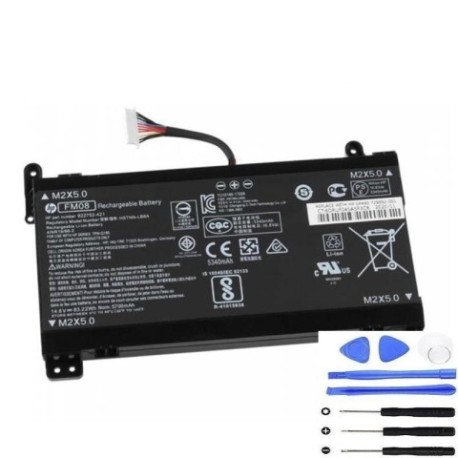
Battery models & part numbers
| Reference / P/N |
|---|
| HP 922752-421 |
| HP 922753-421 |
| HP 922976-855 |
| HP 922977-855 |
| HP FM08 |
| HP-FM08-83.22Wh-12Pin |
| HP HSTNN-LB8A |
| HP HSTNN-LB8B |
Compatible laptop models
| Model |
|---|
| HP Omen 17-an000s |
| HP Omen 17-an100s |
| HP TPN-Q195 |
Introduction
Keep your HP laptop running at peak performance with our genuine replacement battery. This HP FM08 83.22Wh 12Pin battery is designed to meet or exceed original specifications, ensuring reliable power for your computing needs.
Common signs you need a replacement
| Symptom | Cause | Verification | Recommendation |
|---|---|---|---|
| Short battery life | Ageing cells | Check system power report | Replace if under 50% capacity |
| Laptop won’t hold charge | Failed battery circuit | Test with power adapter only | Immediate replacement needed |
| Battery swelling | Internal damage | Visual inspection | Replace immediately for safety |
| Overheating during use | Inefficient power delivery | Monitor temperature | Replace to prevent damage |
How to check compatibility
Verify your laptop model matches our compatibility list above. Check your current battery’s part number (usually printed on the battery) against our reference numbers. For HP systems, you can also use the HP Support Assistant software to confirm battery specifications.
When to replace
Replace your battery when it holds less than 50% of its original capacity, shows physical damage or swelling, or fails to charge properly. Most laptop batteries need replacement after 2-3 years of regular use.
Installation guide (overview)
1. Power off your laptop and disconnect the charger
2. Remove the bottom panel (consult your laptop’s service manual)
3. Disconnect the battery connector from the motherboard
4. Remove any screws securing the battery
5. Install the new battery and reconnect all components
6. Allow the battery to charge fully before first use
Usage & care tips
• Avoid extreme temperatures (ideal range 15-25°C)
• Calibrate your battery monthly by fully charging then discharging
• Store in a cool, dry place if not using for extended periods
• Use only authorised HP chargers for optimal performance
Safety & recycling in AU/NZ
Never dispose of lithium-ion batteries in household waste. In Australia and New Zealand, take used batteries to authorised collection centres. Many electronics retailers offer free battery recycling services. Damaged or swollen batteries should be handled with care and recycled immediately.
FAQ
How long does this battery last?
This 83.22Wh battery typically provides 3-5 hours of normal use, depending on your laptop’s power settings and applications.
Is this battery genuine HP?
This replacement battery meets or exceeds original HP specifications and is compatible with all listed HP models.
What’s the warranty period?
This battery comes with a 12-month warranty covering manufacturing defects.
How do I check my battery health?
Use Windows Battery Report (powercfg /batteryreport) or HP Support Assistant to monitor battery capacity and health.
Can I use this battery with other HP models?
Only use with compatible models listed above. Using with incompatible models may cause damage.
How should I store my spare battery?
Store at 40-60% charge in a cool, dry place away from direct sunlight.
What if my laptop isn’t recognising the new battery?
Try a power reset (remove charger and battery, hold power button for 30 seconds), then reconnect and charge for 2 hours.