ASUS C21N1629 38Wh Laptop Battery Replacement Guide
If your ASUS VivoBook is struggling to hold a charge or won’t power on without being plugged in, you’ve come to the right place. This comprehensive guide covers everything Australian and New Zealand users need to know about replacing their laptop battery with the genuine ASUS C21N1629 38Wh model.
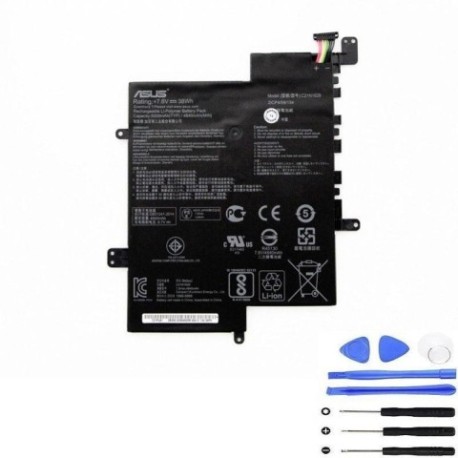
Battery models & part numbers
| Reference / P/N |
|---|
| 0B200-02500000 |
| 0B200-02500100 |
| Asus-C21N1629-38Wh |
Compatible models
| Model |
|---|
| Asus E203MA |
| Asus E203MAH |
| Asus E203NA |
| Asus R203MA |
| Asus R203MA-FD025TS |
| Asus VivoBook E12 E203NA |
| Asus VivoBook E12 X207NA |
| Asus VivoBook E203MA |
| Asus VivoBook E203MAH |
| Asus VivoBook R207NA |
Introduction
Laptop batteries don’t last forever – they typically need replacement every 2-4 years depending on usage patterns. The ASUS C21N1629 38Wh battery is specifically designed for various VivoBook models, providing reliable power for your mobile computing needs across Australia and New Zealand.
Common signs you need a replacement
| Symptom | Cause | Verification | Recommendation |
|---|---|---|---|
| Battery drains quickly (less than 1 hour) | Reduced battery capacity from age/cycles | Check battery health in Windows Power Settings | Consider replacement if capacity below 60% |
| Laptop won’t power on without charger | Battery no longer holds charge | Remove charger – if laptop turns off immediately | Urgent replacement needed |
| Battery percentage jumps (e.g., 40% to 10%) | Faulty battery cells or calibration issues | Run battery calibration in ASUS Battery Health Charging | Replace if calibration fails multiple times |
| Battery swelling or bulging | Internal chemical breakdown – safety hazard | Visual inspection – place laptop on flat surface | Immediate replacement – do not use |
| Overheating during charging | Inefficient charging circuit or damaged cells | Monitor temperature with HWMonitor software | Replace if consistently over 45°C |
How to check compatibility
Finding your exact ASUS model number is crucial for battery compatibility. For VivoBook users in Australia and New Zealand, here’s how to locate your specific model information:
Physical Identification: Turn your laptop over and look for the model sticker on the bottom case. You should see text like “ASUS VivoBook E203MA” or similar. Some models may have the information under the battery compartment if removable.
Software Identification: Press Windows Key + R, type “msinfo32” and press Enter. Look for “System Model” in the System Information window. Alternatively, open Command Prompt and type “wmic csproduct get name” for quick model identification.
ASUS Official Tools: Visit the ASUS support website and use their automatic detection tool, or manually enter your serial number (found on the bottom sticker) to verify exact compatibility.
Cross-Reference: Compare your found model number against our comprehensive compatibility table above. The C21N1629 battery works with multiple VivoBook E12 and R series models, but exact matching is essential for proper fit and performance.
When to replace
Timing your battery replacement correctly can save you from unexpected downtime. Consider replacement when:
- Your battery health shows less than 60% of original capacity
- You experience sudden shutdowns even with 20-30% charge remaining
- The battery has completed over 500 charge cycles (typical lifespan)
- Your laptop is 2-3 years old with regular mobile use
- You notice physical swelling or deformation
- Planning extended travel where reliable battery life is essential
For Australian and New Zealand users, it’s wise to replace before the battery completely fails, especially if you rely on your laptop for work or study.
Installation guide
Replacing your ASUS VivoBook battery is generally straightforward. Here’s a step-by-step guide for Australian and New Zealand users:
Safety First: Power off your laptop completely and unplug the AC adapter. Work on a clean, static-free surface. If possible, use an anti-static wrist strap.
For Removable Batteries: Turn the laptop over and locate the battery release latches. Slide them to the unlock position and gently lift the battery out. Insert the new C21N1629 battery, ensuring proper alignment with the connectors, then slide the latches back to locked position.
For Internal Batteries: Most modern VivoBooks have internal batteries. You’ll need to remove the bottom case screws (typically Phillips #00 screwdriver). Carefully pry open the bottom case starting from the edges. Locate the battery connector on the motherboard and gently disconnect it. Remove any screws securing the battery, then lift it out. Reverse the process with your new battery.
Initial Setup: After installation, plug in your charger and allow the battery to charge fully before first use. It’s recommended to perform a complete charge-discharge cycle to calibrate the new battery.
Professional Assistance: If you’re uncomfortable with internal disassembly, consider visiting an authorised ASUS service centre in Australia or New Zealand for professional installation.
Usage & care tips
Maximise your new ASUS battery’s lifespan with these practical tips for AU/NZ conditions:
- Avoid Extreme Temperatures: Don’t leave your laptop in hot cars (common in Australian summers) or direct sunlight. Ideal operating temperature is 10°C to 35°C.
- Charge Smart: Use ASUS Battery Health Charging software to limit maximum charge to 60-80% for extended storage periods.
- Regular Use: Lithium-ion batteries perform best with regular use. Avoid leaving your laptop plugged in constantly at 100% charge.
- Storage Guidelines: If storing for extended periods, charge to 50-60% and store in a cool, dry place away from direct sunlight.
- Power Management: Adjust your power settings in Windows to optimise battery life based on your usage patterns.
- Clean Connections: Periodically check and clean battery contacts with isopropyl alcohol if accessible.
Safety & recycling in AU/NZ
Battery safety and proper disposal are particularly important in Australia and New Zealand:
Safety Precautions: Never attempt to open or puncture a lithium-ion battery. If you notice swelling, overheating, or unusual odours, discontinue use immediately and contact professionals. Keep batteries away from children and pets.
Australian Recycling: In Australia, used laptop batteries can be recycled through Batteryback program drop-off points at major retailers like Officeworks, Bunnings, and ALDI. Many council waste facilities also accept e-waste including batteries.
New Zealand Recycling: In NZ, check with your local council for e-waste collection days or use dedicated recycling centres. Some retailers like Noel Leeming and Harvey Norman offer take-back programs.
Transport Regulations: When shipping batteries within Australia or New Zealand, ensure they’re properly packaged and declared according to transport safety regulations.
Legal Compliance: Both countries have strict regulations against disposing of batteries in household rubbish due to environmental concerns and fire risks.
FAQ
How long does the ASUS C21N1629 38Wh battery typically last?
With normal usage, expect 2-4 years or 500-800 charge cycles. Heavy users might see reduced lifespan, while light users may get longer service.
Will this battery work with my ASUS VivoBook purchased in Australia?
Yes, the C21N1629 is compatible with ASUS laptops sold in both Australian and New Zealand markets, provided your specific model matches our compatibility list.
How do I know if my battery is genuine ASUS?
Genuine ASUS batteries have proper branding, correct model numbering, and come with authentication seals. Purchase from authorised retailers to ensure authenticity.
Can I replace the battery myself or should I go to a service centre?
Many VivoBook models allow user-replaceable batteries. However, if your model requires internal disassembly and you’re not comfortable, visiting an authorised service centre is recommended.
What’s the warranty on replacement batteries?
Genuine ASUS batteries typically come with 12-month warranty in Australia and New Zealand. Always check the specific warranty terms with your retailer.
How long does shipping take within Australia/New Zealand?
Most retailers offer 2-5 business day shipping within Australia and 3-7 days within New Zealand, depending on your location and chosen shipping method.
This could indicate a failing battery, but first try resetting your EC (Embedded Controller) by shutting down, unplugging everything, then holding the power button for 40 seconds. If the issue persists, your battery likely needs replacement.
Remember that timely battery replacement not only restores your laptop’s mobility but also prevents potential damage to other components. For Australian and New Zealand users dealing with our unique climate conditions and power standards, choosing the correct genuine replacement ensures optimal performance and safety.