HP DN02 37Wh Battery Replacement Guide
Find the right replacement battery for your HP device with our comprehensive compatibility guide and installation instructions.
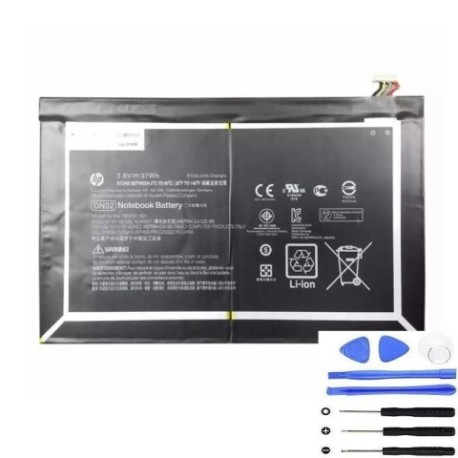
Battery models & part numbers
| Reference / P/N |
|---|
| HP 780731-2C1 |
| HP 782644-005 |
| HP 799168-001 |
| HP DN02037-PL |
| HP HSTNH-C412D |
| HP-DN02-37Wh |
Compatible laptop models
| Model |
|---|
| HP Pro Slate 12 QC8074 2015 |
Introduction
The HP DN02 37Wh battery is a high-quality replacement power source designed for specific HP devices. This guide helps Australian and New Zealand consumers identify compatibility and replace their laptop batteries safely.
Common signs you need a replacement
| Symptoms | Causes | Verification | Recommendation |
|---|---|---|---|
| Short battery life | Ageing cells | Check power settings | Consider replacement |
| Device won’t charge | Battery failure | Test with different charger | Replace battery |
| Swollen battery | Internal damage | Visual inspection | Replace immediately |
| Random shutdowns | Power delivery issues | Monitor battery percentage | Battery replacement needed |
How to check compatibility
Verify your device model matches the compatible models listed above. Check your current battery’s part number against our reference table. Always cross-reference with your device’s specifications.
When to replace
Replace your battery when it holds less than 50% of its original capacity, shows physical damage, or causes performance issues. Most batteries need replacement after 2-3 years of regular use.
Installation guide (overview)
1. Power off your device and disconnect all cables
2. Remove the battery compartment cover
3. Carefully disconnect the old battery
4. Insert the new HP DN02 37Wh battery
5. Secure the battery and replace the cover
6. Charge fully before first use
Usage & care tips
• Avoid extreme temperatures (ideal range: 15-25°C)
• Don’t leave device plugged in constantly
• Perform regular calibration cycles
• Store in cool, dry conditions when not in use
• Use authorised HP chargers only
Safety & recycling in AU/NZ
Never dispose of batteries in household waste. Use approved battery recycling centres available at most electronics retailers. In Australia, check with your local council for battery disposal options. In New Zealand, use dedicated battery recycling services.
FAQ
How long does this battery last?
Typically 2-3 years with normal use, or 500-800 charge cycles.
Is this battery genuine HP?
This is a high-quality replacement battery compatible with HP devices.
What’s the warranty period?
Check the product page for current warranty details.
Can I install this myself?
Yes, most users can follow our installation guide for successful replacement.
How do I recycle my old battery?
Use authorised battery recycling centres in your area.
What if my device isn’t listed?
Double-check your model number and consult HP’s official compatibility guide.
Does this work with Australian/NZ power standards?
Yes, the battery is compatible with AU/NZ voltage requirements.