Asus B21N1329 30Wh Laptop Battery Replacement Guide
If your Asus laptop is struggling to hold a charge or won’t power on without being plugged in, you’ve come to the right place. This comprehensive guide covers everything Australian and New Zealand consumers need to know about replacing their Asus B21N1329 30Wh battery, including compatible models, installation steps, and local safety considerations.
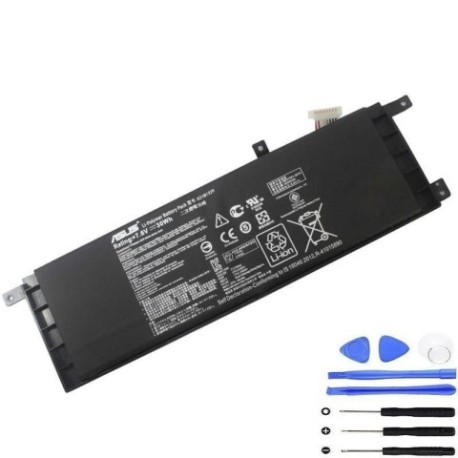
Battery models & part numbers
| Reference / P/N |
|---|
| Asus-B21N1329-30Wh |
Compatible models
| Model |
|---|
| Asus 0B200-00840000 |
| Asus 0B200-00840100 |
| Asus 0B200-00840200 |
| Asus 0B200-00840400 |
| Asus 0B200-00840500 |
| Asus 0B200-00840600 |
| Asus 0B200-00840700 |
| Asus B21Bn4Q |
| Asus B21Bn9H |
| Asus D553MA |
| Asus ET2040 |
| Asus ET2040INK |
| Asus ET2040IUK 1B |
| Asus F453MA |
| Asus F453SA |
| Asus F553M |
| Asus F553MA |
| Asus F553SA |
| Asus R413MA |
| Asus R515MA |
| Asus R515MA-Bing |
| Asus X453MA |
| Asus X453SA |
| Asus X553MA |
| Asus X553SA |
Introduction
Laptop batteries are consumable components with a finite lifespan, typically lasting 2-4 years with regular use. The Asus B21N1329 30Wh battery powers a wide range of Asus laptops commonly used by Australian and New Zealand consumers for work, study, and entertainment. Understanding when and how to replace your battery can save you from unexpected downtime and extend your laptop’s useful life.
Common signs you need a replacement
| Symptom | Cause | Verification | Recommendation |
|---|---|---|---|
| Rapid battery drain | Reduced capacity from chemical degradation | Check Windows Battery Report or macOS System Information | Replace if capacity below 60% of original |
| Laptop won’t power on without AC adapter | Battery no longer holds any charge | Unplug power cord – if immediate shutdown occurs | Immediate replacement needed |
| Battery swelling or bulging | Gas buildup from internal chemical reactions | Visual inspection – case may not close properly | Replace immediately – safety hazard |
| Overheating during charging | Internal resistance increase | Touch test – unusually hot to touch | Replace to prevent damage to laptop |
| Inconsistent charging percentage | Failing battery management system | Observe percentage jumps during use | Replace for reliable performance |
How to check compatibility
Before purchasing any replacement battery, verifying compatibility is crucial. For Asus laptops, you can find your model number in several locations:
Physical inspection: Turn your laptop over and look for the model number sticker on the bottom case. For Asus models compatible with the B21N1329 battery, you should see one of the listed model numbers like “Asus X553MA” or “Asus F553SA”. The sticker typically includes both the marketing name and technical model number.
System information: On Windows, press Windows Key + R, type “msinfo32” and look for “System Model”. On macOS compatible Asus models (though rare), check About This Mac > System Report > Hardware.
Asus official resources: Visit the Asus support website and enter your serial number or model number. The official compatibility checker will confirm if the B21N1329 is the correct replacement. You can also check your original battery – remove it carefully and note the part number printed on the label.
Third-party verification: Reputable battery suppliers in Australia and New Zealand often have compatibility checkers on their websites. Cross-reference your findings with multiple sources for confidence.
When to replace
Timing your battery replacement correctly balances cost with performance needs. Consider replacement when:
Performance impact: If your battery life has dropped to less than 2 hours and this affects your mobile usage patterns, replacement becomes practical. Many Asus models in the compatible list are productivity machines where reliable battery performance matters.
Age consideration: Most lithium-ion batteries like the B21N1329 show significant degradation after 500-800 charge cycles, typically 2-3 years of daily use. If your laptop is older than 3 years and you plan to keep using it, investing in a new battery makes economic sense.
Seasonal planning: For Australian and New Zealand consumers, consider replacing before summer when you’re likely to use your laptop outdoors or during holiday travel. A fresh battery ensures you’re not tethered to power points during peak usage periods.
Preventative replacement: If you rely on your Asus laptop for critical work or study, replacing the battery proactively at the first signs of degradation prevents unexpected failures during important tasks.
Installation guide
Replacing the B21N1329 battery in compatible Asus models is generally straightforward. Most models in our compatibility list feature externally accessible batteries, making DIY replacement feasible for most users.
Tools needed: Phillips #00 screwdriver, plastic spudger or guitar pick, anti-static wrist strap (recommended), clean workspace.
Step-by-step process:
- Power down your laptop completely and unplug the AC adapter
- Turn the laptop over and locate the battery compartment
- Remove any screws securing the battery cover – typically 2-4 screws
- Gently lift the battery cover and set aside
- Locate the battery connector – it may have a small tab for easy removal
- Carefully disconnect the battery connector by pulling straight out (never pull by wires)
- Remove any screws securing the battery itself
- Lift the old battery out at an angle, being careful not to force it
- Place the new B21N1329 battery in position
- Reconnect the battery connector until it clicks into place
- Replace any battery securing screws
- Replace the battery cover and screws
- Power on and check battery status in your operating system
Model-specific notes: Some Asus models like the ET2040 series may have slightly different battery mounting mechanisms. Always refer to your specific model’s service manual if available. The R515MA and similar models typically have very straightforward battery access.
Calibration: After installation, charge your new battery to 100%, then use it until it reaches about 10% before recharging. This helps calibrate the battery monitoring system for accurate reporting.
Usage & care tips
Proper battery maintenance can significantly extend the life of your new B21N1329 battery. Follow these Australian and New Zealand focused tips:
Temperature management: Avoid exposing your laptop to extreme temperatures. In Australian summers, never leave your laptop in a hot car where temperatures can exceed 60°C. Similarly, during New Zealand winters, avoid leaving laptops in freezing conditions overnight.
Storage advice: If storing your laptop for more than a few weeks, charge the battery to around 50-60% and power down completely. Store in a cool, dry place away from direct sunlight.
Power settings: Configure your operating system’s power settings for balanced performance. Use power-saving modes when on battery to extend runtime. For the compatible Asus models, the Asus Battery Health Charging software (if available for your model) can help optimise long-term battery health.
Safety & recycling in AU/NZ
Battery safety and proper disposal are critical responsibilities for Australian and New Zealand consumers.
Safety precautions: Never attempt to open, puncture, or modify the battery. If you notice swelling, overheating, or strange odours, discontinue use immediately and place the battery in a fire-proof container. Only use the original Asus charger or a high-quality compatible replacement.
Recycling options: In Australia, most council waste transfer stations accept laptop batteries for recycling. Major retailers like Officeworks and JB Hi-Fi also have battery recycling bins. In New Zealand, look for recycling stations at places like Noel Leeming, PB Tech, or council facilities. Never dispose of lithium-ion batteries in household rubbish as they pose fire risks in landfills.
Transportation: When shipping old batteries for recycling, tape the terminals to prevent short circuits and package them securely. Many recycling programmes provide prepaid shipping labels.
FAQ
How long does the Asus B21N1329 30Wh battery typically last?
Under normal usage conditions, expect 2-4 years of service or 500-800 full charge cycles before capacity drops to around 60-70% of original.
Will this battery work with my Asus model if it’s not explicitly listed?
We strongly recommend against using this battery for models not on our compatibility list. Physical fit, connector type, and voltage requirements must match exactly to avoid damage to your laptop.
Is it safe to replace the battery myself?
Yes, for the models listed, battery replacement is designed to be user-serviceable. Follow our installation guide carefully, power down completely, and use appropriate tools. If unsure, seek professional assistance.
How can I verify my new battery is genuine?
Purchase from authorised retailers or reputable suppliers. Genuine Asus B21N1329 batteries will have proper branding, correct weight (approximately 220g), and should be supplied in official packaging with documentation.
Why is my new battery not charging to 100% immediately?
This is normal behaviour as the battery management system calibrates. After a few full charge-discharge cycles, the reporting should become accurate. The battery may also ship with a partial charge for safety during transportation.
Can I use my laptop while plugged in all the time?
Yes, but for optimal battery health, it’s recommended to use the battery occasionally. Many modern Asus models include battery health modes in their software that limit maximum charge to 60-80% when primarily used while plugged in.
Where can I get help if I encounter installation problems?
Contact the retailer where you purchased the battery for support. For technical assistance with your specific Asus model, visit the official Asus support website for your region (asus.com/au or asus.com/nz).
Replacing your Asus laptop battery with a genuine B21N1329 30Wh replacement can restore mobility and performance to your trusted device. With proper installation and care, your renewed laptop will continue to serve your computing needs reliably across Australia and New Zealand.