HP CC03XL 56Wh Replacement Battery
Find the perfect replacement battery for your HP laptop with our comprehensive compatibility guide for Australian and New Zealand users.
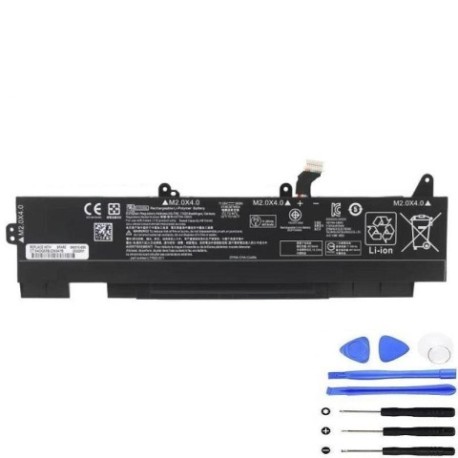
Battery models & part numbers
| Reference / P/N |
|---|
| 3ICP7/54/84 |
| HP-CC03XL-56Wh |
| HSTNN-UB8W |
| L77622-541 |
| L77991-005 |
Compatible laptop models
| Model |
|---|
| HP EliteBook 850 G7s |
| HP EliteBook 850 G8s |
| HP EliteBook 855 G7s |
| HP EliteBook 855 G8s |
| HP ZBook Firefly 14 G7s |
| HP ZBook Firefly 14 G8s |
| HP ZBook Firefly 15.6 inch G8 Mobile Workstation |
Introduction
The HP CC03XL 56Wh battery is a high-quality replacement solution for various HP business laptops. This genuine-compatible battery delivers reliable performance for Australian and New Zealand professionals who depend on their HP devices for daily work.
Common signs you need a replacement
| Symptom | Cause | Verification | Recommendation |
|---|---|---|---|
| Battery drains quickly | Ageing cells, reduced capacity | Check battery health in system settings | Replace if capacity below 60% |
| Laptop won’t hold charge | Failed battery circuitry | Test with power adapter only | Immediate replacement needed |
| Battery swelling | Internal damage, safety risk | Visual inspection, case bulging | Replace immediately, do not use |
| Overheating during use | Internal resistance increase | Monitor temperature, feel case heat | Replace to prevent damage |
How to check compatibility
Verify your laptop model matches our compatibility list above. Check your current battery’s part number (usually printed on the battery) or use HP’s official support website with your laptop serial number. For Australian and New Zealand customers, ensure you’re purchasing from authorised retailers for warranty protection.
When to replace
Replace your battery when it no longer holds sufficient charge for your needs, shows physical damage, or your system indicates battery health below 60%. Most HP batteries last 2-3 years with regular use in typical AU/NZ office environments.
Installation guide (overview)
1. Power off laptop and disconnect charger
2. Remove bottom panel screws
3. Carefully disconnect old battery connector
4. Remove mounting screws
5. Install new battery and reconnect
6. Replace panel and power on
Always refer to official HP documentation or seek professional installation services in Australia or New Zealand.
Usage & care tips
• Avoid complete discharges – recharge at 20-30%
• Store in cool, dry conditions (15-25°C)
• Use original HP chargers for optimal performance
• Calibrate battery monthly by full charge/discharge cycle
• Avoid extreme temperatures in Australian summers or New Zealand winters
Safety & recycling in AU/NZ
In Australia and New Zealand, lithium-ion batteries must be recycled properly. Do not dispose in household waste. Use authorised battery recycling centres like Battery World, Officeworks, or council e-waste programs. Damaged or swollen batteries should be handled with care and recycled immediately.
FAQ
How long does shipping take to Australia/New Zealand?
Typically 7-14 business days with express options available.
Is this battery genuine HP?
This is a high-quality compatible battery meeting original specifications.
What warranty is available?
12-month warranty covering manufacturing defects for AU/NZ customers.
Will this work with my HP EliteBook 850 G8?
Yes, as listed in our compatibility table above.
How do I recycle my old battery in Australia?
Use Battery World stores or council e-waste collection points.
What’s the battery capacity?
56Wh with 3-cell lithium-ion construction.
Can I install this myself?
Yes, with basic technical skills, though professional installation is recommended.