Battery models & part numbers
| Reference / P/N |
|---|
| HP-AH04XL-41.58Wh |
Compatible laptop models
| Model |
|---|
| HP 902402-2B2 |
| HP 902402-2C2 |
| HP 902500-855 |
| HP HSTNN-DB7S |
| HP Spectre 12-C000 X2s |
| HP Spectre X2 12-C000 2017s |
| HP Spectre X2 12-C000 CTOs |
| HP Spectre X2 12T-C000s |
| HP TPN-Q184 |
Introduction
Keep your HP laptop running at peak performance with our genuine HP AH04XL 41.58Wh replacement battery. This high-quality battery is specifically designed for your HP Spectre X2 and compatible models, ensuring reliable power and extended usage time.
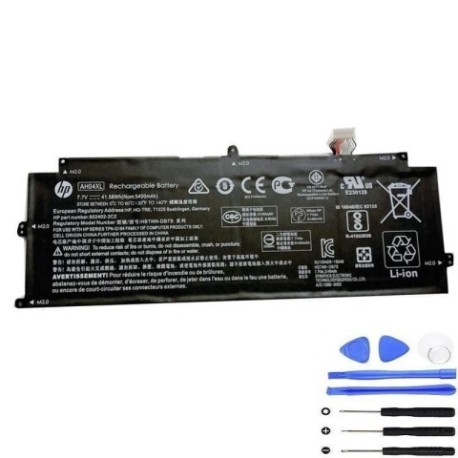
Common signs you need a replacement
| Symptoms | Causes | Verification | Recommendation |
|---|---|---|---|
| Short battery life | Battery degradation over time | Check power settings & usage | Consider replacement if under 2 hours |
| Laptop won’t hold charge | Faulty battery cells | Test with different power sources | Replace immediately |
| Battery swelling | Internal chemical breakdown | Visual inspection | Replace urgently – safety risk |
| Overheating during use | Inefficient power delivery | Monitor temperature | Replace if consistently over 60°C |
How to check compatibility
Verify your laptop model matches one of the compatible models listed above. Check your laptop’s bottom label or system information for the exact model number. You can also remove your current battery and compare the part number with HP-AH04XL-41.58Wh.
When to replace
Replace your battery when you notice significant performance decline, typically after 2-3 years of regular use. If your battery lasts less than 60% of its original capacity or shows physical damage, immediate replacement is recommended for optimal performance and safety.
Installation guide (overview)
Power off your laptop and disconnect all cables. Remove the bottom panel using the appropriate screwdriver. Carefully disconnect the battery connector and remove any securing screws. Install the new HP AH04XL battery, reconnect the connector, and reassemble your laptop. Always refer to authorised HP service documentation for detailed instructions.
Usage & care tips
For optimal battery life, avoid extreme temperatures (store between 15-25°C). Calibrate your battery monthly by fully charging then discharging. Use original HP chargers and avoid leaving your laptop plugged in constantly. Store with 40-80% charge if not used for extended periods.
Safety & recycling in AU/NZ
Never attempt to open or modify the battery. Dispose of old batteries at authorised recycling centres – never in household waste. In Australia, use Batteryback or similar programs. In New Zealand, utilise local council e-waste collection services. Damaged batteries should be handled by professionals.
FAQ
How long does shipping take to Australia/New Zealand?
Standard shipping typically takes 7-14 business days to major cities in Australia and New Zealand. Express options are available for faster delivery.
Is this battery genuine HP quality?
Yes, this is a genuine HP AH04XL 41.58Wh battery meeting all original equipment manufacturer specifications and quality standards.
What warranty do you offer?
All our HP batteries come with a 12-month warranty covering manufacturing defects and performance issues.
Can I install this battery myself?
Yes, most HP laptop batteries are user-replaceable. However, if you’re uncomfortable with the process, we recommend seeking professional installation services.
How do I maximise battery lifespan?
Avoid complete discharges, keep your laptop in cool environments, and update your BIOS and power management drivers regularly.
What if my model isn’t listed?
Contact our support team with your exact laptop model number for compatibility verification before purchase.
Do you ship to regional areas?
Yes, we ship throughout Australia and New Zealand, including regional and remote areas. Additional shipping time may apply.