Asus C31N1703 52Wh Battery Replacement Guide for Australian & New Zealand Users
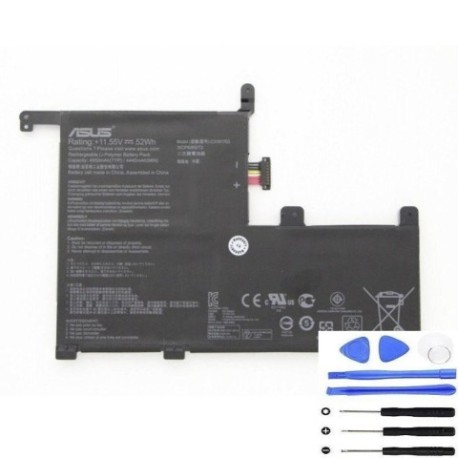
Battery models & part numbers
| Reference / P/N |
|---|
| 0B200-02650100 |
| Asus-C31N1703-52Wh |
| C31POJ1 |
Compatible models
| Model |
|---|
| Asus UX561UA |
| Asus UX561UAR |
| Asus UX561UN |
| Asus UX561UNR |
| Asus ZenBook Flip UX561UA |
| Asus ZenBook Flip UX561UN |
Introduction
If you’re an Asus UX561 series or ZenBook Flip owner in Australia or New Zealand experiencing battery issues, you’ve come to the right place. The Asus C31N1703 52Wh battery is the genuine replacement solution designed specifically for your convertible laptop. This comprehensive guide will walk you through everything from recognising when you need a replacement to installation and proper care, ensuring you get the most out of your device in our unique AU/NZ climate conditions.
Common signs you need a replacement
| Symptom | Cause | Verification | Recommendation |
|---|---|---|---|
| Battery drains in under 2 hours | Normal wear after 300+ charge cycles | Check battery health in Windows Power Report | Consider replacement if capacity below 60% |
| Laptop shuts down unexpectedly | Voltage drops under load | Monitor during intensive tasks | Replace immediately to prevent data loss |
| Battery won’t charge past 80% | Battery protection mode activated | Check Asus Battery Health Charging utility | Reset charging mode or replace battery |
| Laptop feels hot near battery area | Internal resistance increasing | Use infrared thermometer (should be under 45°C) | Replace to prevent thermal damage |
| Battery percentage jumps erratically | Failing battery management system | Observe percentage changes during use | Replace for accurate battery monitoring |
| Physical swelling or bulging | Gas buildup from chemical degradation | Visual inspection of battery compartment | Replace immediately – safety hazard |
How to check compatibility
Before purchasing any replacement battery for your Asus UX561 series laptop, proper compatibility verification is crucial. Start by locating your laptop’s exact model number, which is typically found on the bottom case sticker or in the system information (press Windows key + R, type “msinfo32”, and check System Model). For Asus devices specifically, you can also use the MyASUS app, which provides detailed hardware information including compatible part numbers.
The C31N1703-52Wh battery is designed specifically for the UX561 convertible series, including both standard and R variants (indicating different regional configurations). When checking compatibility, ensure your laptop matches one of the models listed in our compatibility table exactly. Even minor model variations can indicate different internal layouts or power requirements.
For Australian and New Zealand users, it’s important to note that some international models may have different power specifications. Always verify that any replacement battery meets Australian safety standards and carries the RCM mark. The genuine Asus C31N1703 battery is specifically authorised for sale in our region and includes appropriate certifications.
When to replace
Timing your battery replacement correctly can save you from unexpected downtime and potential data loss. For Asus UX561 owners, consider replacement when your battery health drops below 70% of original capacity, which typically occurs after 18-24 months of regular use. The Windows Battery Report (generated via powercfg /batteryreport in Command Prompt) provides detailed cycle count and design capacity versus full charge capacity data.
In Australia’s varying climate conditions, battery degradation can accelerate, particularly in hotter regions like Queensland and Western Australia where temperatures regularly exceed 30°C. If you frequently use your laptop outdoors or in vehicles, the heat exposure can significantly reduce battery lifespan. Similarly, New Zealand’s coastal humidity can affect battery performance over time.
Proactive replacement is recommended if you rely on your laptop for work or study, as sudden battery failure during important tasks can be disruptive. The C31N1703 battery typically maintains optimal performance for 2-3 years with proper care, after which gradual capacity loss becomes more noticeable.
Installation guide
Replacing the battery in your Asus UX561 series laptop requires careful attention to detail but is manageable for most users with basic technical skills. Before beginning, ensure you have the correct tools: a Phillips #00 screwdriver, plastic spudger or guitar pick for prying, and an anti-static wrist strap is recommended.
Start by completely powering down your laptop and disconnecting all peripherals. Remove the 10 screws securing the bottom case – note that some screws may be different lengths, so keep them organised. Carefully pry the bottom case starting from the rear edge near the hinge area. The clips can be firm, so work slowly around the perimeter.
Once inside, locate the battery connector near the centre of the motherboard. Gently pull the connector straight up to disconnect – avoid pulling on the wires. Remove the four screws securing the battery to the chassis, then lift the battery out. Clean any dust from the battery compartment before installing the new C31N1703 unit.
Position the new battery and secure with the four screws. Reconnect the battery connector, ensuring it clicks firmly into place. Before replacing the bottom case, briefly connect your charger to verify the battery is recognised. If successful, reassemble the laptop and allow the battery to charge fully before first use.
Usage & care tips
Proper battery maintenance extends the life of your C31N1703 replacement and ensures optimal performance. For Australian conditions, avoid leaving your laptop in direct sunlight or hot vehicles, as temperatures above 35°C can permanently damage lithium-ion batteries. Ideal operating temperature is between 10°C and 35°C.
Charge cycles matter – try to keep your battery between 20% and 80% for daily use rather than frequently draining to 0% or charging to 100%. The Asus Battery Health Charging utility (available in MyASUS) can help manage this automatically. For storage longer than a month, charge the battery to around 50% and power down completely.
Calibrate your new battery every 2-3 months by charging to 100%, then using until it shuts down automatically, and charging uninterrupted back to 100%. This helps the battery management system accurately report remaining capacity. Avoid using demanding applications while on battery power when possible, as high discharge rates generate additional heat and stress.
Safety & recycling in AU/NZ
Battery safety is paramount, especially with the high-energy-density lithium-ion cells used in the C31N1703. Never attempt to disassemble the battery casing or puncture the cells. If you notice any swelling, overheating, or unusual odours, discontinue use immediately and contact professional disposal services.
In Australia, battery recycling is managed through the B-cycle program, with collection points available at most office supply stores, electronics retailers, and council waste facilities. Similarly, in New Zealand, the Ministry for the Environment recommends using accredited battery recyclers rather than disposing with general waste.
When transporting spare batteries, ensure terminals are protected from short circuits by covering with electrical tape or keeping in original packaging. Airlines have specific regulations regarding spare lithium batteries in carry-on luggage, so check with your carrier before travel.
FAQ
How long does the C31N1703 battery typically last?
With normal use, expect 2-3 years of good performance or approximately 500 full charge cycles before capacity drops to 70-80% of original.
Will replacing the battery void my Asus warranty?
In Australia and New Zealand, consumer law protects your right to repairs and replacements. Using genuine Asus parts like the C31N1703 should not void your warranty, though damage during installation might not be covered.
Can I use a higher capacity battery in my UX561?
No, the physical dimensions and electrical specifications are specific to the 52Wh design. Using incompatible batteries can damage your laptop and poses safety risks.
How do I know if my replacement battery is genuine?
Genuine Asus batteries feature precise branding, proper certification marks (RCM for AU), and come in official packaging with security seals. Purchase from authorised retailers to ensure authenticity.
What should I do with my old battery?
Never dispose of lithiumbatteries in household waste. Use the B-cycle program in Australia or accredited recyclers in New Zealand to ensure environmentally responsible disposal.
Why does my new battery not charge to 100% immediately?
Some battery management systems may initially show slightly reduced capacity until calibration occurs through a few charge cycles. This is normal and should resolve within a week of regular use.
Can I leave my laptop plugged in all the time with the new battery?
While modern batteries have protection circuits, for optimal longevity it’s recommended to occasionally use battery power and avoid keeping the laptop at 100% charge constantly in high-temperature environments common in Australian summers.