HP AB06XL 53.61Wh Battery Replacement Guide
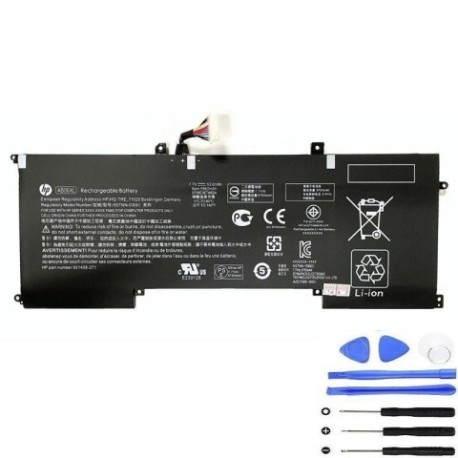
Battery models & part numbers
| Reference / P/N |
|---|
| HP 921408-271 |
| HP 921408-2C1 |
| HP 921438-855 |
| HP AB06053XL |
| HP HSTNN-DB8C |
| HP TPN-I128 |
| HP TPNI128 |
| HP-AB06XL-53.61Wh |
Compatible laptop models
| Model |
|---|
| HP Envy 13 2017 |
| HP Envy 13-AD000s |
| HP Envy 13-AD0XXs |
| HP Envy 13-AD1XXs |
Introduction
Is your HP Envy 13 laptop struggling to hold a charge? The HP AB06XL 53.61Wh battery is the authorised replacement that restores your laptop’s mobility and performance. This high-quality battery is specifically designed for HP Envy 13 models from 2017 and delivers reliable power for work, study, or entertainment.
Common signs you need a replacement
| Symptom | Cause | Verification | Recommendation |
|---|---|---|---|
| Battery drains quickly | Reduced capacity from age/cycles | Check battery health in Windows | Replace if under 50% capacity |
| Laptop shuts down unexpectedly | Battery cannot deliver stable power | Monitor battery percentage drops | Immediate replacement needed |
| Battery won’t charge fully | Charging circuit or cell failure | Check charging indicator lights | Replace battery and check charger |
| Laptop only works when plugged in | Complete battery failure | Remove charger to test | Urgent battery replacement |
| Battery swelling or overheating | Internal damage or defect | Visual inspection and temperature check | Stop using immediately and replace |
How to check compatibility
Before purchasing, verify your laptop’s compatibility by checking the model number on the bottom casing or in System Information. Match it against our compatible models list above. You can also check your current battery’s part number by removing the bottom panel – it should match one of the reference numbers in our table.
When to replace
Replace your HP battery when it holds less than 50% of its original capacity, shows physical damage like swelling, or causes unexpected shutdowns. Most HP Envy 13 batteries need replacement after 2-3 years of regular use or 300-500 charge cycles.
Installation guide (overview)
1. Power off your laptop and disconnect the charger
2. Remove the bottom panel screws (typically 8-10 Phillips head screws)
3. Carefully lift the bottom panel starting from the rear
4. Disconnect the battery connector from the motherboard
5. Remove the battery mounting screws (usually 4)
6. Install the new HP AB06XL battery and reconnect
7. Replace the bottom panel and power on to test
Usage & care tips
• Avoid extreme temperatures – ideal operating range is 10°C to 35°C
• Don’t leave your laptop plugged in constantly – occasional discharge cycles help maintain battery health
• Store in a cool, dry place if not using for extended periods
• Use only HP-authorised chargers and accessories
• Calibrate your battery monthly by fully charging then discharging to 10%
Safety & recycling in AU/NZ
In Australia and New Zealand, lithium-ion batteries must be recycled properly. Do not dispose of in household waste. Many electronics retailers offer free battery recycling services. Check with your local council for designated battery recycling centres. Damaged or swollen batteries should be handled with care and taken to a professional recycling facility immediately.
FAQ
How long does the HP AB06XL battery last?
The 53.61Wh capacity typically provides 6-8 hours of normal use, depending on your settings and applications.
Is this battery compatible with HP Envy 13 models from other years?
No, this battery is specifically designed for 2017 HP Envy 13 models and the compatible variants listed above.
Do I need any special tools for installation?
You’ll need a Phillips head screwdriver (usually #00 or #0 size) and a plastic spudger or guitar pick to safely open the case.
Will replacing the battery void my warranty?
If your laptop is still under manufacturer warranty, check HP’s policy. For out-of-warranty devices, battery replacement does not affect other components.
How do I check my battery’s health in Windows?
Open Command Prompt as administrator and type “powercfg /batteryreport” to generate a detailed battery health report.
Can I use this battery if my original had a different part number?
Yes, as long as your laptop model matches our compatibility list, the HP AB06XL is designed to work with all the part numbers shown.
What’s the warranty on this replacement battery?
Most quality replacement batteries come with a 12-month warranty – check the product page for specific warranty details.