ASUS A42N1403 88Wh Laptop Battery Replacement Guide
If your ASUS laptop is struggling to hold a charge or won’t power on without being plugged in, you’ve come to the right place. Our comprehensive guide covers everything Australian and New Zealand consumers need to know about replacing their ASUS laptop battery with the genuine A42N1403 88Wh model.
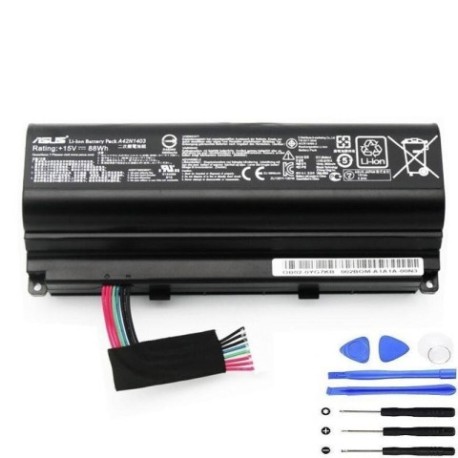
Battery models & part numbers
| Reference / P/N |
|---|
| Asus-A42N1403-88Wh |
Compatible models
| Model |
|---|
| Asus 0B110-00290000 |
| Asus 0B110-00290100 |
| Asus 0B110-00340000 |
| Asus A42LM9H |
| Asus G751JL |
| Asus G751JL-1A |
| Asus G751JL-2A |
| Asus G751JM |
| Asus G751JM-1A |
| Asus G751JM-2A |
| Asus G751JT |
| Asus G751JT-1A |
| Asus G751JT-CH71 |
| Asus G751JT-DH72 |
| Asus G751JY |
| Asus G751JY-1A |
Introduction
The ASUS A42N1403 88Wh battery is specifically designed for ASUS ROG and premium laptop models, providing reliable power for gaming, creative work, and everyday computing. As an authorised replacement part, it ensures your laptop performs at its best without the frustration of sudden shutdowns or limited mobility.
Common signs you need a replacement
| Symptom | Cause | Verification | Recommendation |
|---|---|---|---|
| Battery drains quickly (under 1 hour) | Ageing cells, reduced capacity | Check battery health in Windows | Replace if capacity below 60% |
| Laptop won’t power on without charger | Battery completely failed | Remove charger, try to start | Immediate replacement needed |
| Battery percentage jumps erratically | Faulty battery management system | Monitor percentage changes | Replace to prevent damage |
| Battery swelling or bulging | Gas buildup from cell degradation | Visual inspection, uneven surface | Replace immediately for safety |
| Overheating during charging | Internal resistance increased | Feel battery temperature | Replace to prevent fire risk |
How to check compatibility
Finding your exact ASUS model number is crucial for battery compatibility. For ASUS ROG and premium laptops like the G751 series, check these locations:
- Bottom case label: Turn your laptop over and look for the model number printed on the sticker near the battery compartment
- System Information: Press Windows Key + R, type “msinfo32”, and check System Model
- Command Prompt: Open Command Prompt and type “wmic csproduct get name”
- Original battery: Remove the current battery and check the part number printed on it
- ASUS Support Centre: Visit the official ASUS support website and use their compatibility checker tool
All G751 series models (JL, JM, JT, JY) and specific 0B110 models are compatible with the A42N1403 battery. If your model matches any in our compatibility table above, you’re good to go.
When to replace
Most ASUS laptop batteries last 2-3 years with regular use. Consider replacement when:
- Battery runtime drops below 60% of original capacity
- Your laptop shuts down unexpectedly at 20-30% charge
- You notice physical swelling or deformation
- The battery won’t charge beyond 80% consistently
- You experience frequent overheating during charging cycles
For gaming laptops like the ROG series, battery degradation can accelerate due to high power demands during gaming sessions.
Installation guide
Replacing your ASUS battery is straightforward with these steps:
- Safety first: Shut down your laptop completely and disconnect the AC adapter
- Prepare workspace: Work on a clean, static-free surface with good lighting
- Access battery compartment: For most ASUS ROG models, flip the laptop over and locate the battery release latches
- Remove old battery: Slide the release latches to unlock the battery, then gently lift it out of the compartment
- Install new battery: Align the new A42N1403 battery with the connectors, press firmly until it clicks into place
- Initial charge: Connect the AC adapter and charge the battery completely before first use
- Calibration: Use the battery until it reaches 10%, then charge to 100% without interruption
Important: Some ASUS models may require removing the bottom panel to access the battery. If unsure, consult the official ASUS service manual for your specific model.
Usage & care tips
Maximise your new ASUS battery’s lifespan with these practices:
- Avoid extreme temperatures: Keep your laptop between 10°C and 35°C for optimal battery health
- Partial discharges: Instead of full discharge cycles, recharge when battery reaches 20-30%
- Storage advice: If storing long-term, charge to 50% and store in a cool, dry place
- Gaming considerations: For extended gaming sessions, consider using AC power to reduce battery cycles
- Regular calibration: Perform a full discharge/charge cycle every 2-3 months to maintain accurate battery reporting
- Power settings: Use ASUS Power4Gear Hybrid or Windows battery saver mode for everyday use
Safety & recycling in AU/NZ
Battery safety and proper disposal are regulated in Australia and New Zealand:
- Australian regulations: Follow the Battery Stewardship Council guidelines for lithium-ion battery disposal
- New Zealand requirements: Use accredited e-waste recycling centres through the RCN e-Cycle programme
- Never dispose in household waste: Lithium batteries can cause fires in landfill
- Local recycling options: Most office supply stores and electronics retailers offer free battery recycling
- Transport safety: When mailing old batteries, follow Australia Post and NZ Post dangerous goods guidelines
- Emergency procedures: If battery swells or leaks, place in a fire-proof container and contact local waste authority
FAQ
How long does the A42N1403 battery last on a single charge?
Under normal usage conditions, the 88Wh capacity provides 3-5 hours for general computing. For gaming or intensive tasks, expect 1-2 hours depending on your laptop’s power settings and workload.
Is this battery genuine ASUS or compatible?
This is a genuine ASUS replacement part with the exact same specifications as the original battery. It carries the same warranty and performance guarantees as OEM batteries.
Will replacing the battery void my ASUS warranty?
No, replacing the battery with a genuine ASUS part does not void your laptop’s warranty. However, damage caused during installation might not be covered, so follow installation instructions carefully.
How do I know if my battery needs calibration?
If your battery percentage jumps erratically or your laptop shuts down unexpectedly while showing substantial charge remaining, calibration is needed. Perform a full discharge/charge cycle to recalibrate.
Can I use this battery if my original was a different part number?
Only if your laptop model is listed in our compatibility table. The A42N1403 is designed specifically for the models listed and may not work with other ASUS laptops.
What’s the warranty on this replacement battery?
Genuine ASUS batteries typically come with a 12-month warranty covering manufacturing defects and premature capacity loss.
How should I dispose of my old ASUS battery in Australia?
Take it to any Battery World, Officeworks, or authorised e-waste recycling centre. Most offer free recycling for laptop batteries as part of the national battery stewardship scheme.