Dell X8VWFB 97Wh Battery Replacement Guide
Find the perfect replacement battery for your Dell laptop with our comprehensive compatibility guide and expert installation advice.
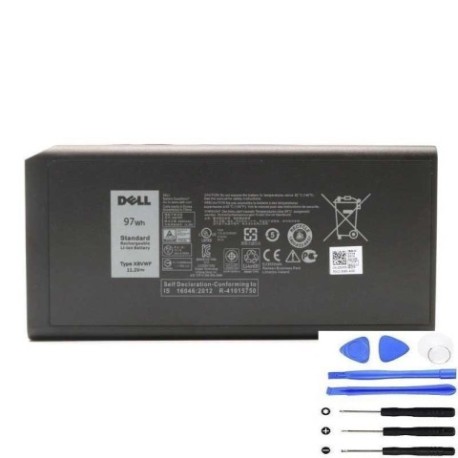
Battery models & part numbers
| Reference / P/N |
|---|
| 4XKN5 |
| 453-BBBD |
| Dell-X8VWFB-97Wh |
| P45G |
| P46G |
| X8VWFB |
| XRJDF |
| YGV51 |
Compatible laptop models
| Model |
|---|
| Dell Latitude 14 5404 |
| Dell Latitude 14 7404 |
| Dell Latitude 14 Rugged – P46G |
| Dell Latitude 14 Rugged Extrem P45G |
Introduction
The Dell X8VWFB 97Wh battery is a high-capacity replacement power solution designed for various Dell Latitude business laptops. This authorised replacement battery ensures optimal performance and reliability for your mobile computing needs.
Common signs you need a replacement
| Symptoms | Causes | Verification | Recommendation |
|---|---|---|---|
| Battery drains quickly | Ageing cells, reduced capacity | Check battery health in system settings | Consider replacement if under 50% capacity |
| Laptop won’t hold charge | Failed battery cells | Test with power adapter disconnected | Immediate replacement needed |
| Battery swelling | Internal damage, overheating | Visual inspection of battery case | Replace immediately for safety |
| Overheating during use | Inefficient power delivery | Monitor temperature with software | Replace to prevent damage |
How to check compatibility
Verify your laptop’s compatibility by checking the model number on the bottom casing or in system information. Cross-reference with our compatibility tables above. For Dell Latitude models, ensure the part number matches your original battery specifications.
When to replace
Replace your battery when it holds less than 50% of its original capacity, shows physical damage or swelling, or fails to hold a charge. Most Dell batteries last 2-3 years with regular use before requiring replacement.
Installation guide (overview)
Power off your laptop and disconnect all cables. Remove the bottom panel using the appropriate screwdriver. Carefully disconnect the battery connector and remove any securing screws. Install the new battery, reconnect the connector, and reassemble your laptop.
Usage & care tips
Avoid extreme temperatures (ideal range 15-25°C). Don’t leave your laptop plugged in constantly. Perform partial discharges rather than full cycles. Store in a cool, dry place when not in use for extended periods.
Safety & recycling in AU/NZ
Always use authorised replacement batteries. Never attempt to open or modify batteries. In Australia and New Zealand, recycle old batteries at designated collection centres. Many electronics retailers offer free battery recycling services.
FAQ
How long does this battery last on a single charge?
The 97Wh capacity typically provides 6-8 hours of standard usage, depending on your laptop model and usage patterns.
Is this battery compatible with my Dell Latitude 14 5404?
Yes, this battery is specifically designed for the Dell Latitude 14 5404 and other compatible models listed above.
Do you provide warranty on this battery?
Yes, our replacement batteries come with a standard 12-month warranty covering manufacturing defects.
How do I properly dispose of my old battery?
Take your old battery to any authorised recycling centre in Australia or New Zealand. Never dispose of batteries in household waste.
Can I use this battery with newer Dell models?
This battery is designed for specific Dell Latitude models. Check our compatibility table for supported devices.
What’s the delivery time within Australia?
Standard delivery within Australia is 3-5 business days, with express options available for faster service.
Is installation difficult for beginners?
Most users can install this battery with basic technical skills. Follow our installation guide or consult a professional if unsure.