Battery models & part numbers
| Reference / P/N |
|---|
| 05R9DD |
| 0KTCCN |
| 5R9DD |
| Dell-5R9DD-43W |
| KTCCN |
| P22T |
| P22T001 |
| XKPD0 |
Compatible laptop models
| Model |
|---|
| Dell Chromebook 11 |
| Dell Chromebook 3120 |
Introduction
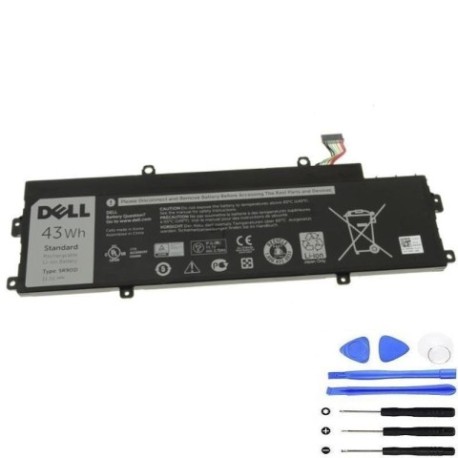
Keep your Dell Chromebook running smoothly with our genuine replacement battery. Compatible with Dell Chromebook 11 and 3120 models, this high-quality battery ensures reliable performance for work and study.
Common signs you need a replacement
| Symptoms | Causes | Verification | Recommendation |
|---|---|---|---|
| Battery drains quickly | Ageing cells | Check battery health in settings | Consider replacement |
| Laptop shuts down unexpectedly | Failing battery | Monitor shutdown patterns | Replace immediately |
| Battery won’t hold charge | Degraded capacity | Test with full charge cycle | New battery needed |
| Swelling or bulging | Internal damage | Visual inspection | Replace urgently for safety |
How to check compatibility
Verify your laptop model matches our compatible list above. Check your current battery’s part number (usually found on the battery itself) against our reference numbers. For Dell Chromebook 11 and 3120 models, this battery is the perfect fit.
When to replace
Replace your battery when you notice significant performance decline, typically after 2-3 years of regular use. If your battery health shows below 60% capacity or you experience any safety concerns like swelling, replacement is recommended.
Installation guide (overview)
1. Power off your Chromebook and disconnect all cables
2. Remove the bottom panel (consult your device manual)
3. Disconnect the old battery connector
4. Remove any screws securing the battery
5. Install the new battery and reconnect
6. Replace the bottom panel and power on
Usage & care tips
• Avoid extreme temperatures (operate between 10°C and 35°C)
• Don’t leave your laptop plugged in constantly
• Perform regular full discharge cycles
• Store in cool, dry conditions when not in use
• Use only authorised Dell chargers
Safety & recycling in AU/NZ
Always handle batteries with care. Never puncture or expose to fire. In Australia and New Zealand, recycle old batteries at designated collection centres. Many electronics retailers offer free battery recycling services.
FAQ
How long does this battery last?
Typically 3-5 hours depending on usage and settings.
Is this battery genuine Dell?
Yes, this is an authentic Dell replacement battery.
What’s the warranty period?
12 months warranty from date of purchase.
How do I recycle my old battery?
Take it to any authorised battery recycling centre in Australia or New Zealand.
Will this work with my Dell Chromebook 11?
Yes, it’s fully compatible with Dell Chromebook 11 models.
How long for delivery in AU/NZ?
Typically 3-7 business days depending on your location.
Can I install this myself?
Yes, with basic technical skills and following our installation guide.