Battery models & part numbers
| Reference / P/N |
|---|
| Dell-3RNFD-54Wh |
Compatible laptop models
| Model |
|---|
| Dell 0FMV51 |
| Dell 0G95J5 |
| Dell 0J7WX3 |
| Dell 0K8J43 |
| Dell 0TJ7V4 |
| Dell 0WVG8T |
| Dell 451-BBFV |
| Dell 451-BBOG |
| Dell 5K1GW |
| Dell F38HT |
| Dell FMV51 |
| Dell G95J5 |
| Dell J7WX3 |
| Dell K8J43 |
| Dell KKNHH |
| Dell Latitude 14 (7450) |
| Dell Latitude 14 (E7420) |
| Dell Latitude 14 (E7440) |
| Dell Latitude 14 (E7450) |
| Dell Latitude 14 (E7450-0064) |
| Dell Latitude 14 (E7450-5064) |
| Dell Latitude 14 (E7450-5694) |
| Dell Latitude 14 (E7450-5816) |
| Dell Latitude 14 (E7450-5960) |
| Dell Latitude 14 (E7450-6853) |
| Dell Latitude 14 (E7450-7805) |
| Dell Latitude 14 (E7450-9253) |
| Dell Latitude 14 (E7450-9260) |
| Dell Latitude 14 (E7450-9912) |
| Dell Latitude 14 (E7450-9929) |
| Dell Latitude 14 (E7450-9981) |
| Dell Latitude 14 E7420 |
| Dell Latitude E7420 (998-BEPT) |
| Dell Latitude E7420 (998-HXXDR) |
| Dell Latitude E7420 (998-M3K21) |
| Dell Latitude E7440 |
| Dell Latitude E7440 (7440-3851) |
| Dell Latitude E7440 (7440-5709) |
| Dell MGH81 |
| Dell TJ7V4 |
| Dell WVG8T |
| Dell-3RNFD-54Wh |
Introduction
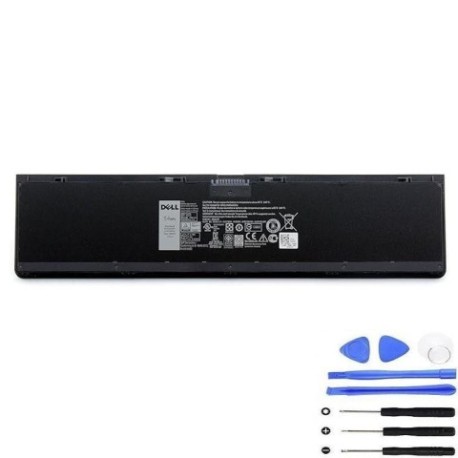
If your Dell laptop is struggling to hold charge or won’t power on without being plugged in, you likely need a replacement battery. The Dell 3RNFD 54Wh battery is designed specifically for various Dell Latitude models and provides reliable performance when your original battery starts to fail.
Common signs you need a replacement
| Symptom | Cause | Verification | Recommendation |
|---|---|---|---|
| Battery drains quickly | Reduced capacity from age/cycles | Check battery health in system settings | Replace if capacity below 60% |
| Laptop won’t power on | Battery completely failed | Try power adapter only | Immediate replacement needed |
| Battery swelling | Internal damage/ageing | Visual inspection of battery compartment | Replace immediately for safety |
| Inconsistent charging | Faulty battery circuits | Monitor charging behaviour | Replace to prevent damage |
How to check compatibility
Check your laptop’s model number on the bottom case or under the battery compartment. Compare it against our comprehensive compatibility list above. For Dell Latitude models, you can also check in the BIOS or use Dell’s support website with your service tag.
When to replace
Replace your battery when it holds less than 60% of its original capacity, shows physical damage or swelling, or fails to charge properly. Most laptop batteries last 2-4 years with regular use before needing replacement.
Installation guide (overview)
1. Power off laptop and disconnect charger
2. Remove the bottom case (consult your model’s service manual)
3. Disconnect old battery connector
4. Remove mounting screws and old battery
5. Install new battery and reconnect
6. Replace bottom case and power on
Always refer to official Dell documentation for your specific model.
Usage & care tips
• Avoid extreme temperatures (ideal range 10°C to 35°C)
• Don’t leave laptop plugged in constantly at 100% charge
• Perform occasional full discharge cycles
• Store in cool, dry place if not using for extended periods
• Use only authorised Dell chargers
Safety & recycling in AU/NZ
Never attempt to open or modify lithium-ion batteries. If your battery is swollen, handle with care and recycle immediately. In Australia and New Zealand, take old batteries to authorised recycling centres or electronic waste collection points. Many retailers offer free battery recycling services.
FAQ
How long does this battery last?
Typically 2-4 years with normal use, or 500-800 charge cycles.
Is this battery genuine Dell?
This is a high-quality replacement battery compatible with Dell models.
Does it come with warranty?
Yes, most replacement batteries include 12-24 month warranty.
How do I check my current battery health?
In Windows, type “battery report” in Command Prompt or check Power Options.
Can I install it myself?
Yes, with basic technical skills and proper tools, though professional installation is recommended if unsure.
Will it work with my charger?
Yes, it’s designed to work with standard Dell 65W/90W chargers.
How should I dispose of my old battery?
Take it to an authorised e-waste recycling centre in your area.