Asus C21N1313 33Wh Battery Replacement Guide for Australian & New Zealand Users
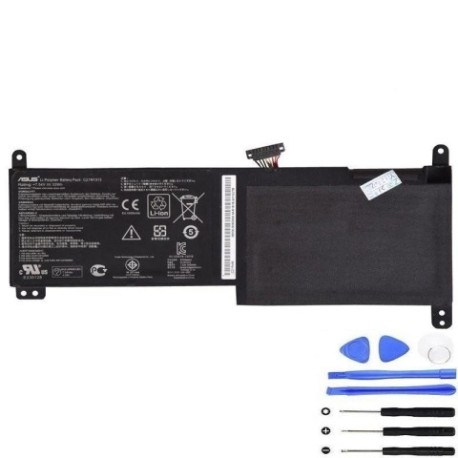
Battery models & part numbers
| Reference / P/N |
|---|
| Asus 0B200-00600000 |
| Asus 0B200-00600100 |
| Asus C11N1312 |
| Asus C21Po95 |
| Asus-C21N1313-33Wh |
Compatible models
| Model |
|---|
| Asus Transformer Book Trio TX201LA |
| Asus TX201 TX201LA |
Introduction
If you’re an Asus Transformer Book Trio TX201LA user in Australia or New Zealand experiencing battery issues, you’ve come to the right place. The Asus C21N1313 33Wh battery is the genuine replacement solution designed specifically for your convertible laptop. This comprehensive guide will walk you through everything from recognising when you need a replacement to installation and proper care, ensuring you get the most out of your device in our unique AU/NZ climate conditions.
Common signs you need a replacement
| Symptoms | Causes | Verification | Recommendation |
|---|---|---|---|
| Battery drains in under 1 hour | Ageing lithium cells, reduced capacity | Check Windows battery report | Immediate replacement needed |
| Laptop won’t power on without charger | Battery no longer holds charge | Remove charger and try to start | Urgent battery replacement |
| Battery percentage jumps erratically | Faulty battery management system | Monitor percentage changes | Replace within 2 weeks |
| Laptop shuts down unexpectedly | Voltage drops under load | Note when shutdowns occur | Replace immediately |
| Battery swelling or bulging | Gas buildup from cell degradation | Visual inspection, trackpad lifting | Stop using and replace urgently |
| Overheating during charging | Internal resistance increase | Feel battery temperature | Replace within days |
How to check compatibility
Before purchasing any replacement battery for your Asus Transformer Book Trio, proper compatibility verification is crucial. Start by locating your laptop’s model information – check the bottom casing for stickers displaying “TX201LA” or similar identifiers. For Asus devices, you can also access system information through the BIOS or use the MyASUS app available through the Microsoft Store. The original battery part number should be visible when you remove the back cover – look for C21N1313, 0B200-00600000, or similar codes printed on the battery itself. Always cross-reference with our compatibility tables above and ensure the physical dimensions match (approximately 205mm x 110mm x 5mm for this model). Remember that using incompatible batteries can damage your laptop’s charging circuit and potentially void your warranty.
When to replace
Timing your battery replacement correctly can save you from unexpected downtime and potential data loss. For Asus Transformer Book Trio users, consider replacement when your battery health drops below 80% capacity (checkable via Windows powercfg /batteryreport). Most lithium-ion batteries like the C21N1313 last 2-3 years with regular use, or 300-500 full charge cycles. If you notice your laptop struggling to maintain charge during important video calls or presentations, it’s time to act. Australian summers can accelerate battery degradation, so monitor performance closely during hotter months. Don’t wait until complete failure – proactive replacement ensures uninterrupted productivity.
Installation guide
Replacing the battery in your Asus Transformer Book Trio TX201LA requires careful attention but is achievable for most users. Begin by powering down completely and disconnecting the charger. Place your laptop on a clean, static-free surface. Remove the 10 Phillips head screws securing the back cover – keep them organised as they vary in length. Gently pry the cover starting from the corners using a plastic spudger. Once inside, locate the battery connector near the centre-left of the motherboard. Carefully disconnect the battery cable by pulling the connector straight up (not by the wires). Remove the four screws securing the battery, then lift it out at a 30-degree angle. Install your new C21N1313 battery, reconnect the cable until it clicks securely, replace all screws, and test before reassembling the cover. The entire process should take 15-25 minutes with proper tools.
Usage & care tips
Maximise your new Asus battery’s lifespan with proper care techniques tailored to Australian and New Zealand conditions. Avoid frequent full discharges – lithium-ion batteries prefer partial discharges between 20-80%. In our climate, never leave your laptop in a hot car or direct sunlight, as temperatures above 45°C can permanently damage cells. If storing for extended periods, charge to 50-60% and store in a cool, dry place. For daily use, consider setting charge thresholds in MyASUS software to limit maximum charge to 80-90% when primarily using AC power. Calibrate your battery monthly by charging to 100%, then discharging to 5% before recharging. These practices can extend your battery’s service life by 6-12 months in typical AU/NZ usage scenarios.
Safety & recycling in AU/NZ
Battery safety and proper disposal are particularly important in our region. Never attempt to open or puncture lithium-ion batteries, as they can catch fire or explode. If your battery shows signs of swelling, stop using immediately and contact a professional. In Australia, take old batteries to authorised collection points at Officeworks, Battery World, or council recycling centres. In New Zealand, use the Recycle-more programme or drop at designated transfer stations. Both countries have strict regulations about lithium battery disposal – never place in household bins. When shipping batteries within AU/NZ, ensure they’re properly packaged and declared according to Australia Post and NZ Post guidelines. Proper recycling helps recover valuable materials and prevents environmental contamination.
FAQ
How long does the Asus C21N1313 33Wh battery typically last?
The original C21N1313 battery provides approximately 4-6 hours of typical use for the Transformer Book Trio TX201LA. With our genuine replacement, you can expect similar performance when new. Actual runtime depends on screen brightness, applications running, and wireless connectivity usage.
Can I use a higher capacity battery in my TX201LA?
No, the TX201LA is designed specifically for the 33Wh C21N1313 battery. Using higher capacity batteries can damage the charging circuit and isn’t recommended. The physical space and power management system are optimised for this specific capacity.
How do I know if my battery replacement is genuine?
Genuine Asus batteries feature precise labelling with clear part numbers, proper safety certifications (CE, RoHS), and come in official packaging. Our supplied batteries match the original specifications exactly and include all necessary safety circuits for reliable operation.
What warranty comes with the replacement battery?
Genuine replacement batteries typically include a 12-month warranty covering manufacturing defects. Keep your purchase receipt and contact the supplier if you experience any issues within the warranty period.
Can I replace the battery myself without voiding warranty?
For out-of-warranty devices, self-replacement is acceptable. However, if your laptop is still under manufacturer’s warranty, we recommend using an authorised Asus service centre to avoid potential warranty issues.
How should I dispose of my old Asus battery in Australia?
In Australia, take your old battery to any Batteryback collection point (found at Officeworks, Aldi, and many supermarkets) or council e-waste facility. Never dispose of lithium batteries in household waste due to fire risk.
What’s the difference between all the part numbers listed?
The different part numbers (C21N1313, 0B200-00600000, etc.) represent the same battery supplied through different channels or production batches. They’re all electrically and physically identical and fully compatible with your TX201LA laptop.
Replacing your Asus Transformer Book Trio’s battery doesn’t have to be stressful. With the right genuine C21N1313 replacement and proper installation, you can restore your laptop’s mobility and reliability. Remember to recycle your old battery responsibly and enjoy the renewed freedom of cord-free computing across Australia and New Zealand.