Battery models & part numbers
| Reference / P/N |
|---|
| Asus-C41N2002-96Wh |
Compatible models
| Model |
|---|
| Asus 0B200-03770000 |
| Asus ZenBook Flip 15 Q528 |
| Asus ZenBook Flip 15 Q528E |
| Asus ZenBook Flip 15 Q528EH |
| Asus ZenBook Flip 15 Q538 |
| Asus ZenBook Flip 15 Q538E |
| Asus ZenBook Flip 15 Q538EI |
| Asus ZenBook Flip 15 UX564 |
| Asus ZenBook Flip 15 UX564EH |
| Asus ZenBook Flip 15 UX564EI |
| Asus ZenBook Flip 15 UX564P |
| Asus ZenBook Flip 15 UX564PH |
| Asus ZenBook Pro 15 OLED |
| Asus ZenBook Pro 15 UM535 |
| Asus ZenBook Pro 15 UM535Q |
| Asus ZenBook Pro 15 UM535QA |
| Asus ZenBook Pro 15 UM535QE |
| Asus ZenBook Pro 15 UM535QH |
| Asus ZenBook Pro 15 UX535 |
| Asus ZenBook Pro 15 UX535L |
| Asus ZenBook Pro 15 UX535LI |
Introduction
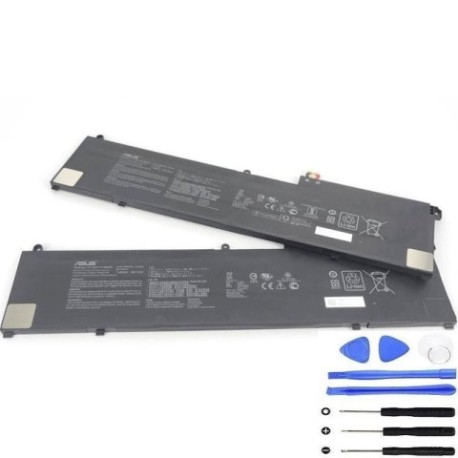
Keep your Asus ZenBook Flip or Pro 15 running smoothly with a genuine C41N2002 96Wh battery replacement. This high-capacity battery is authorised for a wide range of models, ensuring reliable performance and extended usage time.
Common signs you need a replacement
| Symptom | Cause | Verification | Recommendation |
|---|---|---|---|
| Short battery life | Ageing cells, reduced capacity | Check power settings, monitor discharge rate | Consider replacement if under 2 hours |
| Laptop shuts down unexpectedly | Voltage drops under load | Run diagnostics, check event logs | Replace to prevent data loss |
| Battery won’t charge fully | Charging circuit issues, worn battery | Monitor charging percentage over time | Replace if stuck below 80% capacity |
| Physical swelling or overheating | Internal damage, chemical breakdown | Visual inspection, temperature check | Replace immediately for safety |
How to check compatibility
First, locate your laptop’s model number on the bottom case, under the battery, or in System Information (press Windows Key + R, type “msinfo32”). For Asus devices, check the original packaging or invoice. Use Asus’s official support site with your serial number for precise compatibility. Cross-reference with our compatible models list above – this C41N2002 battery fits multiple ZenBook Flip 15 and Pro 15 variants including Q528, Q538, UX564, UM535, and UX535 series.
When to replace
Replace your battery when it holds less than 50% of its original capacity, shows physical damage, or causes system instability. Most laptop batteries last 2-4 years with regular use. In AU/NZ’s varied climate, avoid exposing batteries to temperatures above 45°C or below 0°C for extended periods.
Installation guide (overview)
Power off and unplug your laptop. Remove the bottom cover using appropriate screwdrivers (typically Phillips #00). Disconnect the old battery connector, remove mounting screws, and lift out the old unit. Insert the new C41N2002 battery, secure with screws, reconnect the connector, and reassemble. Allow a full charge cycle before first use.
Usage & care tips
For optimal battery health, avoid frequent full discharges. Keep between 20-80% charge when possible. Store in cool, dry conditions (15-25°C ideal). Calibrate monthly by fully charging then discharging to 5%. Use only authorised Asus chargers to prevent damage.
Safety & recycling in AU/NZ
Never puncture or disassemble lithium-ion batteries. Dispose of old batteries at authorised collection points – most electronics retailers offer free recycling. In Australia, check RecyclingNearYou.com.au; in New Zealand, visit eWaste.org.nz for local options. Never dispose in household waste.
FAQ
How long does delivery take in Australia?
Typically 3-7 business days for metro areas, slightly longer for regional centres.
Is this battery genuine Asus?
Yes, this is an authorised replacement part with original specifications.
What’s the warranty period?
Most reputable suppliers offer 12-24 months warranty in AU/NZ.
Can I replace the battery myself?
Yes, with basic technical skills and proper tools. Follow our installation guide carefully.
Will this work with my ZenBook Pro 15 OLED?
Yes, this battery is fully compatible with the ZenBook Pro 15 OLED model.
How do I maximise battery lifespan?
Avoid extreme temperatures, don’t leave plugged in constantly, and perform regular calibration.
Where can I get professional installation help?
Contact Asus authorised service centres in major cities like Sydney, Melbourne, Auckland, or Wellington.