ASUS C31N1806 42Wh Laptop Battery Replacement Guide
If your ASUS VivoBook is struggling to hold a charge or won’t power on without being plugged in, you’ve come to the right place. This comprehensive guide covers everything Australian and New Zealand users need to know about replacing their laptop battery with the genuine ASUS C31N1806 42Wh model.
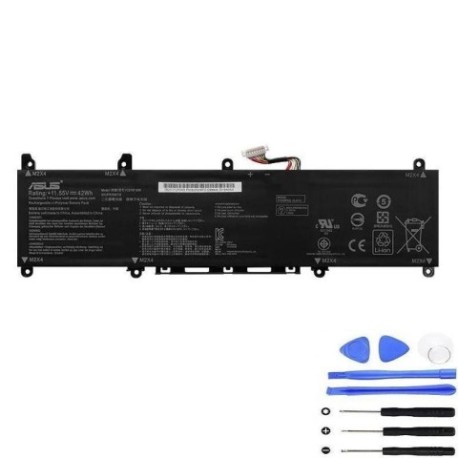
Battery models & part numbers
| Reference / P/N |
|---|
| Asus-C31N1806-42Wh |
Compatible models
| Model |
|---|
| Asus 0B200-02960000 |
| Asus 0B200-03030000 |
| Asus 0B200-03030100 |
| Asus C31PIJ1 |
| Asus I330FN |
| Asus K330FA |
| Asus K330FN |
| Asus R330UN |
| Asus S330FA |
| Asus S330FN |
| Asus S330UA |
| Asus V330FA |
| Asus V330FN |
| Asus VivoBook S13 S330 |
| Asus VivoBook S13 S330FA |
| Asus VivoBook S13 S330FN |
| Asus VivoBook S13 S330UA |
| Asus VivoBook S13 S330UN |
| Asus X330FA |
| Asus X330FL |
| Asus X330FN |
| Asus X330UA |
| Asus X330UN |
Introduction
Laptop batteries are the heart of your portable computing experience, and when they start to fail, it can be incredibly frustrating. The ASUS C31N1806 42Wh battery is specifically designed for various VivoBook S13 models, providing reliable power for work, study, and entertainment. As an authorised replacement part, it ensures your laptop performs exactly as intended by the manufacturer.
Common signs you need a replacement
| Symptom | Cause | Verification | Recommendation |
|---|---|---|---|
| Battery drains quickly (less than 1 hour) | Reduced capacity from age/cycles | Check battery health in Windows | Replace if capacity below 60% |
| Laptop won’t power on without charger | Battery cannot hold charge | Remove charger and try to start | Immediate replacement needed |
| Battery percentage jumps erratically | Faulty battery circuitry | Monitor percentage changes | Replace to prevent damage |
| Battery swelling or bulging | Chemical degradation | Visual inspection of battery | Replace immediately – safety risk |
| Overheating during charging | Internal short circuits | Feel battery temperature | Replace to prevent fire hazard |
How to check compatibility
Finding your exact ASUS model number is crucial for battery compatibility. For VivoBook S13 models, check the bottom case sticker where you’ll find the model number (like S330FA, X330FN, etc.). You can also find it in Windows by pressing Windows Key + R, typing “msinfo32”, and looking under System Model. ASUS provides official compatibility tools on their support website – simply enter your serial number or model to verify battery part numbers. The C31N1806-42Wh is specifically engineered for the VivoBook S13 series with its unique chassis design and power requirements.
When to replace
Most laptop batteries last 2-4 years with regular use. If your battery health shows less than 60% of original capacity, it’s time for replacement. Other indicators include the laptop shutting down unexpectedly at 20-30% charge, or if you notice significant performance degradation. Don’t wait until complete failure – proactive replacement ensures you’re never caught without power when you need it most.
Installation guide
Replacing your ASUS VivoBook battery is straightforward with the right tools and precautions. You’ll need a Phillips #00 screwdriver, plastic spudger, and an anti-static wrist strap. First, power down the laptop and disconnect the charger. Remove the 10 screws from the bottom case (they’re all the same length in VivoBook S13 models). Use the plastic spudger to carefully pry open the bottom case starting from the rear vents. Locate the battery connector near the centre-left of the motherboard and gently disconnect it. Remove the 4 screws securing the battery, lift it out, and replace with your new C31N1806-42Wh. Reconnect the battery connector, replace the bottom case, and power on. The first charge should be uninterrupted for 4-6 hours to calibrate the new battery.
Usage & care tips
To maximise your new battery’s lifespan, avoid frequent full discharges – lithium-ion batteries prefer partial discharges between 20-80%. Don’t leave your laptop plugged in constantly at 100% charge; if you primarily use it as a desktop, consider setting maximum charge to 80% in ASUS Battery Health Charging software. Store your laptop in temperatures between 10°C and 35°C, and never leave it in a hot car. If storing long-term, charge to 50-60% and power down completely.
Safety & recycling in AU/NZ
Battery safety is paramount in Australia and New Zealand. Never attempt to open or puncture a lithium-ion battery. If you notice swelling, immediately power down and remove the battery carefully. Store damaged batteries in a cool, dry place away from flammable materials. For recycling, most electronics retailers like Officeworks, JB Hi-Fi, and Harvey Norman offer free battery recycling services. Many local councils also provide e-waste collection points. Proper recycling prevents environmental contamination and recovers valuable materials.
FAQ
How long does the C31N1806-42Wh battery last on a full charge?
Under normal usage (web browsing, document editing), expect 4-6 hours. Intensive tasks like video editing may reduce this to 2-3 hours.
Will this battery work with my ASUS charger?
Yes, the C31N1806-42Wh is designed to work with the original 45W ASUS adapter that came with your VivoBook.
How do I calibrate the new battery?
After installation, charge to 100% without interruption, then use until it shuts down (around 5%), then charge fully again without using the laptop.
Is this compatible with ASUS VivoBook 13 models not listed?
Only the models specified in our compatibility table are guaranteed to work. Other models may have different physical dimensions or electrical requirements.
What warranty comes with this battery?
Genuine ASUS replacement batteries typically include a 12-month warranty covering manufacturing defects.
Can I replace the battery myself without voiding warranty?
In Australia and New Zealand, replacing consumable components like batteries doesn’t void your laptop warranty, but damage during installation might not be covered.
How do I dispose of my old battery safely?
Take it to any authorised battery recycling centre – most electronics retailers accept them free of charge.
Investing in a genuine ASUS C31N1806-42Wh battery ensures your VivoBook continues to deliver reliable performance for years to come. With proper installation and care, you’ll enjoy the freedom of mobile computing without the anxiety of sudden power loss.