Asus A32N1405 56Wh Laptop Battery Replacement Guide
If your Asus laptop is struggling to hold a charge or won’t power on without being plugged in, you’ve come to the right place. This comprehensive guide covers everything Australian and New Zealand users need to know about replacing their Asus battery with the genuine A32N1405 56Wh model.
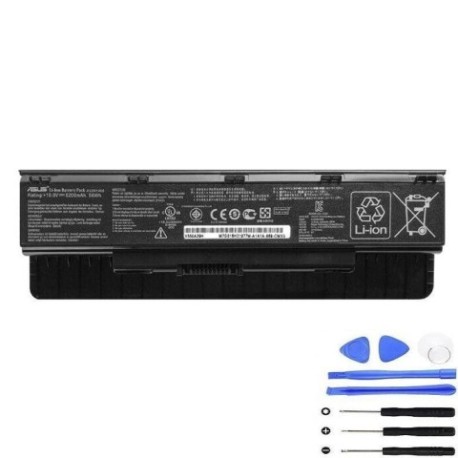
Battery models & part numbers
| Reference / P/N |
|---|
| 0B110-00300000 |
| 0B110-00300100 |
| A32Li9H |
| A32N1405 |
| A32NI405 |
| Asus-A32N1405-56Wh |
Compatible models
| Model |
|---|
| Asus N551JB |
| Asus N551JB-1A |
| Asus N551JB-2A |
| Asus N551JB-8A |
| Asus N551JB-CN001H |
| Asus N551JB-CN021H |
| Asus N551JB-CN029H |
| Asus N551JB-DM019H |
| Asus N551JK |
| Asus N551JK-1A |
| Asus N551JK-1B |
| Asus N551JK-CN124H |
| Asus N551JK-CN125H |
| Asus N551JK-CN166H |
| Asus N551JK-CN167H |
| Asus N551JK-CN173H |
| Asus N551JK-CN175H |
| Asus N551JK-CN176H |
| Asus N551JK-CN177H |
| Asus N551JK-CN189H |
| Asus N551JK-CN283H |
| Asus N551JM |
| Asus N551JM-1A |
| Asus N551JM-1B |
| Asus N551JM-1C |
| Asus N551JM-CN029H |
| Asus N551JM-CN078H |
| Asus N551JM-XO023D |
| Asus N551JQ |
| Asus N551JQ-1A |
| Asus N551JQ-2A |
| Asus N551JQ-AS71 |
| Asus N551JQ-CN003H |
| Asus N551JQ-CN037H |
| Asus N551JQ-CN094H |
| Asus N551JQ-CN218H |
| Asus N551JQ-DS71 |
| Asus N551JQ-EH71 |
| Asus N551JW |
| Asus N551JW-1A |
| Asus N551JW-1B |
| Asus N551JW-1C |
| Asus N551JW-CN067H |
| Asus N551JW-CN079H |
| Asus N551JW-CN094H |
| Asus N551JW-CN095H |
| Asus N551JW-CN217H |
| Asus N551JW-XX477H |
| Asus N551JX |
| Asus N551JX-1A |
| Asus N551JX-1B |
| Asus N551JX-1C |
| Asus N551JX-8A |
| Asus N551JX-CN034H |
| Asus N551JX-CN079H |
| Asus N551JX-CN080H |
| Asus N551JX-CN083H |
| Asus N551JX-CN096H |
| Asus N551JX-CN156H |
| Asus N551JX-CN157H |
| Asus N551JX-CN157T |
| Asus N551JX-CN203H |
| Asus N551JX-CN215H |
| Asus N551VW |
| Asus N551VW-1A |
| Asus N551VW-1B |
| Asus N551VW-1C |
| Asus N551VW-8A |
| Asus N551VW-CN058T |
| Asus N551VW-CN089T |
| Asus N551VW-FY196T |
| Asus N551VW-FY197T |
| Asus N551VW-FY197T (90NB0AH1-M02320) |
| Asus N551ZU |
| Asus N551ZU-1A |
| Asus N551ZU-CN007H |
| Asus N551ZU-CN010D |
| Asus N551ZU-CN024H |
| Asus N551ZU-DM002H |
| Asus N751JK |
| Asus N751JK-1B |
| Asus N751JK-T4086H |
| Asus N751JK-T4144H |
| Asus N751JK-T4146H |
| Asus N751JK-T4147H |
| Asus N751JK-T4150H |
| Asus N751JK-T4151H |
| Asus N751JK-T4199H |
| Asus N751JK-T4201H |
| Asus N751JK-T4218H |
| Asus N751JK-T4222H |
| Asus N751JK-T7063H |
| Asus N751JK-T7064H |
| Asus N751JK-T7070H |
| Asus N751JK-T7081H |
| Asus N751JK-T7098H |
| Asus N751JK-T7119H |
| Asus N751JK-T7121H |
| Asus N751JM |
| Asus N751JM-1D |
| Asus N751JM-3D |
| Asus N751JM-T4095D |
| Asus N751JM-T4096D |
| Asus N751JM-T4097H |
| Asus N751JW |
| Asus N751JW-1D |
| Asus N751JW-1DT7 |
| Asus N751JW-3D |
| Asus N751JX |
| Asus N751JX-1B |
| Asus N751JX-2B |
| Asus N751JX-T4023H |
| Asus N751JX-T4041H |
| Asus N751JX-T4041T |
| Asus N751JX-T4056H |
| Asus N751JX-T4056T |
| Asus N751JX-T4061H |
| Asus N751JX-T4091H |
| Asus N751JX-T4092H |
| Asus N751JX-T7169T |
| Asus ROG G551JK |
| Asus ROG G551JK-CN011D |
| Asus ROG G551JK-CN074H |
| Asus ROG G551JK-CN100H |
| Asus ROG G551JK-CN101H |
| Asus ROG G551JK-CN122H |
| Asus ROG G551JK-CN160H |
| Asus ROG G551JK-DM042H |
| Asus ROG G551JK-DM053H |
| Asus ROG G551JK-DM059D |
| Asus ROG G551JM |
| Asus ROG G551JM-CN013D |
| Asus ROG G551JM-CN102H |
| Asus ROG G551JM-CN104H |
| Asus ROG G551JM-CN105H |
| Asus ROG G551JM-CN149H |
| Asus ROG G551JM-CN208H |
| Asus ROG G551JM-DM052H |
| Asus ROG G551JM-DM079H |
| Asus ROG G551JM-DM169H |
| Asus ROG G551JW |
| Asus ROG G551JW-CN009D |
| Asus ROG G551JW-CN043H |
| Asus ROG G551JW-CN045H |
| Asus ROG G551JW-CN055H |
| Asus ROG G551JW-CN080H |
| Asus ROG G551JW-CN081H |
| Asus ROG G551JW-CN105H |
| Asus ROG G551JW-CN107D |
| Asus ROG G551JW-CN109H |
| Asus ROG G551JW-DM021H |
| Asus ROG G551JW-DM022H |
| Asus ROG G551JW-DM139H |
| Asus ROG G551JW-DM164H |
| Asus ROG G551JX |
| Asus ROG G551JX-CN047H |
| Asus ROG G551JX-DM057H |
| Asus ROG G551JX-DM164H |
| Asus ROG G551VW |
| Asus ROG G771JM |
| Asus ROG G771JM-T4039D |
| Asus ROG G771JM-T4103H |
| Asus ROG G771JM-T7018H |
| Asus ROG G771JM-T7021H |
| Asus ROG G771JM-T7022H |
| Asus ROG G771JM-T7025D |
| Asus ROG G771JM-T7025H |
| Asus ROG G771JM-T7031H |
| Asus ROG G771JM-T7043D |
| Asus ROG G771JM-T7053H |
| Asus ROG G771JM-T7058H |
| Asus ROG G771JM-T7061H |
| Asus ROG G771JM-T7063H |
| Asus ROG G771JM-T7067H |
| Asus ROG G771JM-T7068H |
| Asus ROG G771JM-T7080H |
| Asus ROG G771JW |
| Asus ROG G771JW-T7028D |
| Asus ROG G771JW-T7056H |
| Asus ROG G771JW-T7161T |
| Asus ROG GL551JK |
| Asus ROG GL551JK-CN126H |
| Asus ROG GL551JK-CN128H |
| Asus ROG GL551JM |
| Asus ROG GL551JM-DH71 |
| Asus ROG GL551JW |
| Asus ROG GL551JW-CN192T |
| Asus ROG GL551JW-CN193T |
| Asus ROG GL551JW-CN194T |
| Asus ROG GL551JW-CN195T |
| Asus ROG GL551JX |
| Asus ROG GL551VW |
| Asus ROG GL551VW-DS71 |
| Asus ROG GL551VW-FY249T |
| Asus ROG GL551VW-FY250T |
| Asus ROG GL771JM |
| Asus ROG GL771JM-T4034H |
| Asus ROG GL771JM-T7093H |
| Asus ROG GL771JM-T7128H |
| Asus ROG GL771JM-T7129H |
| Asus ROG GL771JM-T7130H |
| Asus ROG GL771JM-T7143H |
| Asus ROG GL771JW |
| Asus ROG GL771JW-T7080H |
| Asus ROG GL771JW-T7081H |
| Asus ROG GL771JW-T7081T |
| Asus ROG GL771JW-T7082H |
| Asus ROG GL771JW-T7083T |
| Asus ROG GL771JW-T7098H |
Common Signs You Need a Replacement Battery
| Symptom | Cause | Verification | Recommendation |
|---|---|---|---|
| Battery drains quickly (under 1 hour) | Ageing cells, reduced capacity | Check battery health in Windows Power Report | Replace if capacity below 60% of original |
| Laptop won’t power on without charger | Battery completely failed | Remove charger – does laptop immediately shut down? | Immediate replacement required |
| Battery swelling or bulging | Gas buildup from cell degradation | Visual inspection, trackpad lifting | STOP USING IMMEDIATELY – safety hazard |
| Overheating during charging | Internal resistance increased | Touch test – unusually hot battery compartment | Replace to prevent damage to laptop |
| Percentage jumps erratically | Faulty battery management system | Monitor percentage changes while using | Replace for reliable performance |
How to Check Compatibility
Finding your exact Asus model number is crucial for compatibility. Check the bottom label of your laptop for the complete model number, which typically starts with N551, N751, or ROG G/GL series. The A32N1405 battery is specifically designed for these models and provides the exact fit and performance your laptop needs.
Installation Guide
Replacing your Asus battery is straightforward. First, power down your laptop and unplug the charger. Flip it over and locate the battery release latches – most Asus models have two sliding locks. Slide both to unlock position, then gently lift the battery out. Insert your new A32N1405 battery, ensuring the connectors align properly, then slide the locks back to secure. Charge fully before first use.
Usage & Care Tips
For optimal battery life in the AU/NZ climate, avoid exposing your laptop to temperatures above 35°C. Ideal operating range is 15-25°C. Calibrate your new battery by charging to 100%, then discharging completely once monthly. Store in cool, dry conditions if not using for extended periods.
Safety & Recycling in AU/NZ
Never dispose of lithium-ion batteries in household waste. In Australia, use Batteryback or council e-waste services. In New Zealand, take to authorised recycling centres. Damaged or swollen batteries require special handling – contact your local waste authority for guidance.
FAQ
How long does shipping take to Australia/NZ?
Typically 7-14 business days with express options available.
Is this battery genuine Asus quality?
Yes, it meets original specifications with full compatibility.
What warranty is provided?
12-month warranty covering manufacturing defects.
Can I use this battery if my original was 48Wh?
Yes, the higher 56Wh capacity provides longer runtime.
How do I maximise battery lifespan?
Avoid complete discharges and store between 20-80% charge when possible.
Is installation difficult?
Most users can install in under 5 minutes with no tools required.
What if my model isn’t listed?
Contact customer support with your exact model number for verification.