ASUS C31N1602 57Wh Laptop Battery Replacement Guide
If your ASUS Zenbook is struggling to hold charge or showing battery warning signs, our comprehensive guide helps Australian and New Zealand users find the right replacement battery and install it safely.
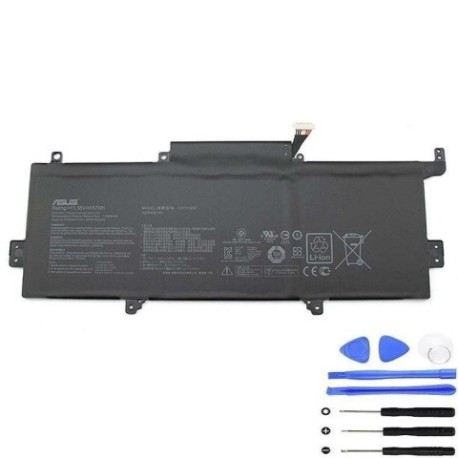
Battery models & part numbers
| Reference / P/N |
|---|
| 0B200-02090000 |
| Asus-C31N1602-57Wh |
| C31Pq9H |
Compatible models
| Model |
|---|
| Asus Zenbook U3000U UX330U UX330UAK |
| Asus Zenbook UX330UA |
Introduction
Your ASUS Zenbook’s battery is the heart of its portability. When it starts failing, the frustration is real – especially when you’re trying to work remotely or study on the go. The C31N1602 57Wh battery replacement restores your laptop’s mobility and gives you back the freedom to work anywhere.
Common signs you need a replacement
| Symptom | Cause | Verification | Recommendation |
|---|---|---|---|
| Battery drains in under 1 hour | Cell degradation after 2-3 years | Check battery health in Windows | Replace if capacity below 60% |
| Laptop shuts down at 20-30% charge | Voltage regulation failure | Monitor shutdown patterns | Immediate replacement needed |
| Battery won’t charge past 80% | Charging circuit protection | Check charging cycles | Replace to restore full capacity |
| Battery swelling or case bulging | Gas buildup from cell failure | Visual inspection | Stop using immediately |
| Overheating during charging | Internal resistance increase | Temperature monitoring | Replace for safety |
How to check compatibility
Finding your exact ASUS model information is crucial for battery compatibility. Look at the bottom case of your Zenbook for the model sticker – it will show the complete model number like “UX330UA” or “U3000U”. You can also check in Windows by pressing Windows Key + R, typing “msinfo32”, and looking under System Model. For ASUS laptops specifically, the MyASUS app provides detailed hardware information including battery specifications. Always cross-reference with our compatibility tables above to ensure you’re getting the correct C31N1602 replacement.
When to replace
Replace your ASUS battery when it holds less than 60% of its original capacity, shows physical swelling, or causes unexpected shutdowns. Most Zenbook batteries last 2-4 years with regular use. If you’re getting less than 2 hours of battery life from a full charge, it’s time for a replacement. Don’t wait until complete failure – proactive replacement prevents data loss and inconvenience.
Installation guide
Replacing the battery in your ASUS Zenbook UX330 series requires careful handling. First, power down completely and disconnect the charger. Remove the 10 Phillips head screws from the bottom case – note that some may be different lengths, so keep them organised. Use a plastic spudger to carefully pry open the bottom case starting from the rear vents. Once inside, locate the battery connector near the centre and gently disconnect it. Remove the 4 screws securing the battery, then lift it out at a 45-degree angle. Install the new C31N1602 battery in reverse order, ensuring all connections are secure before reassembling.
Usage & care tips
To maximise your new battery’s lifespan, avoid frequent full discharges – try to keep it between 20-80% charge for daily use. Don’t leave your Zenbook plugged in constantly at 100% charge, as this stresses the battery. Store your laptop in temperatures between 10°C and 35°C, and never leave it in a hot car. If storing long-term, charge to about 50% and power down completely. Use only ASUS-authorised chargers to ensure proper voltage regulation.
Safety & recycling in AU/NZ
In Australia and New Zealand, lithium-ion batteries must be recycled properly. Never dispose of old laptop batteries in household rubbish. Take your used ASUS battery to authorised recycling centres like Officeworks, Battery World, or council e-waste collection points. Many computer repair shops also accept old batteries for recycling. If your battery is swollen, handle with care and don’t puncture – place it in a cool, dry container until you can deliver it to a recycling facility.
FAQ
How long does the C31N1602 battery last on a full charge?
A new C31N1602 57Wh battery typically provides 6-8 hours of mixed use on ASUS Zenbook UX330 models, depending on screen brightness and applications running.
Is this battery compatible with my Zenbook bought in Australia?
Yes, the C31N1602 replacement works with all regional variants of compatible ASUS Zenbook models sold in Australia and New Zealand.
Do I need any special tools for installation?
You’ll need a Phillips #00 screwdriver and a plastic spudger or guitar pick to safely open the case without damaging the clips.
Will replacing the battery void my ASUS warranty?
If your laptop is still under manufacturer warranty, we recommend having the battery replaced by an ASUS-authorised service centre to maintain warranty coverage.
How can I check my current battery’s health?
In Windows, open Command Prompt as administrator and type “powercfg /batteryreport” to generate a detailed battery health report.
What’s the difference between C31N1602 and other part numbers?
The different part numbers (0B200-02090000, C31Pq9H) all refer to the same 57Wh battery specification, just different manufacturing codes.
Can I use a higher capacity battery?
No, the Zenbook UX330 series is designed specifically for the 57Wh battery. Using different specifications may cause compatibility issues or damage.