ASUS B31N1424 48Wh Battery Replacement Guide for Australian & New Zealand Users
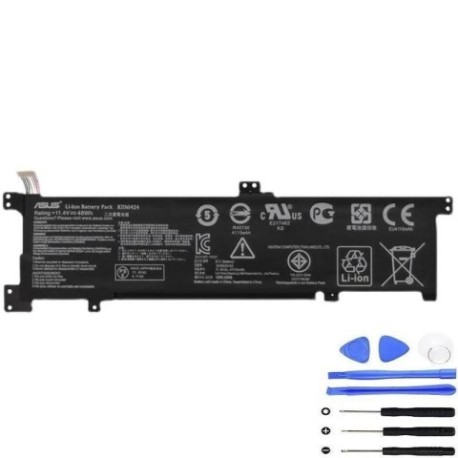
Battery models & part numbers
| Reference / P/N |
|---|
| 0B200-01390000 |
| Asus-B31N1424-48Wh |
| B31Bn91 |
| B31N1424 |
Compatible models
| Model |
|---|
| ASUS K401 K401L |
| Asus K401LB |
| Asus K401UB |
| Asus K401UQ |
Introduction
If you’re an ASUS laptop user in Australia or New Zealand experiencing battery issues with your K401 series device, you’ve come to the right place. The ASUS B31N1424 48Wh battery serves as the official replacement for multiple part numbers and compatible models, ensuring your laptop maintains optimal performance. This comprehensive guide covers everything from identifying battery problems to installation and proper care, specifically tailored for AU/NZ consumers.
Common signs you need a replacement
| Symptoms | Causes | Verification | Recommendation |
|---|---|---|---|
| Rapid battery drain | Ageing cells, reduced capacity | Check battery health in Windows | Replace if capacity below 60% |
| Laptop won’t hold charge | Failed battery circuits | Test with power adapter removed | Immediate replacement needed |
| Battery swelling | Chemical degradation | Visual inspection, uneven surfaces | Replace immediately for safety |
| Overheating during use | Internal resistance increase | Monitor temperature with software | Replace to prevent damage |
| Inconsistent charging | Worn charging circuits | Check charging indicator behaviour | Replace battery and test charger |
How to check compatibility
Before purchasing any replacement battery for your ASUS laptop, proper compatibility verification is essential. For ASUS K401 series laptops, you can find your model information in several ways. The most reliable method is checking the label on the bottom casing of your laptop, which displays the exact model number. Alternatively, you can access System Information in Windows by pressing Windows Key + R, typing “msinfo32”, and looking for “System Model”. ASUS also provides official support tools on their website where you can enter your serial number to verify compatible parts. Remember that the B31N1424 battery is specifically designed for K401 series laptops and their corresponding part numbers. Cross-referencing your laptop’s model with our compatibility table above ensures you’re getting the correct replacement.
When to replace
Timing your battery replacement correctly can save you from unexpected downtime and potential data loss. For ASUS laptops, consider replacement when your battery health drops below 70% capacity, which typically occurs after 2-3 years of regular use. If you notice your K401 series laptop shutting down unexpectedly at 20-30% charge, this indicates significant battery degradation. Seasonal changes in Australian and New Zealand climates can accelerate battery wear, particularly during summer months when temperatures regularly exceed 30°C. Proactive replacement is recommended if you rely on your laptop for work or study, as sudden battery failure can disrupt important tasks. For laptops used primarily as desktop replacements, battery replacement may be less urgent but still beneficial for occasional portable use.
Installation guide
Installing your new ASUS B31N1424 48Wh battery requires careful attention to detail but is achievable for most users. Begin by completely shutting down your laptop and disconnecting the power adapter. Place your laptop on a clean, static-free surface. For K401 series models, you’ll typically need to remove the bottom panel by unscrewing the visible screws – usually 8-10 Phillips head screws. Some models may have additional screws hidden under rubber feet, so check carefully. Once the panel is removed, locate the battery connector near the centre of the motherboard. Gently disconnect the old battery by pulling the connector straight out, avoiding any side-to-side movement that could damage the port. Remove any screws securing the battery to the chassis, then lift the old battery out. Position your new B31N1424 battery in place, secure it with the screws, and reconnect the battery connector firmly. Replace the bottom panel and screws, then connect your power adapter to initiate the first charge. The entire process should take 15-25 minutes for most users.
Usage & care tips
Proper battery maintenance extends the lifespan of your ASUS B31N1424 battery significantly. For Australian and New Zealand users, avoid exposing your laptop to extreme temperatures – never leave it in a hot car during summer months, as temperatures can exceed 60°C inside vehicles. Ideal operating temperatures range between 10°C and 35°C. For optimal battery health, maintain charge levels between 20% and 80% for daily use rather than constantly charging to 100%. If you use your laptop primarily as a desktop replacement, consider setting a charge limit in ASUS Battery Health Charging software (if available for your model). Calibrate your battery every 2-3 months by allowing it to discharge to around 10% then charging fully to 100% without interruption. During winter months in southern regions of Australia and New Zealand, allow your laptop to reach room temperature before charging if it’s been in cold conditions. These practices can help your replacement battery last 2-3 years with minimal capacity loss.
Safety & recycling in AU/NZ
Battery safety and proper disposal are particularly important in Australia and New Zealand due to our strict environmental regulations. Never attempt to open or puncture your old ASUS battery, as the lithium-ion cells can pose fire risks if damaged. If you notice any swelling, leaking, or unusual odours from your battery, place it in a fire-proof container and contact your local waste management facility immediately. For battery recycling, most Australian states and New Zealand regions offer free battery recycling programs through council collection centres or authorised retail drop-off points. Major electronics retailers like Officeworks, JB Hi-Fi, and Noel Leeming participate in battery recycling schemes. Some councils provide special household collection services for hazardous waste, including laptop batteries. Never dispose of lithium-ion batteries in regular household bins, as they can cause fires in garbage trucks and landfill sites. Proper recycling helps recover valuable materials and prevents environmental contamination.
FAQ
How long does the ASUS B31N1424 48Wh battery typically last?
With normal usage patterns common in Australia and New Zealand, you can expect 3-5 hours of battery life depending on your specific K401 model and usage intensity. Higher performance tasks like video editing or gaming will reduce this duration significantly.
Is this battery compatible with all K401 variants?
Yes, the B31N1424 battery is designed to work with all K401 series models including K401L, K401LB, K401UB, and K401UQ. The physical dimensions and electrical specifications are identical across these variants.
How do I know if my battery needs replacement versus other issues?
If your laptop works perfectly when plugged in but has power issues when unplugged, the battery is likely the culprit. Software tools like battery health reports in Windows can provide detailed capacity information to confirm this.
Can I replace the battery myself or should I seek professional help?
Most users with basic technical skills can replace the battery themselves following our installation guide. However, if you’re uncomfortable with disassembling your laptop, authorised ASUS service centres throughout Australia and New Zealand can perform the replacement.
Will replacing the battery void my ASUS warranty?
If your laptop is still under manufacturer warranty, using non-genuine parts may void coverage. However, for out-of-warranty devices, self-replacement with compatible batteries like the B31N1424 is perfectly acceptable and won’t affect other components.
How should I store my old battery before recycling?
Place the old battery in a cool, dry place away from direct sunlight. Cover the terminals with electrical tape to prevent accidental short circuits. Most recycling centres recommend bringing batteries within 3 months of removal.
What’s the typical lifespan of a replacement ASUS battery?
Under normal Australian and New Zealand usage conditions, you can expect 2-3 years of good performance before noticeable capacity degradation. Proper care as outlined in our usage tips can extend this to 3-4 years in some cases.