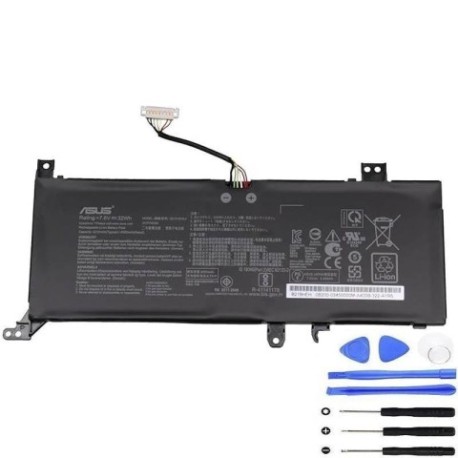
Asus B21N1818 32Wh Battery Replacement Guide for Australian & New Zealand Users
If you’re experiencing battery issues with your Asus laptop in Australia or New Zealand, finding the right replacement battery is crucial. The Asus B21N1818 32Wh battery serves multiple laptop models across the ExpertBook, VivoBook, and other series. This comprehensive guide helps you identify compatibility, understand when to replace, and provides expert installation advice tailored for AU/NZ consumers.
Battery models & part numbers
| Reference / P/N |
|---|
| Asus-B21N1818-1-32Wh |
| Asus B21N1818-2 |
| Asus B21N1818-3 |
Compatible models
| Model |
|---|
| Asus 0B200-03450000 |
| Asus 0B200-03450100 |
| Asus 0B200-03450200 |
| Asus 0B200-03450400 |
| Asus 0B200-03450500 |
| Asus D409DA |
| Asus D409DA-EK005T |
| Asus ExpertBook P1 P1410CDA |
| Asus ExpertBook P1 P1410CDA-EK685R |
| Asus ExpertBook P1 P1501DA |
| Asus ExpertBook P1 P1501DA-EJ068R |
| Asus ExpertBook P1 P1501JA |
| Asus ExpertBook P1 P1501JA-EJ028R |
| Asus ExpertBook P1 P1501JA-EJ030R |
| Asus ExpertBook P1 P1501JA-EJ031R |
| Asus ExpertBook P1 P1510CDA |
| Asus ExpertBook P1 P1510CDA-EJ1014 |
| Asus ExpertBook P1 P1510CDA-EJ1015 |
| Asus ExpertBook P1 P1510CDA-EJ1015R |
| Asus ExpertBook P1 P1510CDA-EJ1016R |
| Asus ExpertBook P1 P1510CJA |
| Asus ExpertBook P1 P1510CJA-EJ420 |
| Asus ExpertBook P1 P1510CJA-EJ783 |
| Asus ExpertBook P1410CJA |
| Asus F509JA-BQ869 |
| Asus VivobBook 15 R521UA |
| Asus VivoBook 14 F409BA |
| Asus VivoBook 14 F409DA |
| Asus VivoBook 14 F409DJ |
| Asus VivoBook 14 F409DL |
| Asus VivoBook 14 F409FA |
| Asus VivoBook 14 F409FA-EK160T |
| Asus VivoBook 14 F409FA-EK254T |
| Asus VivoBook 14 F409FB |
| Asus VivoBook 14 F409FJ |
| Asus VivoBook 14 F409FJ-EK007T |
| Asus VivoBook 14 F409FL |
| Asus VivoBook 14 F409JA |
| Asus VivoBook 14 F409JA-EK049T |
| Asus VivoBook 14 F409JB |
| Asus VivoBook 14 F409JB-EK013T |
| Asus VivoBook 14 F409JP |
| Asus VivoBook 14 F409MA |
| Asus VivoBook 14 F409UA |
| Asus VivoBook 14 F409UA-EK029T |
| Asus VivoBook 14 F409UJ |
| Asus VivoBook 14 R427FJ |
| Asus VivoBook 14 R427FJ-EK094T |
| Asus VivoBook 14 X409BA |
| Asus VivoBook 14 X409DA |
| Asus VivoBook 14 X409DJ |
| Asus VivoBook 14 X409DL |
| Asus VivoBook 14 X409FA |
| Asus VivoBook 14 X409FA-EK064T |
| Asus VivoBook 14 X409FB |
| Asus VivoBook 14 X409FJ |
| Asus VivoBook 14 X409FJ-EK501T |
| Asus VivoBook 14 X409FJ-FT871T |
| Asus VivoBook 14 X409FL |
| Asus VivoBook 14 X409JA |
| Asus VivoBook 14 X409JA-1005G1 |
| Asus VivoBook 14 X409JA-BV009T |
| Asus VivoBook 14 X409JA-EK022T |
| Asus VivoBook 14 X409JA-EK024T |
| Asus VivoBook 14 X409JA-EK050T |
| Asus VivoBook 14 X409JA-EK073R |
| Asus VivoBook 14 X409JA-EK591T |
| Asus VivoBook 14 X409JB |
| Asus VivoBook 14 X409JB-BV068T |
| Asus VivoBook 14 X409JB-EK008T |
| Asus VivoBook 14 X409JB-HT321T |
| Asus VivoBook 14 X409JP |
| Asus VivoBook 14 X409JP-EK004T |
| Asus VivoBook 14 X409JP-WB511T |
| Asus VivoBook 14 X409MA |
| Asus VivoBook 14 X409MA-EK029T |
| Asus VivoBook 14 X409MA-EK080T |
| Asus VivoBook 14 X409MA-EK219T |
| Asus VivoBook 14 X409UA |
| Asus VivoBook 14 X409UA-BV050T |
| Asus VivoBook 14 X409UA-BV074T |
| Asus VivoBook 14 X409UA-BV105T |
| Asus VivoBook 14 X409UA-EB053T |
| Asus VivoBook 14 X409UA-EK035T |
| Asus VivoBook 14 X409UA-EK080T |
| Asus VivoBook 14 X409UJ |
| Asus VivoBook 15 D509BA |
| Asus VivoBook 15 D509BA-EJ081T |
| Asus VivoBook 15 D509DA |
| Asus VivoBook 15 D509DA-BQ1315T |
| Asus VivoBook 15 D509DA-BR403 |
| Asus VivoBook 15 D509DA-EJ051T |
| Asus VivoBook 15 D509DA-EJ097T |
| Asus VivoBook 15 D509DA-EJ295 |
| Asus VivoBook 15 D509DA-EJ295T |
| Asus VivoBook 15 D509DA-EJ374T |
| Asus VivoBook 15 D509DA-EJ375T |
| Asus Vivobook 15 D509DL |
| Asus VivoBook 15 D509DL-EJ026T |
| Asus VivoBook 15 F509FA |
| Asus VivoBook 15 F509FA-EJ207 |
| Asus VivoBook 15 F509FA-EJ337 |
| Asus VivoBook 15 F509FA-EJ337T |
| Asus VivoBook 15 F509FA-EJ501T |
| Asus VivoBook 15 F509FA-EJ551 |
| Asus VivoBook 15 F509FA-EJ672T |
| Asus VivoBook 15 F509FJ |
| Asus VivoBook 15 F509FJ-EJ160T |
| Asus VivoBook 15 F509FL |
| Asus VivoBook 15 F509FL-EJ213T |
| Asus VivoBook 15 F509JA |
| Asus VivoBook 15 F509UA |
| Asus VivoBook 15 F509UA-EJ176 |
| Asus VivoBook 15 F509UA-EJ210T |
| Asus VivoBook 15 F545FJ |
| Asus VivoBook 15 F545FJ-EJ021T |
| Asus VivoBook 15 F545FJ-EJ023T |
| Asus VivoBook 15 F545FJ-EJ024T |
| Asus VivoBook 15 M509BA |
| Asus VivoBook 15 M509BA-EJ021 |
| Asus VivoBook 15 M509DA |
| Asus VivoBook 15 M509DA-EJ024T |
| Asus VivoBook 15 M509DA-EJ058T |
| Asus VivoBook 15 M509DA-EJ098T |
| Asus VivoBook 15 M509DA-EJ102T |
| Asus VivoBook 15 M509DA-EJ153T |
| Asus VivoBook 15 M509DA-EJ749R |
| Asus VivoBook 15 R521UA-EJ091T |
| Asus VivoBook 15 X509BA |
| Asus VivoBook 15 X509DA |
| Asus Vivobook 15 X509DJ |
| Asus VivoBook 15 X509FA |
| Asus VivoBook 15 X509FA-EJ014T |
| Asus VivoBook 15 X509FA-EJ102T |
| Asus VivoBook 15 X509FA-EJ103T |
| Asus VivoBook 15 X509FA-EJ208T |
| Asus VivoBook 15 X509FB |
| Asus VivoBook 15 X509FB-BR062T |
| Asus VivoBook 15 X509FJ |
| Asus VivoBook 15 X509FJ-BR012T |
| Asus VivoBook 15 X509FL |
| Asus VivoBook 15 X509FL-BQ138T |
| Asus VivoBook 15 X509FL-EJ079T |
| Asus VivoBook 15 X509JA |
| Asus VivoBook 15 X509JA-EJ024T |
| Asus VivoBook 15 X509JA-EJ026T |
| Asus VivoBook 15 X509JA-EJ027T |
| Asus VivoBook 15 X509JB |
| Asus VivoBook 15 X509JB-BR055T |
| Asus VivoBook 15 X509JB-BR099T |
| Asus VivoBook 15 X509JB-EJ005T |
| Asus VivoBook 15 X509JB-WB511T |
| Asus VivoBook 15 X509JP |
| Asus VivoBook 15 X509JP-EJ043T |
| AsusVivoBook 15 X509JP-EJ070T |
| Asus VivoBook 15 X509MA |
| Asus VivoBook 15 X509MA-BQ064T |
| Asus VivoBook 15 X509MA-BR059T |
| Asus VivoBook 15 X509MA-BR060T |
| Asus VivoBook 15 X509MA-BR138T |
| Asus VivoBook 15 X509MA-EJ049T |
| Asus VivoBook 15 X509MA-EJ056T |
| Asus VivoBook 15 X509MA-EJ140T |
| Asus VivoBook 15 X509UA |
| Asus VivoBook 15 X509UA-EJ001T |
| Asus VivoBook 15 X509UA-EJ021T |
| Asus VivoBook 15 X509UA-EJ050T |
| Asus VivoBook 15 X509UA-EJ062T |
| Asus VivoBook 15 X509UA-EJ064T |
| Asus VivoBook 15 X509UA-EJ071T |
| Asus VivoBook 15 X509UA-EJ073T |
| Asus VivoBook 15 X509UB |
| Asus VivoBook 15 X509UB-EJ009 |
| Asus VivoBook 15 X509UB-EJ009T |
| Asus VivoBook 15 X509UB-EJ010T |
| Asus VivoBook 15 X509UB-EJ021T |
| Asus VivoBook 15 X509UJ |
| Asus VivoBook 15 X545FA |
| Asus VivoBook 15 X545FA-EJ085T |
| Asus VivoBook 15 X545FJ |
| Asus VivoBook 15 X545FJ-EJ009T |
| Asus VivoBook S15 X545FB |
Common signs you need a replacement
| Symptom | Possible Cause | How to Verify | Recommendation |
|---|---|---|---|
| Rapid power drain | Battery degradation | Check battery health in Windows | Consider replacement |
| Laptop won’t hold charge | Failed cells | Test with power adapter removed | Immediate replacement needed |
| Battery swelling | Internal damage | Visual inspection | Replace immediately for safety |
| Overheating during use | Ageing battery | Monitor temperature | Replace to prevent damage |
| Inconsistent charging | Worn connectors | Check charging cycles | Test with new battery |
How to check compatibility
Finding your exact Asus model number is crucial for battery compatibility. Check the bottom panel of your laptop for a sticker containing the model number. For Australian and New Zealand consumers, you can also find this information in your original purchase documentation or through Asus’s official support website by entering your serial number. The B21N1818 battery series is specifically designed for multiple VivoBook and ExpertBook models, so ensure your exact model appears in our compatibility table above.
When to replace your battery
Most Asus laptop batteries last 2-3 years with regular use in Australian conditions. If your battery health shows less than 60% capacity in Windows battery reports, or if you’re experiencing any of the symptoms listed above, it’s time for replacement. High temperatures in Australian summers can accelerate battery degradation, so consider replacement before the battery completely fails during important work.
Installation guide
Replacing your Asus battery is straightforward with proper precautions. First, ensure your laptop is completely powered off and disconnected from any power source. Use the appropriate screwdriver to remove the bottom panel screws. Gently disconnect the battery connector from the motherboard, then remove any screws securing the battery. Install your new B21N1818 battery, reconnect the connector, and reassemble. Always handle lithium-ion batteries with care and avoid puncturing the battery casing.
Usage & care tips
To maximise your new battery’s lifespan in AU/NZ conditions: avoid frequent full discharges, keep your laptop between 15-35°C when possible, and calibrate your battery monthly by fully charging then discharging. Unplug the charger once fully charged to prevent overcharging. Store in cool, dry conditions when not in use.
Safety & recycling in AU/NZ
In Australia and New Zealand, lithium-ion batteries must be recycled properly. Never dispose of batteries in household waste. Use authorised battery recycling services available at most electronics retailers. Damaged or swollen batteries should be handled with extreme care and taken to professional recycling centres immediately.
FAQ
How long does the B21N1818 battery last on a single charge?
Depending on your specific laptop model and usage patterns, expect 4-8 hours of typical use. ExpertBook models typically achieve longer runtime than VivoBook variants.
Is this battery genuine Asus quality?
Our B21N1818 batteries meet or exceed original specifications and are tested for compatibility with all listed Asus models.
What warranty comes with the battery?
We offer a 12-month warranty covering manufacturing defects, with support available for Australian and New Zealand customers.
How do I check my current battery’s health?
In Windows, open Command Prompt and type “powercfg /batteryreport” to generate a detailed battery health analysis.
Can I replace the battery myself?
Yes, most Asus laptops designed for the B21N1818 battery allow user replacement. Follow our installation guide or consult a professional if unsure.
Will this battery work with my older Asus model?
Check the compatibility table above carefully. The B21N1818 is designed for specific models from recent years.
How should I store my old battery before recycling?
Store in a cool, dry place with terminals covered to prevent short circuits until you can take it to a recycling centre.