ASUS A32-1015-63Wh Laptop Battery Replacement Guide
If your ASUS laptop is struggling to hold a charge or won’t power on without being plugged in, you likely need a replacement battery. Our comprehensive guide covers everything Australian and New Zealand consumers need to know about the ASUS A32-1015-63Wh battery replacement.
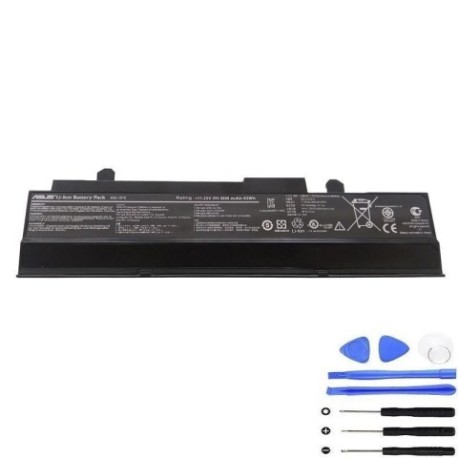
Battery models & part numbers
| Reference / P/N |
|---|
| 00A1A-035-00R8 |
| 07G016FM1875 |
| 07G016FN1875 |
| 07G016FP1875 |
| 07G016FP1875M |
| 07G016FQ1875 |
| 07G016FR1875 |
| 07G016FS1875 |
| 07G016FT1875 |
| 07G016GD1875 |
| 07G016GF1875 |
| 07G016HP1875 |
| 0B110-00110100 |
| 0B20-00TD0AS |
| 90-OA001B2500Q |
| 90-XB29OABT00000Q |
| A15LA26 |
| A15LA9C |
| A311015 |
| A31-1015 |
| AL-31-1015 |
| Asus-A32-1015-63Wh |
| PL32-1015 |
Compatible models
| Model |
|---|
| 1015PE-6B |
| 1015PE-8R |
| 1015PED-1B |
| 1015PED-6B |
| 1015PED-8M |
| 1015PT-2B |
| Eee PC 1015BX |
| Eee PC 1015P |
| Eee PC 1015PEM |
| Eee PC 1015PN |
| Eee PC 1015PW |
| Eee PC 1015PX |
| Eee PC 1215B |
| Eee PC 1215P |
| Eee PC R051PX |
Introduction
The ASUS A32-1015-63Wh battery is a high-quality replacement solution for numerous ASUS Eee PC and laptop models popular in Australia and New Zealand. This 63Wh lithium-ion battery provides reliable power for your portable computing needs, whether you’re working from home in Sydney, studying in Auckland, or travelling across our beautiful countries.
Common signs you need a replacement
| Symptom | Cause | Verification | Recommendation |
|---|---|---|---|
| Battery drains quickly (under 1 hour) | Ageing cells, reduced capacity | Check battery health in Windows Power Options | Replace if capacity below 50% |
| Laptop won’t power on without AC adapter | Dead battery cells | Remove AC power – if no power, battery dead | Immediate replacement needed |
| Battery swelling or bulging | Gas buildup from cell degradation | Visual inspection, case doesn’t close properly | Replace immediately – safety hazard |
| Overheating during charging | Internal short circuits | Touch test – unusually hot to touch | Replace to prevent damage |
| Inconsistent charge levels | Faulty battery management system | Battery percentage jumps unexpectedly | Replace for reliable performance |
How to check compatibility
Before purchasing your ASUS A32-1015-63Wh replacement battery, it’s crucial to verify compatibility with your specific laptop model. Here’s how to check:
Finding Your Model Information: Turn your laptop over and locate the sticker on the bottom casing. For ASUS Eee PC models, you’ll typically find the model number near the battery compartment. Common locations include under the battery, on the bottom panel, or in the system information within Windows.
Using ASUS Official Tools: Visit the ASUS support website and use their compatibility checker tool. Enter your serial number or model number to verify battery compatibility. You can also download the ASUS Battery Health Charging utility from the Microsoft Store to check your current battery status and compatible replacements.
Cross-Reference Part Numbers: Compare the part number on your existing battery with our compatibility list above. If your battery shows any of the part numbers listed, the A32-1015-63Wh is compatible with your device.
When to replace
Most laptop batteries last 2-4 years with regular use. Consider replacement when:
- Battery capacity drops below 60% of original
- Your laptop shuts down unexpectedly at 20-30% charge
- You notice physical swelling or deformation
- The battery no longer charges to 100%
- Your computing needs require longer battery life
For ASUS Eee PC models, which are often used as secondary devices or for travel, maintaining good battery health is essential for their portability advantage.
Installation guide
Replacing your ASUS battery is straightforward with these steps:
- Power down completely – Shut down your laptop and disconnect the AC adapter
- Remove old battery – Locate the battery release latches (usually on the bottom of Eee PC models) and slide them to unlock
- Ground yourself – Touch a metal surface to discharge static electricity
- Install new battery – Align the new A32-1015-63Wh battery with the connectors and slide into place until it clicks
- Initial charge – Connect the AC adapter and charge fully before first use
- Calibration – After installation, allow the battery to drain completely then recharge to 100% to calibrate the battery meter
Important Note: Some ASUS Eee PC models may require you to remove a few screws from the bottom panel to access the battery compartment. Always refer to your specific model’s service manual if available.
Usage & care tips
Maximise your new ASUS battery’s lifespan with these expert tips:
- Avoid extreme temperatures – Don’t leave your laptop in hot cars (common in Australian summers) or in direct sunlight
- Partial discharges are better – Unlike older battery types, lithium-ion batteries prefer partial rather than full discharges
- Store properly – If not using for extended periods, store at 40-60% charge in a cool, dry place
- Use ASUS Battery Health Charging – This utility helps maintain battery health by limiting maximum charge to 80% for extended AC use
- Regular use – Use your battery at least once every two weeks to keep cells active
Safety & recycling in AU/NZ
Safety First: Never attempt to open or puncture a lithium-ion battery. If you notice swelling, overheating, or unusual odours, discontinue use immediately and contact a professional.
Australian Recycling: In Australia, you can recycle old laptop batteries through Battery World stores, Officeworks, or your local council’s e-waste program. Many computer retailers also accept old batteries for recycling.
New Zealand Recycling: In New Zealand, take your old batteries to participating Noel Leeming, Harvey Norman, or PB Tech stores. Most council transfer stations also have dedicated battery recycling bins.
Legal Compliance: Both countries have strict regulations about battery disposal. Never place lithium-ion batteries in household rubbish bins due to fire risk.
FAQ
How long does the A32-1015-63Wh battery last on a full charge?
Depending on your specific ASUS model and usage, expect 4-8 hours of typical use. Eee PC models with efficient Intel Atom processors typically achieve longer battery life.
Is this battery genuine ASUS or compatible?
This is a high-quality compatible replacement that meets or exceeds original specifications, certified for safety and performance in Australia and New Zealand.
Will this battery work with my ASUS Eee PC 1015PEM if it originally had a different part number?
Yes, the A32-1015-63Wh is designed as a universal replacement for all compatible models listed above, regardless of the original battery’s part number.
How do I know if my battery is genuine and safe?
Look for proper certification marks, purchase from authorised retailers, and check for authentic packaging. Our batteries meet all Australian and New Zealand safety standards.
What’s the warranty on this replacement battery?
Typically 12-24 months from reputable suppliers, covering defects in materials and workmanship under normal use.
Can I replace the battery myself or should I seek professional help?
Most ASUS Eee PC models have user-replaceable batteries that don’t require technical expertise. However, if you’re uncomfortable, any computer repair shop in AU/NZ can assist.
My laptop shows “battery not detected” after installation – what should I do?
Ensure the battery is properly seated, try resetting the EC (Embedded Controller) by holding the power button for 40 seconds with battery and AC adapter removed, then reconnect and power on.
How should I dispose of my old ASUS battery in Melbourne/Sydney/Auckland?
Use council e-waste collections, dedicated recycling centres, or drop-off points at major electronics retailers – never in household waste due to fire risk.
Restore your ASUS laptop’s mobility with a reliable A32-1015-63Wh battery replacement. Enjoy peace of mind with compatible performance and proper AU/NZ compliance for all your computing needs across Australia and New Zealand.