Asus A32-K53-56Wh Laptop Battery Replacement Guide
If your Asus laptop is struggling to hold a charge or shutting down unexpectedly, you’ve come to the right place. This comprehensive guide covers everything Australian and New Zealand consumers need to know about replacing their Asus laptop battery with the A32-K53-56Wh model.
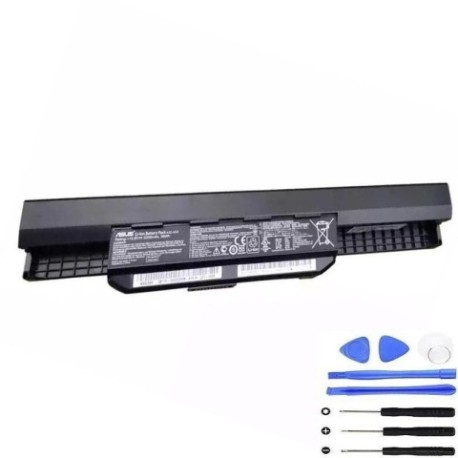
Battery models & part numbers
| Reference / P/N |
|---|
| Asus-A32-K53-56Wh |
Compatible models
| Model |
|---|
| Asus 07G016H31875 |
| Asus 07G016H31875M |
| Asus 07G016HG1875 |
| Asus 07G016HG1875M |
| Asus 07G016HK1875 |
| Asus 07G016HK1875M |
| Asus 07G016JD1875 |
| Asus 07G016JE1875 |
| Asus 0B110-00020200 |
| Asus 0B110-00020300 |
| Asus 0B20-00X50AS |
| Asus 0B20-00YC0AS |
| Asus 0B20-00YG0AS |
| Asus 90-N3V3B1000Y |
| Asus A41-K53 |
| Asus A42-K53 |
| Asus A43EI241SV-SL |
| Asus A53SM |
| Asus A53Z |
| Asus A54H |
| Asus A54HR |
| Asus A54L |
| Asus A54LY |
| Asus K43SD |
| Asus K43SJ |
| Asus K43SM |
| Asus K43SV |
| Asus K43TA |
| Asus K53E |
| Asus K53L823 |
| Asus K53L893 |
| Asus K53L89C |
| Asus K53L89H |
| Asus K53SJ |
| Asus K53SK |
| Asus K53SM |
| Asus K53SV |
| Asus K53U |
| Asus K54C |
| Asus K54HR |
| Asus K54L |
| Asus K54LY |
| Asus K84LY |
| Asus Pro Essential P43SJ |
| Asus Pro Essential P53E |
| Asus X43S |
| Asus X53B |
| Asus X53BR |
| Asus X53BY |
| Asus X53SD |
| Asus X53SJ |
| Asus X53SM |
| Asus X53SV |
| Asus X54H |
| Asus X54HR |
| Asus X54L |
Introduction
Laptop batteries don’t last forever – they typically need replacement every 2-4 years depending on usage patterns. The Asus A32-K53-56Wh battery is designed specifically for numerous Asus laptop models commonly used across Australia and New Zealand. This 56Wh lithium-ion battery provides reliable power for your computing needs, whether you’re working from home, studying, or travelling.
Common signs you need a replacement
| Symptom | Cause | Verification | Recommendation |
|---|---|---|---|
| Rapid battery drain | Reduced capacity from age/cycles | Check battery health in Windows | Consider replacement if below 60% |
| Laptop shuts down unexpectedly | Battery can’t maintain voltage | Monitor shutdown at specific % | Replace immediately for reliability |
| Battery won’t charge fully | Internal cell degradation | Check charging stops before 100% | Replace to restore full capacity |
| Battery swelling/bulging | Gas buildup from cell failure | Visual inspection of battery | Replace urgently – safety risk |
| Overheating during use | Increased internal resistance | Feel excessive heat from battery area | Replace to prevent damage |
How to check compatibility
Before purchasing any replacement battery, it’s crucial to verify compatibility with your specific Asus laptop. Here’s how to confirm your model needs the A32-K53-56Wh battery:
Finding your laptop model: Check the bottom of your laptop for a sticker containing the model number. For Asus devices, this is typically located near the battery compartment or on the bottom case. Common locations include near the hinge area or centred on the base.
Using system information: On Windows, press Windows Key + R, type “msinfo32” and look for “System Model”. This will display your exact laptop model that you can cross-reference with our compatibility list above.
Official verification: Visit the Asus support website and enter your serial number or model to access official compatibility information. Many Australian and New Zealand consumers find this method most reliable.
Physical battery check: Remove your current battery (if removable) and note the part number printed on it. The A32-K53-56Wh should match this exactly for guaranteed compatibility.
When to replace
Timing your battery replacement correctly can save you from unexpected downtime. Consider replacement when:
- Your battery lasts less than 1 hour on a full charge
- Windows shows “Consider replacing your battery” warnings
- Your laptop is 2+ years old with regular use
- You notice significant performance degradation
- The battery shows physical signs of swelling
For Australian and New Zealand climates, batteries may degrade faster in warmer regions, so consider your local environment when assessing replacement timing.
Installation guide
Replacing your Asus battery is generally straightforward, but requires care. Here’s a step-by-step guide for A32-K53-56Wh installation:
Safety first: Always shut down your laptop completely and disconnect the AC adapter. Work on a clean, static-free surface.
For removable batteries: Most compatible Asus models have external battery releases. Slide the lock mechanism to unlock, then gently remove the old battery. Insert the new A32-K53-56Wh battery until it clicks into place.
For internal batteries: Some newer modelsrequire careful disassembly. Remove the bottom cover screws (keep them organised), gently disconnect the old battery connector, and reverse the process with your new battery.
First-time setup: After installation, connect your AC adapter and power on. Allow the battery to charge fully before first use. Your system may need to recalibrate battery reporting – a full charge/discharge cycle helps accuracy.
Usage & care tips
Maximise your new battery’s lifespan with these practices tailored for AU/NZ conditions:
- Avoid frequent full discharges – partial discharges are healthier for lithium-ion batteries
- Store between 20-80% charge when possible for long-term health
- Keep your laptop in temperature-controlled environments (ideal 15-25°C)
- Remove the AC adapter occasionally even when desk-bound to exercise the battery
- Update your BIOS and battery drivers regularly from Asus support
Safety & recycling in AU/NZ
Battery safety and proper disposal are regulated in Australia and New Zealand. Never dispose of lithium-ion batteries in household waste. Most electronics retailers offer free battery recycling services. In case of battery damage or swelling, stop using immediately and contact a professional. Always use authorised replacement parts to maintain safety standards.
FAQ
How long does the A32-K53-56Wh battery typically last?
Under normal usage conditions, expect 2-4 years of service life, or approximately 500 full charge cycles before capacity noticeably diminishes.
Will this battery work with my Asus laptop if it’s not on the compatibility list?
We strongly recommend against using batteries with unverified compatibility. Physical fit and electrical specifications must match exactly for safe operation.
How do I check my current battery’s health in Windows?
Open Command Prompt as administrator and type “powercfg /batteryreport” – this generates a detailed HTML report including design capacity versus current capacity.
Is overnight charging harmful for my new battery?
Modern laptops include protection circuits, but for optimal longevity, avoid keeping your laptop at 100% charge for extended periods when possible.
What warranty comes with this replacement battery?
Replacement batteries typically include 12-24 month warranties – check with your supplier for specific terms applicable in Australia or New Zealand.
Can I replace the battery myself without voiding warranty?
For older out-of-warranty devices, self-replacement is generally acceptable. For newer devices under warranty, check Asus policies or consult an authorised service centre.
How should I store my laptop if not using for extended periods?
Charge to approximately 50-60%, power down completely, and store in a cool, dry place away from direct sunlight.