Asus A32-F52-46Wh Laptop Battery Replacement Guide
If your Asus laptop is struggling to hold a charge or won’t power on, you’ve come to the right place. Our comprehensive guide covers everything Australian and New Zealand customers need to know about replacing their Asus laptop battery with the genuine A32-F52-46Wh model.
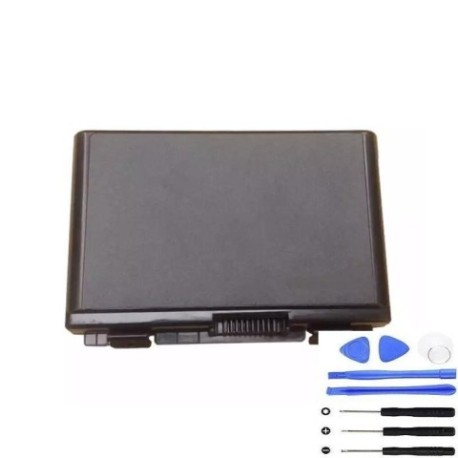
Battery models & part numbers
| Reference / P/N |
|---|
| Asus-A32-F52-46Wh |
Compatible models
| Model |
|---|
| Asus A32-F82 |
| Asus F52A |
| Asus F52Q |
| Asus F52Q-SX016A |
| Asus F52Q-SX064C |
| Asus F52Q-SX065E |
| Asus F52Q-SX071E |
| Asus F82L696 |
| Asus F82Q |
| Asus K40AE |
| Asus K40AE-1A |
| Asus K40AF |
| Asus K40AF-1A |
| Asus K40AF-1D |
| Asus K40C |
| Asus K40C-1A |
| Asus K40IE |
| Asus K40IE-1A |
| Asus K40IE-1D |
| Asus K40IE-1F |
| Asus K40IJ |
| Asus K40IJ-1A |
| Asus K40IL |
| Asus K40IL-1A |
| Asus K40IN |
| Asus K40IN-1A |
| Asus K40IN-1D |
| Asus K40IP |
| Asus K40IP-1A |
| Asus K40IP-1D |
| Asus K50AB |
| Asus K50AB-1A |
| Asus K50AB-SX073C |
| Asus K50AB-SX073V |
| Asus K50AD |
| Asus K50AD-1A |
| Asus K50AD-SX001V |
| Asus K50AD-SX068V |
| Asus K50AD-SX080L |
| Asus K50AF |
| Asus K50AF-1A |
| Asus K50AF-SX014V |
| Asus K50AF-SX020L |
| Asus K50C |
| Asus K50C-1A |
| Asus K50C-1B |
| Asus K50ID |
| Asus K50ID-1A |
| Asus K50ID-1C |
| Asus K50ID-SX042V |
| Asus K50ID-SX049V |
| Asus K50IE |
| Asus K50IE-1A |
| Asus K50IE-1C |
| Asus K50IE-SX019V |
| Asus K50IE-SX023V |
| Asus K50IE-SX031D |
| Asus K50IE-SX034X |
| Asus K50IE-SX035V |
| Asus K50IE-SX038X |
| Asus K50IE-SX046V |
| Asus K50IE-SX053D |
| Asus K50IE-SX112D |
| Asus K50IE-SX113D |
| Asus K50IE-SX128V |
| Asus K50IE-SX134D |
| Asus K50IE-SX153 |
| Asus K50IE-SX159 |
| Asus K50IE-SX162V |
| Asus K50IE-SX170V |
| Asus K50IJ |
| Asus K50IJ-1A |
| Asus K50IJ-1E |
| Asus K50IJ-2B |
| Asus K50IJ-2C |
| Asus K50IJ-SX145V |
| Asus K50IJ-SX148V |
| Asus K50IJ-SX148X |
| Asus K50IJ-SX154L |
| Asus K50IJ-SX256V |
| Asus K50IJ-SX263L |
| Asus K50IJ-SX280V |
| Asus K50IJ-SX540D |
| Asus K50IN |
| Asus K50IN-1A |
| Asus K50IP |
| Asus K50IP-1A |
| Asus K50IP-SX074V |
| Asus K50IP-SX111V |
| Asus K51AC |
| Asus K51AC-1A |
| Asus K51AC-SX037D |
| Asus K51AC-SX038C |
| Asus K51AC-SX038V |
| Asus K51AC-SX080V |
| Asus K51AE |
| Asus K51AE-1A |
| Asus K51AE-SX049L |
| Asus K61IC |
| Asus K61IC-1A |
| Asus K70AB |
| Asus K70AB-1A |
| Asus K70AB-TY003C |
| Asus K70AB-TY006L |
| Asus K70AB-TY018L |
| Asus K70AB-TY045A |
| Asus K70AB-TY050C |
| Asus K70AB-TY050V |
| Asus K70AB-TY055V |
| Asus K70AB-TY057V |
| Asus K70AB-TY059D |
| Asus K70AB-TY059V |
| Asus K70AB-TY060V |
| Asus K70AB-TY079D |
| Asus K70AC |
| Asus K70AC-1A |
| Asus K70AC-TY009C |
| Asus K70AC-TY024V |
| Asus K70AC-TY026V |
| Asus K70AC-TY050V |
| Asus K70AD |
| Asus K70AD-1A |
| Asus K70AD-TY005V |
| Asus K70AD-TY010V |
| Asus K70AD-TY024 |
| Asus K70AD-TY037R |
| Asus K70AD-TY059V |
| Asus K70AD-TY060L |
| Asus K70AE |
| Asus K70AE-1A |
| Asus K70AE-TY037L |
| Asus K70AF |
| Asus K70AF-1A |
| Asus K70AF-TY007V |
| Asus K70AF-TY011V |
| Asus K70AF-TY016L |
| Asus K70AF-TY041V |
| Asus K70IC |
| Asus K70IC-1A |
| Asus K70IC-TY006V |
| Asus K70ID |
| Asus K70ID-1A |
| Asus K70ID-1ATY |
| Asus K70IJ |
| Asus K70IJ-1A |
| Asus K70IJ-T4300 |
| Asus K70IJ-TY041L |
| Asus K70IJ-TY041X |
| Asus K70IJ-TY049X |
| Asus K70IJ-TY078X |
| Asus K70IJ-TY085V |
| Asus K70IJ-TY090V |
| Asus K70IJ-TY107L |
| Asus K70IJ-TY111X |
| Asus K70IO |
| Asus K70IO-1A |
| Asus K70IO-TY002C |
| Asus K70IO-TY002E |
| Asus K70IO-TY002V |
| Asus K70IO-TY014C |
| Asus K70IO-TY016C |
| Asus K70IO-TY069C |
| Asus K70IO-TY069V |
| Asus K70IO-TY078C |
| Asus P50IJ |
| Asus P50IJ-SO008L |
| Asus P50IJ-SO034X |
| Asus P50IJ-SO066L |
| Asus P50IJ-SO071X |
| Asus P50IJ-SO119D |
| Asus P50IJ-SO119V |
| Asus P50IJ-SO127V |
| Asus P50IJ-SO192D |
| Asus P50IJ-SO200D |
| Asus Pro5DI |
| Asus Pro5DIJ |
| Asus Pro5DIJ-SX303V |
| Asus Pro5DIN |
| Asus Pro5DIN-SX110C |
| Asus Pro5DIN-SX165V |
| Asus Pro66IC |
| Asus Pro66IC-1AJX-1 |
| Asus Pro79IC |
| Asus Pro79IC-TY040V |
| Asus Pro79IO |
| Asus Pro79IO-TY045C |
| Asus X5DAB |
| Asus X5DAB-SX035C |
| Asus X5DAB-SX038C |
| Asus X5DAB-SX051C |
| Asus X5DAB-SX070C | Asus X5DAB-SX070V |
| Asus X5DAD |
| Asus X5DAD-SX003V |
| Asus X5DAD-SX004V |
| Asus X5DAD-SX041V |
| Asus X5DAD-SX042V |
| Asus X5DAF |
| Asus X5DAF-SX028V |
| Asus X5DC |
| Asus X5DID |
| Asus X5DID-SX173V |
| Asus X5DIE |
| Asus X5DIJ |
| Asus X5DIJ-SX018L |
| Asus X5DIJ-SX101L |
| Asus X5DIJ-SX155L |
| Asus X5DIJ-SX247V |
| Asus X5DIJ-SX303V |
| Asus X5DIJ-SX449V |
| Asus X5DIN |
| Asus X5DIN-SX009C |
| Asus X5DIP |
| Asus X5EAC |
| Asus X5EAE |
| Asus X5EAE-SX014V |
| Asus X5EAE-SX047V |
| Asus X66IC |
| Asus X66IC-JX003V |
| Asus X66IC-JX010V |
| Asus X70AB |
| Asus X70AB-TY005C |
| Asus X70AB-TY027V |
| Asus X70AB-TY048C |
| Asus X70AB-TY048V |
| Asus X70AB-TY049V |
| Asus X70AB-TY056V |
| Asus X70AC |
| Asus X70AC-TY024C |
| Asus X70AC-TY024V |
| Asus X70AD |
| Asus X70AD-TY009V |
| Asus X70AD-TY022V |
| Asus X70AD-TY053V |
| Asus X70AE |
| Asus X70AE-TY030V |
| Asus X70AE-TY031V |
| Asus X70AF |
| Asus X70AF-TY002V |
| Asus X70IC |
| Asus X70IJ |
| Asus X70IO |
| Asus X70IO-TY082V |
Common signs you need a replacement
| Symptom | Possible Cause | How to Verify | Recommendation |
|---|---|---|---|
| Battery drains quickly | Reduced capacity from age/cycles | Check battery health in Windows | Consider replacement if below 60% |
| Laptop won’t hold charge | Failed battery cells | Test with power adapter removed | Immediate replacement needed |
| Battery swelling | Gas buildup from degradation | Visual inspection of battery compartment | Replace immediately – safety risk |
| Inaccurate battery percentage | Faulty battery controller | Compare reported vs actual runtime | Replace battery for accurate readings |
| Overheating during use | Inefficient battery operation | Monitor temperature during charging | Replace to prevent damage |
How to check compatibility
Finding your exact Asus model number is crucial for battery compatibility. Check the bottom label of your laptop, the original packaging, or the system information in Windows. For K and X series models, the full model number including suffixes like -1A or -SX016A must match our compatibility list exactly.
When to replace your battery
Most Asus batteries last 2-3 years with regular use. If you’re experiencing reduced runtime, sudden shutdowns, or your laptop only works when plugged in, it’s time for a replacement. Don’t wait until complete failure – proactive replacement ensures you always have reliable power.
Installation guide
Replacing your Asus battery is straightforward. First, power down completely and disconnect the AC adapter. Remove the battery compartment cover (if applicable) or bottom panel. Carefully disconnect the battery connector from the motherboard, then remove any securing screws. Install your new A32-F52-46Wh battery, reconnect all components, and secure everything before powering on.
Usage & care tips
To maximise your new battery’s lifespan, avoid frequent full discharges and don’t leave your laptop plugged in constantly. Ideal storage temperature is 15-25°C. For K series models, consider calibrating your battery monthly by fully charging then discharging to maintain accurate capacity readings.
Safety & recycling in AU/NZ
Never dispose of lithium-ion batteries in household waste. In Australia, use Batteryback or council e-waste services. In New Zealand, take to authorised recycling centres. Damaged or swollen batteries should be handled with care and recycled immediately through proper channels.
FAQ
How long does shipping take to Australia/NZ?
Most orders arrive within 5-7 business days to major cities, with rural areas taking slightly longer.
Is this battery genuine Asus?
Yes, we supply original Asus A32-F52-46Wh batteries with full manufacturer warranty.
Will this battery work with my specific K50 model?
Check our comprehensive compatibility list above – all K50 variants including K50IE, K50IJ, and K50AB are supported.
How do I check my current battery health?
In Windows, open Command Prompt and type “powercfg /batteryreport” to generate a detailed health analysis.
What’s the warranty on this battery?
All our Asus batteries come with 12 months warranty covering manufacturing defects.
Can I replace the battery myself?
Yes, most Asus models have user-replaceable batteries. Follow our installation guide above.
What if my model isn’t on the compatibility list?
Contact our support team with your exact model number for verification – our list is regularly updated.