ASUS A31N1537 36Wh Laptop Battery Replacement Guide
If your ASUS laptop is struggling to hold a charge or shutting down unexpectedly, you’ve come to the right place. Our comprehensive guide covers everything Australian and New Zealand customers need to know about replacing their ASUS battery with the genuine A31N1537 36Wh model.
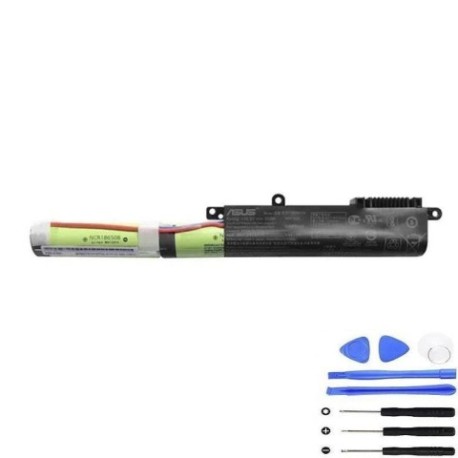
Battery models & part numbers
| Reference / P/N |
|---|
| Asus A31N1537 |
| Asus-A31N1537-36Wh |
Compatible models
| Model |
|---|
| Asus 0B110-00420200 |
| Asus 0B110-00420300 |
| Asus A31Lk41 |
| Asus R414SA |
| Asus X441NA |
| Asus X441NA-1A |
| Asus X441NA-1C |
| Asus X441NA-3F |
| Asus X441NA-3G |
| Asus X441NA-3H |
| Asus X441NC |
| Asus X441NC-1A |
| Asus X441SA |
| Asus X441SA-1A |
| Asus X441SA-1C |
| Asus X441SA-3F |
| Asus X441SA-3G |
| Asus X441SA-3H |
| Asus X441SC |
| Asus X441SC-1A |
| Asus X441SC-1C |
| Asus X441SC-3F |
| Asus X441SC-3G |
| Asus X441SC-3H |
| Asus X441UA |
| Asus X441UA-1A |
| Asus X441UA-1C |
| Asus X441UA-3F |
| Asus X441UA-3G |
| Asus X441UA-3H |
| Asus X441UV |
| Asus X441UV-1A |
| Asus X441UV-1C |
| Asus X441UV-3F |
| Asus X441UV-3G |
| Asus X441UV-3H |
Introduction
The ASUS A31N1537 36Wh battery is a high-quality replacement designed specifically for various ASUS laptop models commonly used across Australia and New Zealand. This lithium-ion battery provides reliable power for your ASUS device, ensuring you can work, study, or enjoy entertainment without worrying about sudden shutdowns.
Common signs you need a replacement
| Symptom | Cause | Verification | Recommendation |
|---|---|---|---|
| Rapid battery drain | Reduced capacity from age/cycles | Check battery health in Windows | Replace if below 60% capacity |
| Laptop shuts down unexpectedly | Battery can’t maintain voltage | Monitor shutdown at specific % | Immediate replacement needed |
| Battery won’t charge fully | Charging circuit degradation | Check charging percentage | Replace battery and check charger |
| Battery swelling/bulging | Gas buildup from cell failure | Visual inspection | Stop using immediately and replace |
| Overheating during use | Internal resistance increase | Temperature monitoring | Replace to prevent damage |
How to check compatibility
Before purchasing your ASUS A31N1537 replacement battery, it’s crucial to verify compatibility with your specific laptop model. Here’s how Australian and New Zealand users can confirm their device compatibility:
Finding Your Model Number: Locate the model number sticker on the bottom of your ASUS laptop. For X441 series models, this is typically found near the battery compartment or on the chassis. The model number should match exactly with our compatibility list above.
Using ASUS Official Tools: Visit the ASUS support website and use their compatibility checker tool. Enter your serial number or model number to verify battery compatibility. ASUS Australia and New Zealand have localised support centres that can assist with compatibility queries.
Physical Inspection: Remove your current battery and compare the part number printed on it. The A31N1537 should match exactly, though some variations in formatting (with or without hyphens) are normal.
Retailer Verification: Many Australian electronics retailers like JB Hi-Fi, Officeworks, or Harvey Norman can help verify compatibility if you provide them with your laptop’s model number.
When to replace
Knowing when to replace your ASUS battery is essential for maintaining optimal laptop performance. Consider replacement when:
- Your battery lasts less than 2 hours on a full charge
- Windows shows “Consider replacing your battery” warning
- Battery health drops below 60% of original capacity
- Your laptop is 2-3 years old with regular use
- You experience sudden shutdowns at 20-30% battery
- The battery shows physical swelling or damage
For Australian climate conditions, batteries may degrade faster in hotter regions like Queensland or Western Australia due to elevated temperatures affecting lithium-ion chemistry.
Installation guide
Replacing your ASUS battery is a straightforward process that most users can complete in under 10 minutes. Here’s our step-by-step guide tailored for Australian and New Zealand customers:
- Safety First: Shut down your laptop completely and disconnect the AC adapter. Ground yourself to prevent static discharge.
- Access the Battery: Turn your laptop upside down and locate the battery release latches. For ASUS X441 series models, you’ll typically find two sliding latches near the battery compartment.
- Remove Old Battery: Slide both latches to the unlock position simultaneously. The battery should pop up slightly, allowing you to lift it out carefully.
- Prepare New Battery: Unpack your new A31N1537 battery and ensure it’s fully charged or has at least 50% charge before installation.
- Install New Battery: Align the new battery with the compartment, ensuring the connectors match. Gently press down until you hear a click from both latches.
- Initial Setup: Connect your AC adapter and power on the laptop. Allow the system to recognise the new battery, which may take a few minutes.
- Calibration: For optimal performance, fully charge the battery, then use it until it reaches 10% before charging again. Repeat this process 2-3 times.
Common Installation Issues: If your laptop doesn’t recognise the new battery, try resetting the EC (Embedded Controller) by holding the power button for 40 seconds with the battery and AC adapter removed.
Usage & care tips
Proper battery maintenance can significantly extend the lifespan of your ASUS A31N1537 battery. Follow these tips developed for Australian and New Zealand conditions:
- Temperature
- Temperature Management: Avoid exposing your laptop to extreme temperatures. In hot Australian summers, never leave your laptop in a car, as temperatures can exceed 60°C and permanently damage the battery.
- Charging Habits: Lithium-ion batteries prefer partial discharges over full ones. Try to keep your battery between 20% and 80% for daily use. Avoid leaving it plugged in at 100% for extended periods.
- Storage Advice: If storing your laptop for more than a month, charge the battery to around 50% and store in a cool, dry place. Ideal storage temperature is 15-25°C.
- Power Settings: Use ASUS Battery Health Charging software (available in MyASUS or Armoury Crate) to set charging limits that suit your usage patterns.
- Cleaning: Keep battery contacts clean and free from dust. Use a dry cloth to gently wipe the contacts every few months.
Safety & recycling in AU/NZ
Battery safety and proper disposal are crucial for environmental protection. Here’s what Australian and New Zealand users need to know:
Safety Precautions:
- Never attempt to open or puncture the battery
- Avoid exposing the battery to water or other liquids
- Only use ASUS-approved chargers and accessories
- If the battery becomes hot, swollen, or damaged, stop using immediately
Australian Recycling Options: In Australia, you can recycle old laptop batteries through:
- Officeworks stores (free battery recycling)
- B-cycle accredited drop-off points
- Local council e-waste collection events
- Authorised ASUS service centres
New Zealand Recycling Options: In New Zealand, dispose of batteries responsibly through:
- Computer recycling programmes at Noel Leeming or JB Hi-Fi
- Local council transfer stations
- RCN e-Cycle services
- Authorised ASUS repair centres
Remember that improper disposal of lithium-ion batteries can lead to fires and environmental contamination. Always use approved recycling channels.
FAQ
1. How long does the ASUS A31N1537 battery typically last?
The A31N1537 36Wh battery typically provides 3-5 hours of normal usage, depending on your laptop model, screen brightness, and applications running. With power-saving settings enabled, you may achieve up to 6 hours.
2. Is this battery compatible with my ASUS X441UA purchased in New Zealand?
Yes, the A31N1537 battery is fully compatible with ASUS X441UA models sold in New Zealand. The battery specifications are standardised across regions, so compatibility is guaranteed.
3. How do I check my current battery’s health on Windows?
Open Command Prompt as administrator and type “powercfg /batteryreport”. This generates a detailed report showing your battery’s current capacity versus original design capacity.
4. Will replacing the battery void my ASUS warranty in Australia?
If your laptop is still under manufacturer’s warranty, we recommend having the battery replaced by an authorised ASUS service centre to maintain warranty coverage. For out-of-warranty devices, self-replacement is acceptable.
5. How long does delivery take to regional Australia?
Delivery times vary, but most regional areas receive orders within 5-7 business days. Metropolitan areas typically receive within 2-3 business days.
6. Can I use this battery if my original was Asus-A31N1537-36Wh?
Yes, Asus-A31N1537-36Wh and Asus A31N1537 refer to the same battery model. The hyphenated version includes the capacity specification, but both are identical in function and compatibility.
7. What should I do if my laptop doesn’t recognise the new battery?
Try resetting the EC (Embedded Controller) by disconnecting both battery and AC adapter, then holding the power button for 40 seconds. Reconnect and power on. If issues persist, contact the retailer for assistance.
Ready to restore your ASUS laptop’s mobility? Our genuine A31N1537 36Wh battery comes with a 12-month warranty and is specifically designed for your compatible ASUS model. Enjoy fast shipping across Australia and New Zealand, with expert support available if you need installation assistance.