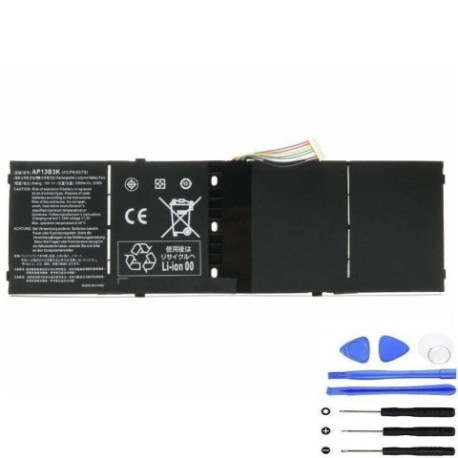
If you’re experiencing shorter battery life or charging issues with your Acer laptop, this comprehensive guide covers everything Australian and New Zealand consumers need to know about the AP13B8K 53Wh replacement battery.
The Acer AP13B8K 53Wh battery is a high-quality replacement solution for numerous Acer laptop models popular in Australia and New Zealand. This lithium-ion battery delivers reliable performance with its 53 watt-hour capacity, ensuring your laptop maintains optimal mobility and productivity. Whether you’re a student, professional, or home user, having a properly functioning battery is essential for getting the most from your Acer device.
Common signs you need a replacement
Symptom
Cause
Verification
Recommendation
Battery drains quickly (less than 1 hour)
Natural degradation after 300-500 charge cycles
Check battery health in Windows Power Options
Replace battery if capacity below 60%
Laptop won’t charge or charges intermittently
Faulty battery cells or charging circuit
Try different power outlet and charger
Test with known working battery
Battery percentage stuck or fluctuates wildly
Battery management system failure
Monitor percentage changes during use
Replace battery and recalibrate
Laptop shuts down suddenly when unplugged
Severe battery degradation or dead cells
Check if laptop works only when plugged in
Immediate replacement recommended
Battery swelling or physical damage
Internal short circuit or overheating
Visual inspection for bulging case
Stop using immediately and replace
Overheating during charging or use
Internal resistance increase in aged battery
Monitor temperature with software tools
Replace if consistently over 45°C
How to check compatibility
Before purchasing your replacement battery, it’s crucial to verify compatibility with your specific Acer model. Start by locating your laptop’s model number, typically found on a sticker on the bottom case, under the battery compartment, or in the system information (press Windows Key + R, type “msinfo32”, and check System Model). For Acer devices specifically, you can also use the Acer Support website by entering your serial number to find genuine part numbers. Cross-reference the part numbers listed above with your current battery’s markings. If your laptop uses any of the compatible part numbers like KT.00403.015, KT.00403.035, or AP13B3K, the AP13B8K 53Wh battery will be compatible. For Chromebook models like CB3-111 and CB5-311P, ensure you’re replacing with the exact specification to maintain optimal performance.
Most lithium-ion batteries like the AP13B8K last between 2-4 years with regular use, or approximately 300-500 full charge cycles. You should consider replacement when your battery capacity drops below 80% of its original specification, which typically manifests as significantly reduced runtime. Windows battery reports (accessible via powercfg /batteryreport in Command Prompt) can provide detailed health metrics. Other indicators include the battery not charging to 100%, rapid percentage drops from high to low charge levels, or the system reporting “Consider replacing your battery” in power settings. For business users with TravelMate models or students with Aspire devices, replacing before complete failure prevents unexpected downtime during critical work periods.
Installation guide
Replacing your Acer battery is generally straightforward but requires care. First, ensure your laptop is completely powered off and disconnected from all power sources. For most compatible models like the Aspire V5 and V7 series, the battery is externally accessible – simply slide the locking latches to release the old battery and insert the new one until it clicks into place. For some TravelMate business models, you may need to remove a protective cover using a Phillips screwdriver. Always handle the battery by its edges, avoiding pressure on the centre where the cells are located. After installation, connect the power adapter and allow the battery to charge fully before first use. It’s recommended to calibrate the new battery by charging to 100%, then discharging to about 10% before recharging again.
Usage & care tips
To maximise the lifespan of your new AP13B8K battery, avoid frequent full discharges – instead, partial discharges between 20-80% are ideal. Store your laptop in cool environments (15-25°C) as excessive heat accelerates battery degradation. If using your laptop primarily plugged in, consider setting maximum charge level to 80% in Acer Power Management software if available. For extended storage, charge the battery to around 50% and store in a cool, dry place. Regular use is beneficial – batteries that remain unused for months can lose capacity. For Australian and New Zealand climates, avoid leaving laptops in hot cars or direct sunlight, as temperatures above 35°C can cause permanent damage to lithium-ion cells.
Safety & recycling in AU/NZ
Battery safety is paramount. Never attempt to open, puncture, or modify the battery casing. If you notice swelling, leakage, or unusual heating during use or charging, discontinue use immediately and contact a professional. In Australia, used batteries can be recycled through Batteryback.org.au programs available at most office supply stores and electronics retailers. In New Zealand, the Ministry for the Environment recommends taking used batteries to designated collection points at recycling centres or participating retailers. Both countries have strict regulations about lithium-ion battery disposal – never place them in household rubbish bins due to fire risk. When transporting spare batteries, use protective cases to prevent short circuits.
How long does the AP13B8K 53Wh battery typically last on a single charge? Runtime varies by laptop model and usage, but generally provides 4-7 hours for typical productivity tasks on compatible Aspire models. Power-intensive applications like video editing or gaming will reduce this significantly.
Is this battery compatible with my Acer laptop purchased in Australia/NZ? Yes, the AP13B8K is designed for global compatibility and works with Acer laptops sold in Australian and New Zealand markets, provided your specific model is listed in the compatibility table above.
How can I verify this is a genuine Acer replacement battery? Genuine Acer batteries feature precise branding, proper certification markings (CE, RoHS), and exact physical dimensions. Purchase from authorised resellers and check for the authentic Acer hologram on packaging.
What warranty coverage applies to replacement batteries in Australia? Under Australian Consumer Law, batteries must be of acceptable quality and fit for purpose. Most reputable suppliers offer at least 12 months warranty, with additional protections through consumer guarantees.
My laptop model isn’t listed – can I still use this battery? We strongly recommend against using batteries with unlisted models. Physical fit and electrical compatibility cannot be guaranteed, which may cause performance issues or safety hazards.
How do I properly dispose of my old Acer battery in New Zealand? In NZ, take used batteries to accredited e-waste recyclers or participating retailers. Many council transfer stations have dedicated battery recycling containers free for public use.
Can I use my laptop while the new battery is charging for the first time? Yes, modern lithium-ion batteries don’t require special first-charge procedures. You can use your laptop normally during the initial charge cycle without affecting long-term performance.