Acer AP16L8J 36.5Wh Battery Replacement – Complete Guide for Australian & New Zealand Users
If your Acer laptop or Chromebook is struggling to hold charge or showing battery warning signs, you’ve come to the right place. This comprehensive guide covers everything Australian and New Zealand users need to know about the Acer AP16L8J 36.5Wh replacement battery, including compatible models, installation tips, and local safety standards.
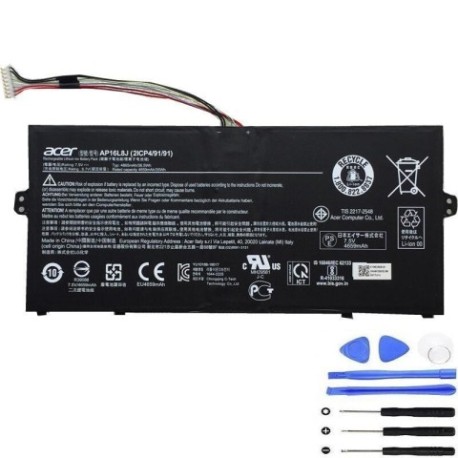
Battery models & part numbers
| Reference / P/N |
|---|
| 2ICP4/91/91 |
| 5J36WHB4 |
| Acer-AP16L8J-36.5Wh |
| AP16L8J-B1 |
| KT.0020G.010 |
Compatible models
| Model |
|---|
| Acer Chromebook 311 (CB311-11H) |
| Acer Chromebook 311 (CB311-11HT) |
| Acer Chromebook Spin (CP513-1HL) |
| Acer Chromebook Spin 311 (CP311-3H) |
| Acer Chromebook Spin 513 (CP513-1H) |
| Acer Chromebook Spin 513 (CP513-1HL) |
| Acer Chromebook Spin 513 (R841LT) |
| Acer Chromebook Spin 513 (R841T) |
| Acer Chromebook Spin 513 Convertible (R841LT) |
| Acer Chromebook Spin 523 (CP513-1H-S85K) |
| Acer Spin 1 (SP111-33) |
| Acer Spin 1 (SP111-34N) |
| Acer Swift 1 (11-34N-C1TJ) |
| Acer Swift 5 (SF514-53T) |
| Acer TravelMate X514-51 |
Introduction
The Acer AP16L8J 36.5Wh battery is a high-quality replacement solution designed specifically for various Acer Chromebook and laptop models popular in Australia and New Zealand. With a capacity of 36.5 watt-hours, this lithium-ion battery provides reliable power for your computing needs while maintaining the slim profile that makes Acer devices so portable.
Many Australian users find their laptop batteries degrade faster due to our climate conditions and frequent power cycling. The good news is that replacing your battery can give your device a new lease on life, saving you hundreds of dollars compared to buying a new laptop.
Common signs you need a replacement
| Symptom | Cause | Verification | Recommendation |
|---|---|---|---|
| Battery drains quickly (less than 2 hours) | Natural degradation over 300-500 charge cycles | Check battery health in system settings | Consider replacement if capacity below 60% |
| Laptop shuts down unexpectedly | Voltage drops under load | Monitor battery percentage during use | Replace battery to prevent data loss |
| Battery won’t charge to 100% | Cell imbalance or BMS protection | Check charging status over several cycles | Replace if stuck below 80% capacity |
| Laptop feels hot near battery area | Internal resistance increase | Feel temperature during charging/use | Immediate replacement recommended |
| Battery swelling or bulging | Gas buildup from chemical reactions | Visual inspection of battery compartment | Stop using immediately and replace |
| Error messages about battery | Communication failure with BMS | Check system logs and error codes | Replace battery to restore functionality |
How to check compatibility
Before purchasing any replacement battery, it’s crucial to verify compatibility with your specific Acer model. Here’s how Australian and New Zealand users can ensure they’re getting the right battery:
Finding your model information
Locate the model number on your Acer device. For most compatible models listed above, you’ll find this information:
- On the bottom case of the laptop, usually near the regulatory labels
- In the system information (Windows: Settings > System > About; Chrome OS: Settings > About Chrome OS)
- On the original packaging or purchase documentation
- In the battery compartment if accessible
For Acer Chromebook Spin models, pay particular attention to the exact model variant as some have different battery configurations despite similar model names.
Using official Acer resources
Acer provides several tools to help identify your device and compatible parts:
- Visit the Acer Australia support website and use their product identification tool
- Check the Acer Community forums for specific model discussions
- Contact Acer authorised service centres in Australia or New Zealand for verification
Cross-referencing part numbers
Match your existing battery’s part number with those listed in our compatibility table. The Acer AP16L8J battery is also known by several alternative part numbers including 2ICP4/91/91, 5J36WHB4, and KT.0020G.010. If your current battery shows any of these numbers, you can be confident in compatibility.
When to replace
Timing your battery replacement correctly can save you from unexpected downtime and potential data loss. Consider replacing your Acer battery when:
- Battery health drops below 70%: Most Acer devices will show battery health in system settings. Once capacity significantly degrades, performance suffers.
- After 2-3 years of regular use: Lithium-ion batteries naturally degrade over time, even with careful use.
- Before important projects or travel: Don’t wait until your battery fails completely during critical work periods.
- When swelling occurs: This is a safety hazard that requires immediate attention.
- If experiencing frequent unexpected shutdowns: This indicates the battery can no longer deliver consistent power.
Many Australian users find their batteries degrade faster due to our warmer climate and frequent power cycling between AC and battery power.
Installation guide
Replacing the battery in your Acer laptop is generally straightforward, but requires care and the right tools. Here’s a step-by-step guide for Australian DIY enthusiasts:
Tools required
- Phillips #00 screwdriver
- Plastic spudger or guitar pick
- Anti-static wrist strap (recommended)
- Clean, well-lit workspace
Step-by-step procedure
- Power down and disconnect: Shut down your laptop completely and disconnect all cables and peripherals.
- Remove bottom cover: Most compatible Acer models have removable bottom covers secured with screws. Carefully remove all screws and use a plastic tool to gently pry open the case.
- Disconnect old battery: Locate the battery connector on the motherboard. Gently disconnect it by pulling straight up or sliding the locking mechanism.
- Remove mounting screws: The battery is typically secured with 2-4 screws. Remove these and carefully lift the battery out.
- Install new battery: Place the new Acer AP16L8J battery in position and secure with screws. Reconnect the battery cable to the motherboard.
- Reassemble and test: Replace the bottom cover, secure all screws, and power on your device. Check that the system recognises the new battery.
Important notes for specific models
Acer Chromebook Spin models: These convertible devices often have more complex internal layouts. Take extra care when working around the hinge mechanism.
Acer Swift and TravelMate series: These business-class laptops may have additional security screws or tamper-evident seals.
If you’re uncomfortable with DIY installation, consider using an authorised Acer service centre in Australia or New Zealand for professional installation.
Safety & recycling in AU/NZ
Battery safety and proper disposal are particularly important in Australia and New Zealand’s unique environmental context. Follow these guidelines to ensure safety and compliance with local regulations:
Safety precautions
- Never puncture or disassemble batteries: Lithium-ion batteries contain hazardous materials and can catch fire if damaged.
- Avoid extreme temperatures: Don’t leave your laptop in hot cars (common in Australian summers) or in direct sunlight for extended periods.
- Use certified equipment: Only use chargers and accessories that meet Australian/New Zealand safety standards (look for RCM mark in AU or tick mark in NZ).
- Monitor during charging: Don’t charge batteries unattended for long periods, especially older devices.
Recycling options
Both Australia and New Zealand have well-established battery recycling programs:
- Australia: Use B-cycle approved collection points at most office supply stores, electronics retailers, and council waste facilities.
- New Zealand: Participate in the e-waste recycling programmes available at most transfer stations and through specialised e-waste collectors.
- Retailer take-back: Many electronics stores including Officeworks, JB Hi-Fi (AU) and Noel Leeming (NZ) offer battery recycling services.
- Never dispose in household waste: Lithium batteries can cause fires in waste facilities and harm the environment.
FAQ
How long does the Acer AP16L8J battery typically last?
With normal use, you can expect 2-4 years of service or 300-500 complete charge cycles before significant capacity loss. Actual lifespan depends on usage patterns, charging habits, and environmental conditions.
Will replacing my battery void my Acer warranty?
In Australia and New Zealand, consumer law protects your rights even when using third-party replacement parts. However, if the battery installation causes damage to other components, that specific damage may not be covered. For devices still under manufacturer warranty, consider using an authorised service centre.
How can I check my current battery’s health?
On Windows: Open Command Prompt and type “powercfg /batteryreport” then check the generated HTML file. On Chrome OS: Go to Settings > About Chrome OS > Diagnostics > Battery. Both will show current capacity versus design capacity.
Why does my battery drain faster in the first year?
Initial rapid capacity loss (up to 20% in the first year) is normal for lithium-ion batteries. The degradation rate typically slows after this initial period. Australian heat can accelerate this process.
Can I use my laptop while plugged in all the time?
Yes, modern Acer devices with the AP16L8J battery include charging circuits that stop charging at 100% and switch to AC power. However, for optimal battery health, it’s recommended to occasionally discharge to around 20% then recharge.
What should I do if my new battery isn’t recognised?
First, ensure the connector is properly seated. Try resetting the EC (Embedded Controller) by shutting down, disconnecting power, holding the power button for 30 seconds, then reconnecting. If issues persist, contact the supplier for potential replacement.
Are there any special considerations for NZ power outlets?
New Zealand’s 230V/50Hz power is compatible with Acer chargers. However, ensure your power adapter is approved for use in NZ (look for the electrical safety approval mark). Some older buildings may have ungrounded outlets, but this shouldn’t affect battery charging.
Restoring your Acer laptop or Chromebook with a genuine AP16L8J replacement battery can give you years of additional service while maintaining the portability you depend on. With proper installation and care, you’ll enjoy reliable performance whether you’re working from a Sydney office, studying in Auckland, or travelling across our beautiful countries.